Superdelete
A .NET command-line utility for deleting Windows files and directories whose paths exceed the traditional 260-character limit.
Built in the open.
A .NET command-line utility for deleting Windows files and directories whose paths exceed the traditional 260-character limit.
From the repository.
SuperDelete
Safely delete files and folders with very long paths (more than 260 characters), from the command line or a modern desktop app.
About
Windows normally blocks file paths longer than the classic MAX_PATH of 260 characters, which makes
some files and folders impossible to delete with Explorer or del/rmdir. SuperDelete removes them by
using extended-length paths (\\?\) together with the Unicode Win32 functions for enumerating and
deleting files, supporting paths up to 32 767 characters. It can also bypass ACL checks when the
user has administrative rights on the drive (useful when a disk was moved from another machine or Windows
installation).
More on the mechanism: MSDN, Naming Files, Paths, and Namespaces, section Maximum Path Length Limitation.
SuperDelete ships in two forms that share one deletion engine:
SuperDelete.exe, the original command-line tool (same flags, same behavior).SuperDeleteUI.exe, a sober, modern WPF desktop app, so a non-technical user can delete a long path safely without using a terminal.
Download
Grab the latest pre-built, self-contained executables from the Releases page, no .NET installation required, just download and run:
| File | What it is |
|---|---|
SuperDeleteUI.exe | The desktop app (double-click to launch). |
SuperDelete.exe | The command-line tool. |
For Bypass ACL, right-click the executable → Run as administrator.
Project layout
| Project | Type | Purpose |
|---|---|---|
src/SuperDelete.Core | class library (net8.0-windows) | The shared deletion engine: long-path delete, preview/analysis, result models, service interfaces. Single source of truth. |
src/SuperDelete.Cli | console app (net8.0-windows) | Thin CLI over the engine. Builds to SuperDelete.exe. |
src/SuperDelete.App | WPF app (net8.0-windows) | The desktop UI over the same engine. Builds to SuperDeleteUI.exe. |
The engine is exposed through interfaces (IDeletionService, IPathAnalyzer) and reports progress via
IProgress, so it carries no console/UI dependency. See
docs/NOTES.md for design decisions and future improvements.
Build from source
Requires the .NET 8 SDK (dotnet --version ≥ 8.0). From the repository root:
dotnet build SuperDelete.sln -c Release
To produce the self-contained single-file executables yourself:
dotnet publish src/SuperDelete.App -c Release -r win-x64 --self-contained true ^
  -p:PublishSingleFile=true -p:IncludeNativeLibrariesForSelfExtract=true -p:EnableCompressionInSingleFile=true -o dist/ui
dotnet publish src/SuperDelete.Cli -c Release -r win-x64 --self-contained true ^
  -p:PublishSingleFile=true -p:IncludeNativeLibrariesForSelfExtract=true -p:EnableCompressionInSingleFile=true -o dist/cli
The project is Windows-only: it depends on Win32 APIs (
kernel32,advapi32,ntdll) and WPF.
Run the CLI
The CLI is unchanged from the original tool. It takes a single file or folder path plus optional switches.
SuperDelete.exe            # with confirmation
SuperDelete.exe --silentMode                      # or -s : skip the confirmation prompt
SuperDelete.exe --bypassAcl                       # bypass ACLs (run as Administrator)
SuperDelete.exe --printStackTrace                 # print full call stack on error
Switches can be combined and the order does not matter. During development:
dotnet run --project src/SuperDelete.Cli -- -s "C:\some\very\long\path"
Run the desktop app
Double-click SuperDeleteUI.exe, or during development:
dotnet run --project src/SuperDelete.App
To use Bypass ACL from the UI, start it as administrator, the option is available either way, and an indicator reminds you when it is enabled.
Screens
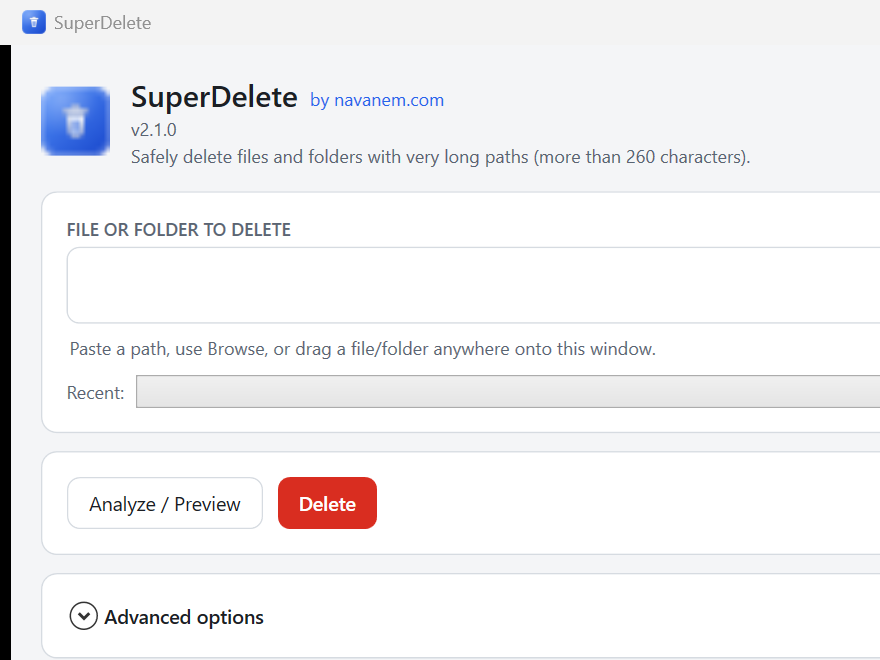
The window is a single, sober utility screen organized top-to-bottom:
- Header, app name, version, one-line description, a Help → About menu, and a Dark mode toggle.
- File or folder to delete, a path box plus Browse file… / Browse folder…. You can also paste a path or drag-and-drop a file/folder anywhere onto the window. A Recent dropdown lists paths used during the session.
- Actions, Analyze / Preview, Delete (danger-styled), and Cancel (while busy). A progress
bar shows the current item and a live
files · folderscount. - Summary (after Analyze), type (file/folder), existence, path length with a badge when it exceeds 260 characters, item counts, an amber note for access/ACL or reparse-point concerns, and a red warning before recursive deletion.
- Advanced options, Preview only (dry run, deletes nothing), Bypass ACL (with a visible "enabled" indicator), Show diagnostic details, and a short explanation of the long-path limitation.
- Activity log, timestamped, real-time log with Clear and a collapsible Technical details panel (stack traces) shown when something fails.
- Status bar, a colored final status: green = success, amber = cancelled/partial, red = failure.
Safety behaviors: a real deletion always asks for an explicit confirmation naming the target and item count; Preview only never changes anything; the UI stays responsive during long deletes and the operation can be cancelled mid-run.
License
Apache License 2.0, see LICENSE.
Why it exists.
The code is public and the scope stays focused. Read the README, open an issue, or send a pull request if you have an idea.