Sysinfo Tool
A lightweight BGInfo-style Windows utility that generates a polished system information panel and applies it as the desktop wallpaper.
Built in the open.
A lightweight BGInfo-style Windows utility that generates a polished system information panel and applies it as the desktop wallpaper.
From the repository.
BgLight
BgLight is a lightweight BGInfo-like tool for Windows: it draws a "premium" system information panel on a solid background and applies it automatically as the desktop wallpaper. It is a one-shot executable (it runs, updates the wallpaper, then exits immediately), silent, with no UI and no external dependency (.NET Framework 4.8, shipped by default on Windows 10/11).
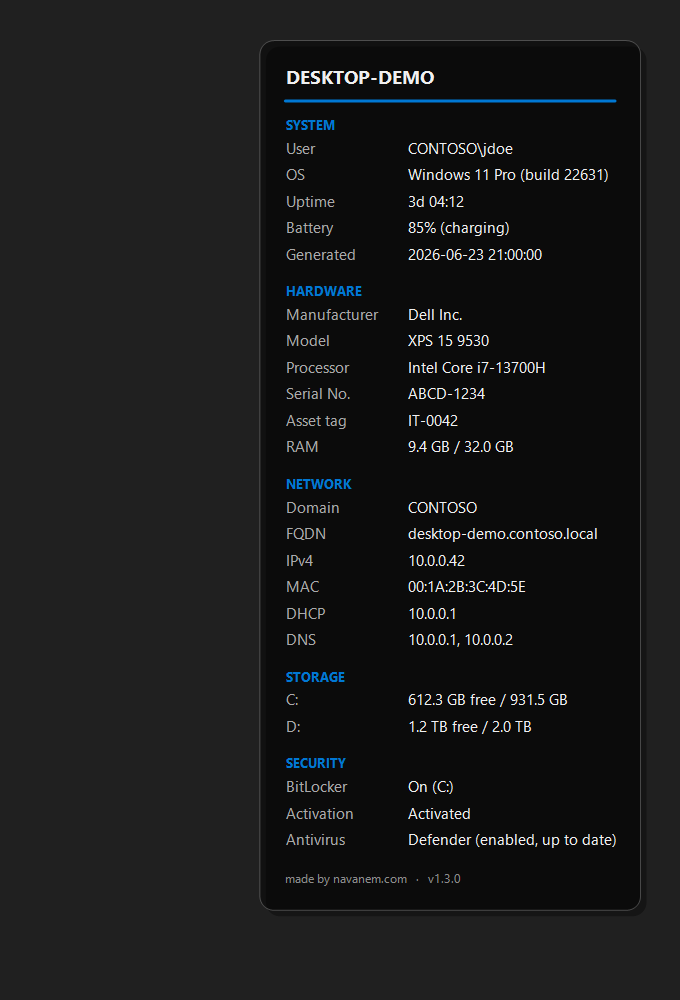
Preview rendered with placeholder data. On a real machine the values come from the system (WMI + .NET APIs).
Table of contents
- Features
- Displayed information
- Requirements
- Quick install (binary)
- Usage
- Command-line options
- Enterprise deployment
- Building from source
- How it works
- Troubleshooting
- Versions
Features
- "Premium" panel: translucent dark card with rounded, anti-aliased corners.
- Configurable position (defaults to the top-right corner).
- Header = computer name, in bold, underlined by an accent line whose color is
configurable (
/accentColor, default blue#0078D4). - Two aligned columns (label / value) for clean readability.
- Panel footer:
made by navanem.com+ version number. - Grouped sections (System / Hardware / Network / Storage / Security).
- Optional background image (
/bgImage), the panel is drawn over it; falls back to the solid color. - Multi-monitor: one panel per monitor across the whole virtual desktop.
- DPI-aware (PerMonitorV2) with pixel-accurate Span wallpaper.
- Panel drop shadow + border.
- Robust: every information source is isolated; if a query fails, the value shows
N/Ainstead of crashing the tool. - Lightweight and non-resident: no service, no background process; the exe exits as soon as the update is done.
Displayed information
| Section | Fields |
|---|---|
| System | User · OS · Uptime · Battery (laptops) · Generated |
| Hardware | Manufacturer · Model · Processor · Serial No. · Asset tag · RAM |
| Network | Domain · FQDN · IPv4 · MAC · DHCP · DNS |
| Storage | Free / total for every fixed disk |
| Security | BitLocker · Windows activation · Antivirus |
Sizes are shown in GB (gibibytes, base 1024). Security fields require elevation and
otherwise show N/A.
Requirements
- Runtime: Windows 10/11. .NET Framework 4.8 is preinstalled on those versions.
- Build: the .NET SDK is enough (see Building from source); Visual Studio 2022 also works.
Quick install (binary)
- Download
BgLight-vX.Y.Z.exefrom the Releases page. - (Optional) place it in
%ProgramData%\BgLight\. - Run it once to check the rendering, then schedule it (see Deployment).
Usage
Defaults (panel in the top-right corner, blue accent):
BgLight.exe
With arguments:
BgLight.exe /position=TopRight /accentColor=#0078D4 /fontSize=11 /fontName="Segoe UI"
Command-line options
Arguments use the /key=value form (case-insensitive). An invalid value is ignored and
the default is kept.
| Argument | Default | Description |
|---|---|---|
/outputPath | C:\ProgramData\BgLight\wallpaper_info.bmp | Path of the generated BMP (and of log.txt) |
/bgImage | (none) | Background image drawn full-screen behind the panel; falls back to /bgColor |
/position | TopRight | TopLeft, TopRight, BottomLeft, BottomRight |
/accentColor | #0078D4 | Accent line color (hex #RRGGBB) |
/bgColor | #202020 | Solid background color (hex) |
/fontSize | 11 | Body font size (points); the title is slightly larger |
/fontName | Segoe UI | Text font |
The error log (log.txt) is created in the outputPath folder.
Enterprise deployment
Scheduled task (recommended for periodic refresh)
schtasks /create /tn "BgLight"         /tr "%ProgramData%\BgLight\BgLight.exe" /sc onlogon
schtasks /create /tn "BgLight-Refresh" /tr "%ProgramData%\BgLight\BgLight.exe" /sc minute /mo 30
onlogon: at every sign-in./sc minute /mo 30: refresh every 30 minutes (useful for RAM/disk/IP).
Logon script (GPO)
- Copy
BgLight.exeto\\server\share\BgLight\or%ProgramData%\BgLight\. - GPO → User Configuration > Policies > Windows Settings > Scripts (Logon).
- Add
deploy\run-bglight.bat.
Building from source
The project targets net48. It references Microsoft.NETFramework.ReferenceAssemblies
for build only, which allows building net48 with just the .NET SDK (no targeting pack
installed); no dependency is added to the shipped exe.
# Build
dotnet build BgLight.sln -c Release
# -> src/BgLight/bin/Release/net48/BgLight.exe

# Tests
dotnet test -c Debug
With Visual Studio: open BgLight.sln, select the Release configuration, build the
solution.
How it works
A one-shot pipeline runs on every launch:
AppConfig.Parse, reads the/key=valuearguments and applies defaults.SystemInfoCollector.Collect, gathers system info (WMI + .NET APIs), each source isolated in its owntry/catch(no exception ever escapes).WallpaperRenderer.Render, draws the panel (GDI+) on a full-screen bitmap and saves it as a BMP.WallpaperSetter.Apply, applies the BMP as the wallpaper viaSystemParametersInfo.
Source layout:
| File | Responsibility |
|---|---|
Program.cs | One-shot orchestration + root error handling |
AppConfig.cs | Argument parsing and defaults |
SystemInfoCollector.cs | System information collection |
SystemInfoData.cs | Data model (title + label/value rows) |
Format.cs | Formatting (GB sizes, joins) |
WallpaperRenderer.cs | GDI+ rendering of the panel |
WallpaperSetter.cs | Wallpaper application (P/Invoke) |
Logger.cs | Error logging |
Troubleshooting
- Wallpaper does not change /
log.txtreports access denied: choose a writableoutputPath(e.g. a folder under%LOCALAPPDATA%), or run with sufficient rights on%ProgramData%. - A "forced wallpaper" GPO policy is active: it can override the wallpaper. Disable the policy or deploy the BMP through that same policy.
N/Avalues: the corresponding WMI query failed (permissions, driver, corrupted WMI); the other fields stay populated.
Versions
See CHANGELOG.md and the
Releases page.
made by navanem.com
Why it exists.
The code is public and the scope stays focused. Read the README, open an issue, or send a pull request if you have an idea.