BgLight: a premium BGInfo-style system info panel for Windows
BgLight is a lightweight, one-shot Windows tool (C# / .NET 4.8) that paints a premium system-info panel onto the desktop wallpaper — a modern, deployable take on BGInfo. No agent, no UI, no dependencies.
by Emanuel De Almeida
 View source on GitHub
TL;DR
- BgLight is a lightweight, one-shot Windows tool that paints a clean system-info panel onto the desktop wallpaper — a modern take on Sysinternals BGInfo.
- It runs once, updates the wallpaper and exits: no installer, no service, no background process, no tray icon, no UI.
- The panel is organised into sections — System, Hardware, Network, Storage and Security — with dozens of fields (uptime, manufacturer/model, MAC, FQDN, DHCP/DNS, every disk, BitLocker, antivirus and more), pulled live from WMI and .NET.
- Multi-monitor and scriptable: one panel per screen, DPI-aware; position, accent and background colour, a background image, font and output path are all command-line options.
- Built for fleets: deploy by scheduled task or GPO logon script. C# / .NET Framework 4.8 (already on Windows 10/11), single exe, zero external dependencies.
What is BgLight?
BgLight is a small Windows utility that renders a polished system-information panel and sets it as the desktop wallpaper. It is inspired by Sysinternals BGInfo, but built for a cleaner look and zero-friction deployment: a single one-shot executable that runs, redraws the wallpaper with the current machine details, and exits immediately — no installer, no service, no agent sitting in memory. It targets .NET Framework 4.8, which ships with Windows 10 and 11, so there is nothing to install on the endpoint.
The project is on GitHub as navanem/navanem_SysInfoTool, with compiled binaries on the Releases page.
What is new in v1.3.1?
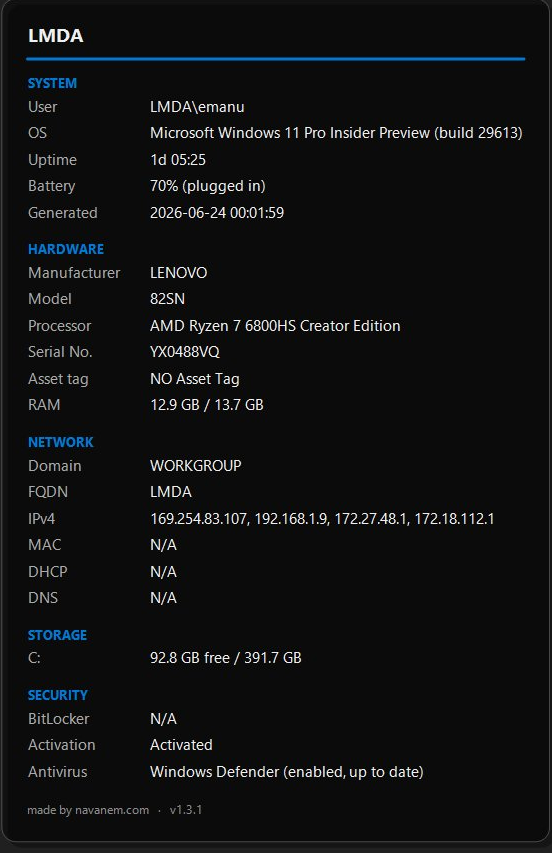
The 1.3 line is a big step up. The panel is now organised into clear sections — System, Hardware, Network, Storage and Security — and gains a lot of fields: manufacturer, model, asset tag, uptime, MAC, FQDN, DHCP and DNS servers, every fixed disk (not just C:), battery on laptops, and a Security block with BitLocker, Windows activation and antivirus status. It also adds true multi-monitor support (one panel per screen across the whole virtual desktop), DPI awareness (PerMonitorV2) with a pixel-accurate Span wallpaper, an optional background image behind the panel (/bgImage), and a subtle drop shadow and border. v1.3.1 then refines it: DNS reports the primary (first active) adapter only, consistent with MAC and DHCP; antivirus state decoding is more robust for third-party products; and the disk handling was cleaned up internally.
What does BgLight display on the desktop?
Each run collects the machine's details from WMI and .NET APIs and lays them out in labelled sections under the computer name:
- System — current user, OS edition and build, uptime, battery (on laptops) and the generation timestamp.
- Hardware — manufacturer, model, processor, BIOS serial number, asset tag and RAM (used / total).
- Network — domain or workgroup, FQDN, IPv4 address(es), MAC address, DHCP and DNS servers.
- Storage — free and total space for every fixed disk, shown in GB.
- Security — BitLocker status, Windows activation state and the installed antivirus product.
Each field is collected in isolation, so if one query fails the value simply shows N/A instead of crashing the run. The Security fields report fully when the tool runs elevated.
How do you customise the panel?
BgLight takes /key=value arguments (case-insensitive); an invalid value is ignored and the default kept. The defaults put the panel in the top-right corner with a blue accent:
BgLight.exe /position=TopRight /accentColor=#0078D4 /fontSize=11 /fontName="Segoe UI"You can set /position (TopLeft, TopRight, BottomLeft or BottomRight), /accentColor and /bgColor (hex #RRGGBB), /bgImage (a full-screen background image drawn behind the panel, falling back to /bgColor), /fontSize, /fontName, and /outputPath — the path of the generated BMP and the log.txt error log, which defaults to C:\ProgramData\BgLight\.
How do you deploy it across a fleet?
Because it is a single exe with no dependencies, rolling BgLight out is just a matter of running it on a schedule. A scheduled task refreshes the panel at logon and on an interval, so RAM, disk and IP stay current:
schtasks /create /tn "BgLight"         /tr "%ProgramData%\BgLight\BgLight.exe" /sc onlogon
schtasks /create /tn "BgLight-Refresh" /tr "%ProgramData%\BgLight\BgLight.exe" /sc minute /mo 30
Alternatively, drop the exe on a share and call it from a GPO logon script (User Configuration > Policies > Windows Settings > Scripts). One caveat: a Group Policy that forces a specific desktop wallpaper will overwrite BgLight’s image — either disable that policy, or distribute the generated BMP through it.
How does BgLight work under the hood?
Each launch runs a short one-shot pipeline. AppConfig parses the arguments and applies defaults; SystemInfoCollector gathers the system details (WMI + .NET), each source wrapped in its own try/catch so a single failure never bubbles up; WallpaperRenderer draws the panel with GDI+ onto a full-screen bitmap and saves it as a BMP; and WallpaperSetter applies that BMP as the wallpaper via the SystemParametersInfo Win32 call. Errors land in a log.txt next to the output file. The code is split into focused files (config, collector, data model, formatting, renderer, setter, logger) and ships with unit tests.
How do you build it from source?
The project targets net48 and references the .NET Framework reference assemblies at build time only, so you can compile it with just the .NET SDK (no targeting pack installed) and the shipped exe carries no added dependencies:
# build
dotnet build BgLight.sln -c Release
# -> src/BgLight/bin/Release/net48/BgLight.exe

# tests
dotnet test -c Debug
Visual Studio 2022 works too: open BgLight.sln, pick the Release configuration, and build the solution.
FAQ
Does it install anything or run in the background?
No. BgLight is a one-shot executable — it runs, redraws the wallpaper and exits. There is no installer, no Windows service, and no resident process or tray icon.
Does the endpoint need .NET installed?
Not to run it: BgLight targets .NET Framework 4.8, which is preinstalled on Windows 10 and 11. The .NET SDK is only needed to build it from source.
Can I change the look and the position?
Yes. The accent colour, background colour, panel position (any corner), font, font size and output path are all command-line options, so you can match your corporate style.
Why does a field show N/A?
That field’s WMI query failed — permissions, a driver issue, or a corrupted WMI repository. Each source is isolated, so the other fields still render normally.
Will it conflict with a wallpaper Group Policy?
It can. A policy that enforces a specific desktop wallpaper will overwrite BgLight’s image. Disable that policy, or push the generated BMP through the same policy.
Where do I get it?
The source is on GitHub at navanem/navanem_SysInfoTool, and compiled BgLight binaries are published on the repository’s Releases page.