Payload Comments: anonymous comments and reactions for Payload 3
Anonymous comments and reactions for Payload 3 — now with Markdown comment bodies and a runtime moderation toggle, plus threaded replies, reactions, anti-spam and a stats view.
by Emanuel De Almeida
in_this_guide+
- 01TL;DR
- 02What is @navanem/payload-comments?
- 03What is new in v0.4.0?
- 04What does a comment thread look like for visitors?
- 05How do you moderate comments?
- 06How do you toggle moderation and per-collection commenting?
- 07What insight does the Statistics view give you?
- 08How do you install and use it?
- 09How does it stay safe and spam-resistant?
- 10FAQ
 View source on GitHub
TL;DR
- @navanem/payload-comments adds anonymous comments and reactions to any Payload 3 collection: no user accounts, no third-party service, your data stays in your own database.
- v0.3.0 introduces Markdown comment bodies (a safe subset, no raw HTML) and a runtime moderation toggle in the admin Settings.
- Up to three levels of threaded replies, mood emojis, per-comment reactions, and built-in anti-spam (honeypot, rate limiting, length and link rules).
- A Comments Settings global turns commenting (and now mandatory approval) on or off per collection without a redeploy, and a Comment Statistics admin view surfaces KPIs and breakdowns.
- Drop in the ready-made
<Comments />React component, or build your own UI on the REST API.
What is @navanem/payload-comments?
It is a self-hosted comments and reactions plugin for Payload CMS 3.x. Visitors comment with a name (email optional or required) and a mood emoji, react to other comments, and reply up to three levels deep. Everything is stored in your own Postgres or SQLite through Payload, with no external comment service and no data leaving your stack. Moderation, anti-spam and a settings UI are built in.
What is new in v0.4.0?
The latest release, v0.4.0, sharpens moderation. The Comments list now carries a Thread column that labels every row as either a top-level comment or a reply — with the parent author, e.g. "↳ Reply to James Carter" — next to the target document, so you can triage a busy thread at a glance instead of opening each comment. It is a virtual field (no database column, no migration) computed only for admin reads, so the public comment endpoint is untouched. The previous release, v0.3.0, added Markdown comment bodies (a safe subset rendered via react-markdown and remark-gfm, with no raw-HTML/XSS surface and hardened links) and moved the mandatory-approval toggle into the admin Settings, so you can switch moderation on or off at runtime without redeploying.
What does a comment thread look like for visitors?
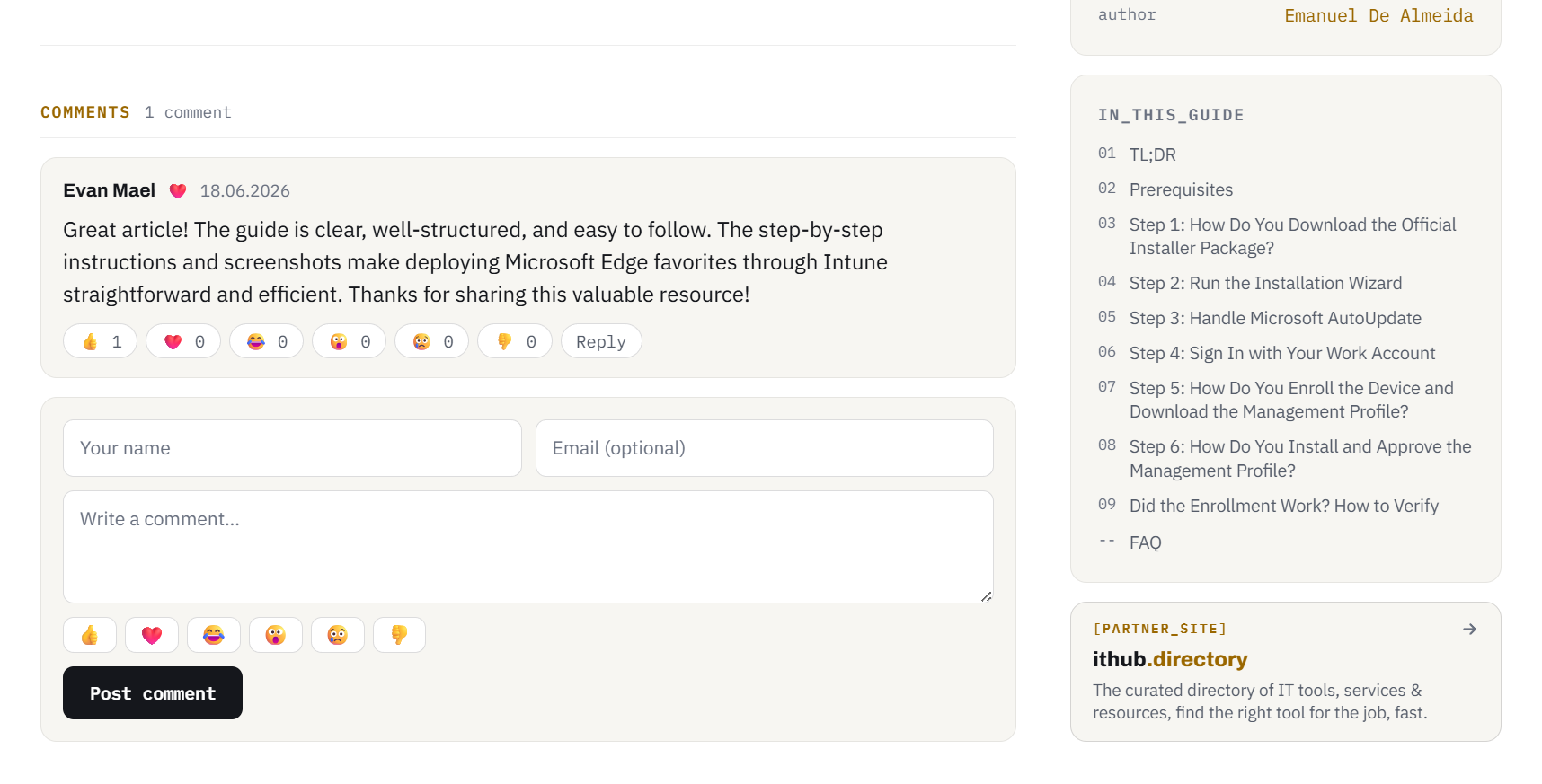
The front-end widget renders a thread on a live page: each comment shows its author, a mood emoji and a date, renders its body as Markdown, and exposes a reaction row plus a reply button. Nested replies are indented up to three levels. The composer at the bottom collects a name, an optional email, the Markdown comment text and a mood, with a "Markdown supported" hint. It is the bundled <Comments /> component, styled to inherit your site theme.
How do you moderate comments?
Every submission lands in a standard Payload Comments collection, so moderation uses the admin UI you already know. Each comment carries a status (pending, approved, spam or trash) and only approved comments appear on the site.
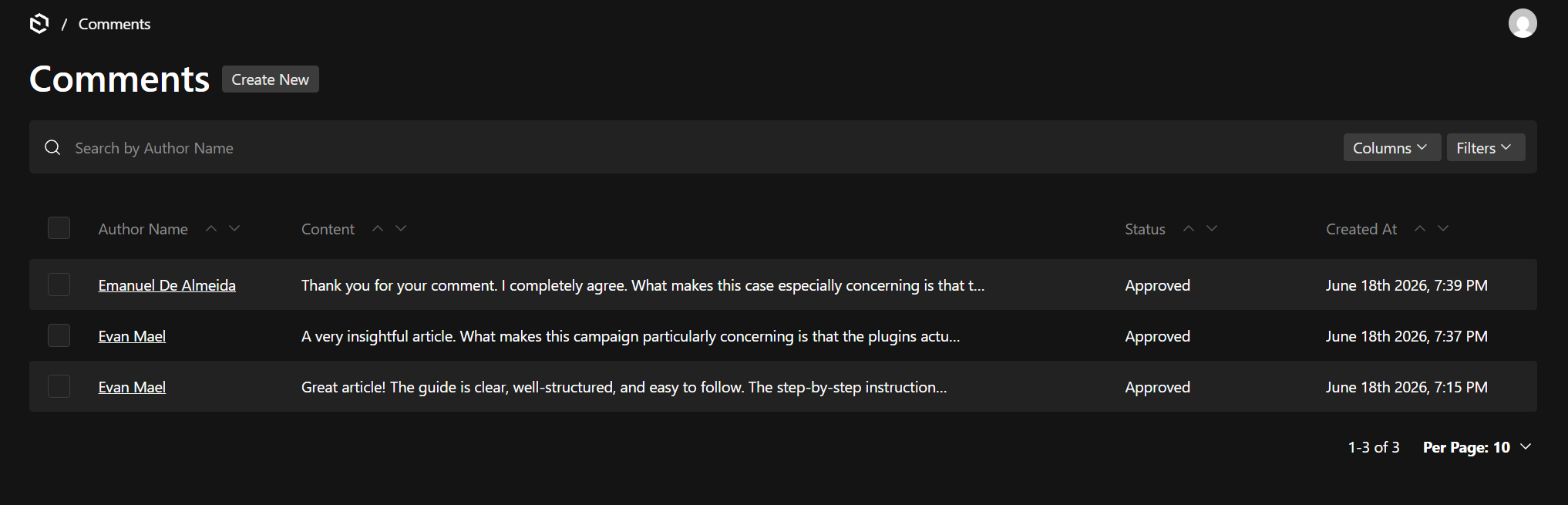
The comments list is your moderation queue: author, excerpt, a Thread indicator (top-level vs "↳ Reply to <author>"), the target document, status and date at a glance, with Payload’s native filtering and bulk actions. Approving a pending comment publishes it immediately.
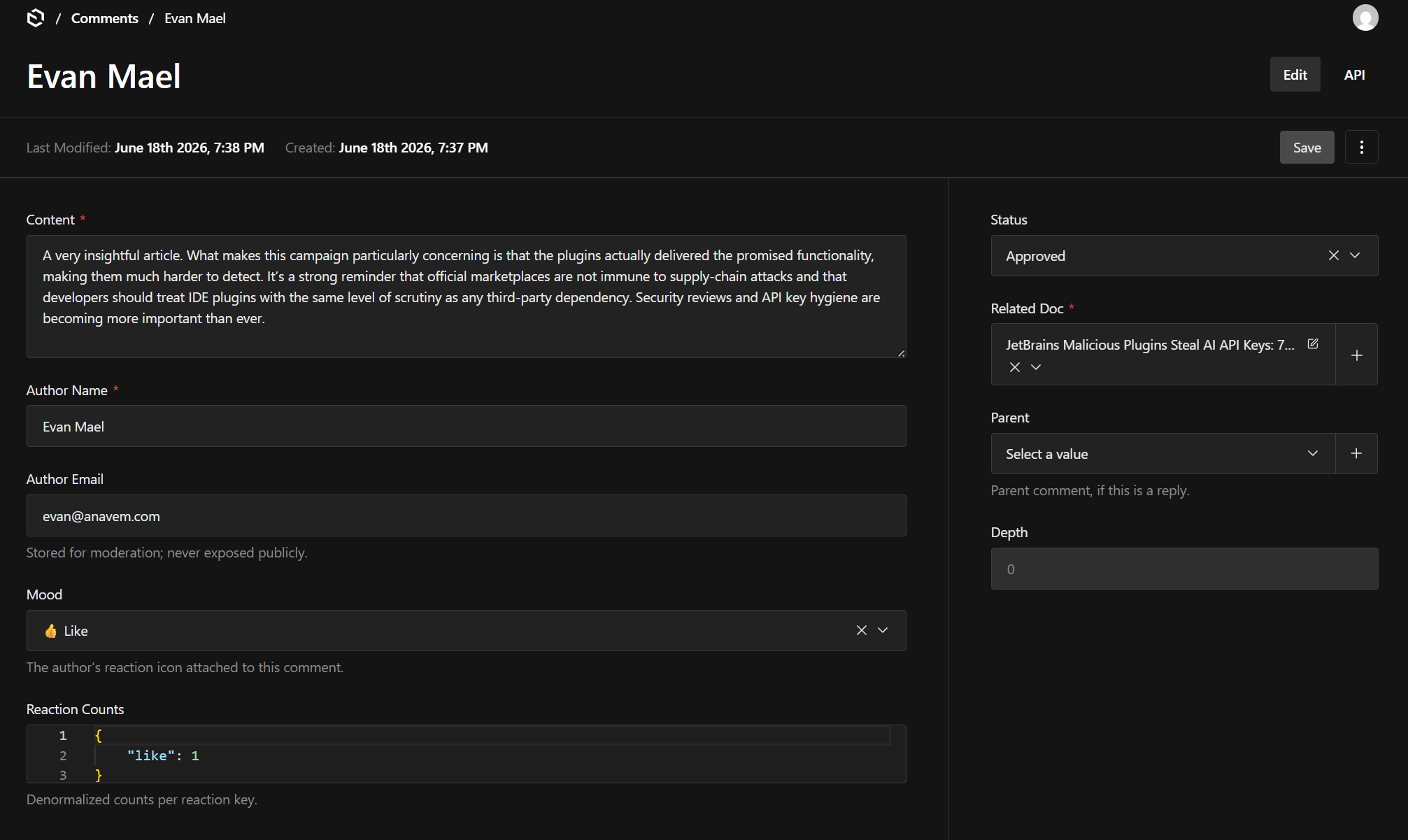
Opening a comment shows its full record: author and email, the mood, the related document and threaded parent, the salted IP and fingerprint hashes used for anti-spam, and the status selector you flip to approve, mark as spam, or trash it.
How do you toggle moderation and per-collection commenting?
The plugin registers a Comments Settings global (admin group "Comments") so you can change behaviour at runtime, with no redeploy.
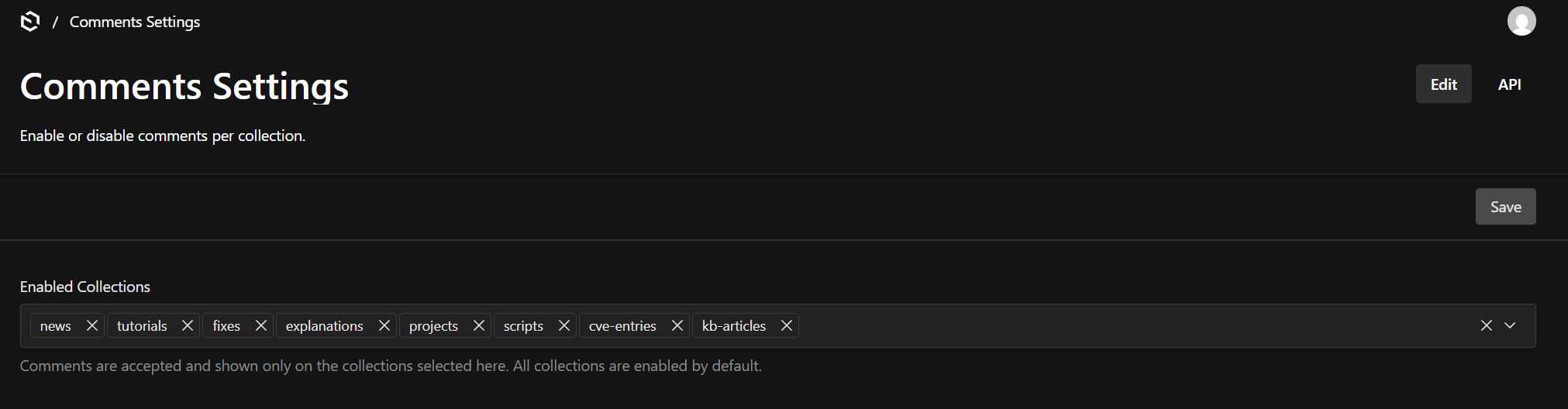
Here you choose which collections accept comments: unchecking one immediately rejects new submissions and replaces the thread with a "closed" notice. New in v0.3.0, the Require approval before a comment is published switch lets you flip mandatory moderation on or off. With it on, comments start as pending; with it off, they publish instantly. The submit flow reads this setting live, falling back to the requireApproval config option when it has never been saved.
What insight does the Statistics view give you?
A dedicated Comment Statistics view lives at /admin/comments-statistics.
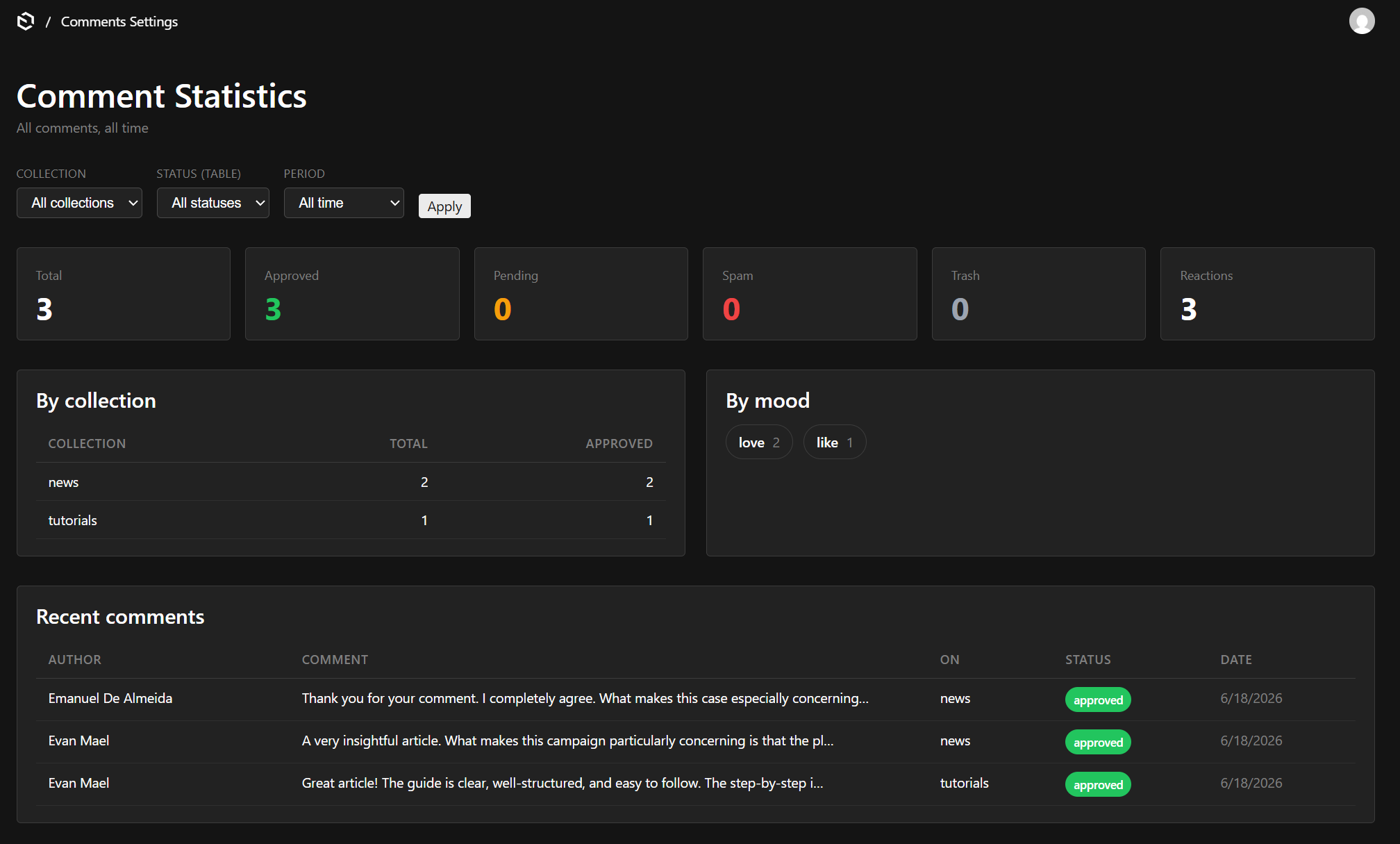
It shows KPIs (totals by status, reaction count, per-day rate), per-collection and per-mood breakdowns, and a recent-comments table, all filterable by collection, status and period. The view queries moderation data server-side and is gated to authenticated admins, so nothing is rendered for anonymous requests.
How do you install and use it?
Install from npm, or directly from Git until it is published:
pnpm add @navanem/payload-comments
# or, from Git:
pnpm add github:navanem/navanem_payload_comments
Register the plugin in your Payload config:
import { commentsPlugin } from '@navanem/payload-comments'

export default buildConfig({
  plugins: [
    commentsPlugin({
      enabledCollections: ['posts', 'pages'],
      requireApproval: true,
      requireEmail: false,
    }),
  ],
})
Set a salt for IP hashing in your environment:
COMMENTS_IP_SALT="a-long-random-string"Then drop the component onto any page:
import { Comments } from '@navanem/payload-comments/client'

export default function PostPage({ post }) {
  return <Comments relationTo="posts" docId={post.id} />
}payload, react and react-dom are peer dependencies. Prefer your own UI? Every action is available on the REST API under /api/comments-api/*.
How does it stay safe and spam-resistant?
Several layers work together. Markdown is rendered without raw HTML, so comment input cannot inject scripts or markup. Submissions pass a hidden honeypot field, per-IP rate limiting, and configurable minimum and maximum length plus optional link blocking. IP addresses are stored only as salted hashes (set COMMENTS_IP_SALT). And with mandatory approval enabled, nothing reaches the page until you approve it.
FAQ
Does it require visitors to create an account?
No. Comments are anonymous: a name, and optionally an email, is all that is needed. There are no user accounts to manage.
Where is the comment data stored?
In your own Payload database, as ordinary collections (comments and comment-reactions). There is no third-party service and no data leaves your stack.
Can I moderate comments before they appear?
Yes. Turn on Require approval in Comments Settings (or set the requireApproval option) and every comment waits as "pending" until you approve it in the admin.
What Markdown is supported in comments?
Bold, italic, strikethrough, inline and block code, links, lists and blockquotes. Raw HTML is intentionally not rendered, so comments cannot inject markup or scripts.
Which Payload version does it support?
Payload 3.x. payload, react and react-dom are peer dependencies.
Can I use my own comment UI instead of the bundled component?
Yes. The <Comments /> component is optional. Every operation (load the thread, submit a comment, react) is exposed on the REST API under /api/comments-api/*.