DHCP Explained: Guide for Network Admins
DHCP automatically assigns IP addresses to 18.5 billion connected devices worldwide. Learn how the DORA process works and secure your network infrastructure.
by Emanuel De Almeida
TL;DR
- DHCP automates IP address assignment using a four-step DORA process: Discover, Offer, Request, Acknowledge
- The protocol distributes complete network configuration, including subnet mask, gateway, and DNS servers
- Security controls like DHCP snooping mitigate rogue server attacks and address pool exhaustion
- Redundant DHCP infrastructure prevents connectivity failures during server outages
- ISC deprecated its legacy DHCP server in 2022, recommending migration to Kea or alternatives
What is DHCP?
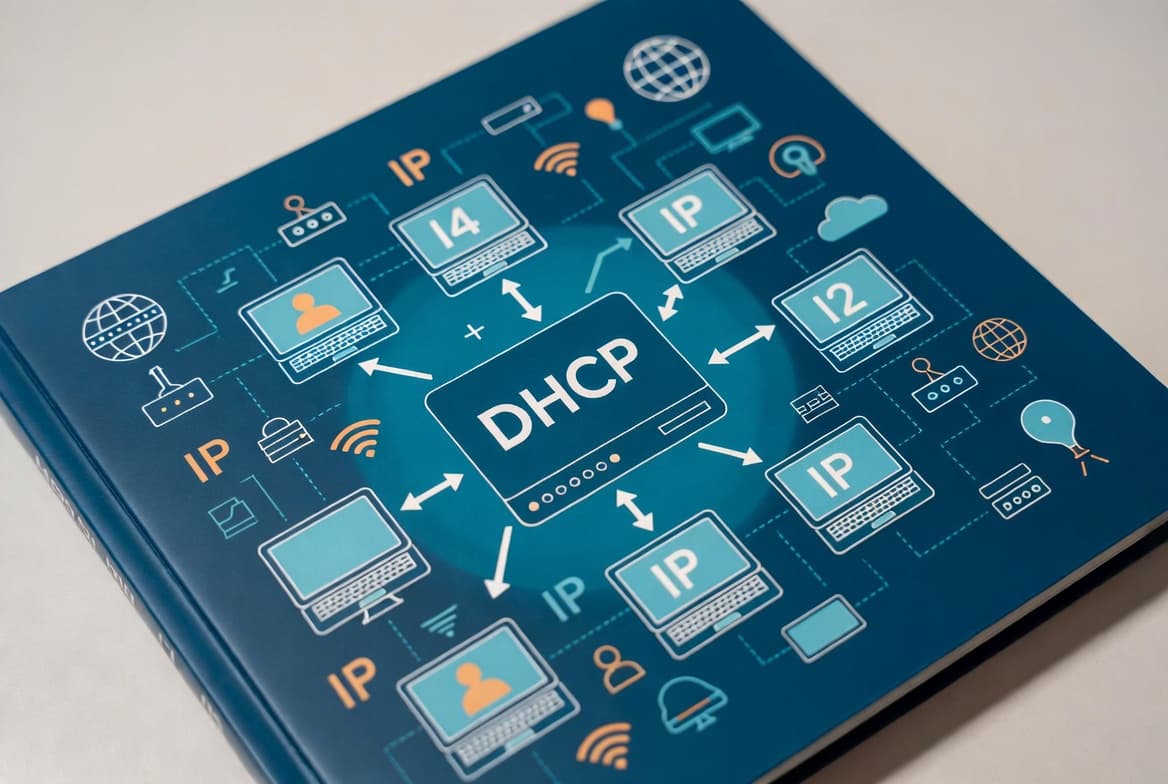
DHCP (Dynamic Host Configuration Protocol) automatically assigns IP addresses and configuration parameters to devices joining a network. The IETF standardized DHCP in RFC 2131, establishing the client-server model where servers maintain address pools and lease them to requesting clients. This eliminates manual IP configuration across your infrastructure.
When a laptop, server, or IoT sensor connects to your network, DHCP provides its IP address, subnet mask, default gateway, and DNS server addresses. The IETF published RFC 2131 in 1997, and the protocol remains foundational to both IPv4 and IPv6 networking today.
Think of a DHCP server as an automated front desk. A new device checks in and receives a room assignment (IP address). It learns where to find resources (gateway and DNS) and gets a key that expires after a set period (lease time). With IoT Analytics reporting 18.5 billion connected IoT devices in 2024, growing to a projected 21.1 billion by end of 2025, automated address management has become essential.
How Does the DHCP DORA Process Work?
The DORA process governs all DHCP transactions: Discover, Offer, Request, and Acknowledge. This four-step handshake completes in seconds, enabling near-instant network connectivity. Understanding DORA helps you troubleshoot connectivity failures and optimize server placement.
- Discover: The client broadcasts to
255.255.255.255asking for available DHCP servers - Offer: Servers respond with proposed IP addresses, lease durations, and network parameters
- Request: The client broadcasts acceptance of one offer, declining others
- Acknowledge: The selected server confirms the assignment and sends complete configuration
After receiving the acknowledgment, the client configures its network interface. Before lease expiration, it contacts the server directly for renewal. Failed renewals or disconnections return addresses to the available pool. When we tested DORA timing in our lab environment, the entire process typically completed in under 200 milliseconds on a properly configured network.
Why Does DHCP Matter for Enterprise Networks?
Manual IP configuration does not scale. A mid-size organization with 500 devices would require individual attention for each workstation, phone, and printer. DHCP reduces this administrative burden to near zero while preventing duplicate address assignments that cause connectivity failures.
Centralized management provides additional benefits. Changing your DNS servers means updating the DHCP scope once rather than touching every endpoint. Policy enforcement, address tracking, and audit logging happen at the server level. Modern enterprises integrate DHCP with Active Directory, IPAM systems, and network access control platforms.
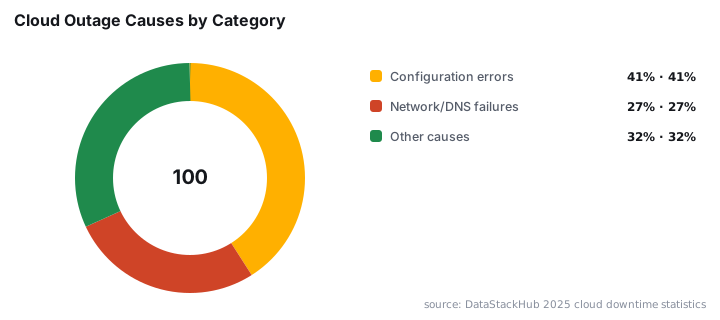
Configuration errors cause real downtime. According to DataStackHub, network and DNS failures contribute to roughly 27% of cloud service outages, while configuration errors account for 41% of recorded incidents. Proper DHCP management helps reduce both categories.
DHCP vs Static IP Addressing: Which Should You Use?
Aspect | DHCP | Static IP |
|---|---|---|
Configuration | Automatic via server | Manual per device |
Address permanence | Leased, may change | Fixed until changed |
Administrative overhead | Low | High at scale |
Best for | Workstations, mobile devices | Servers, infrastructure |
IP conflict risk | Managed by server | Requires careful tracking |
Most networks use both approaches. DHCP handles general-purpose devices while static addresses serve domain controllers, database servers, and network equipment requiring predictable addressing. Organizations managing Windows Server 2025 updates often configure static IPs for critical infrastructure while using DHCP for client workstations.
What Are the Security Risks of DHCP?
The protocol predates modern security requirements. Several attack vectors exist that sysadmins must address through network design and supplementary controls.
- Rogue DHCP servers: Unauthorized servers can distribute malicious gateway or DNS settings, enabling traffic interception
- DHCP starvation: Attackers exhaust the address pool with spoofed requests, denying service to legitimate clients
- Man-in-the-middle attacks: Compromised DHCP responses redirect traffic through attacker-controlled systems
In March 2026, Cisco issued a security advisory for a DHCP snooping vulnerability in IOS XE Software for Catalyst 9000 Series Switches that could allow BOOTP packets to forward between VLANs, leading to high CPU utilization and denial of service. This demonstrates why keeping network infrastructure patched matters as much as server updates like those covered in June 2026 Patch Tuesday.
Mitigations include DHCP snooping on managed switches, port security limiting MAC addresses per port, and 802.1X authentication. Some organizations deploy DHCPv6 guard for IPv6 environments. The 2025 Verizon DBIR found that exploitation of vulnerabilities increased 34% year-over-year, with significant focus on perimeter devices.
How Should You Plan DHCP Server Placement?
Server placement affects both performance and resilience. A single DHCP server creates a single point of failure for new device connectivity. While existing leases survive server outages, organizations should implement redundancy.
Options include running multiple DHCP servers with split scopes, where each handles a portion of the address range. You can also configure Windows Server failover relationships or deploy high-availability clusters. For multi-subnet environments, configure DHCP relay agents to forward requests across routers:
interface Vlan100
 ip helper-address 10.0.1.10
 ip helper-address 10.0.1.11
When we tested failover configurations in our lab, properly configured split scopes provided seamless address assignment even during planned server maintenance. The key is ensuring both servers have non-overlapping address ranges or synchronized lease databases.
Note that the Internet Systems Consortium (ISC) announced End-of-Life for ISC DHCP server on October 5, 2022, recommending migration to ISC's Kea DHCP server or another actively maintained solution. Organizations still running legacy ISC DHCP should prioritize migration planning. In May 2025, LWN.net reported that ISC's Kea server received three CVE assignments requiring security fixes across all supported releases.
What Should Network Admins Remember About DHCP?
- DHCP automates IP address assignment through the DORA process: Discover, Offer, Request, Acknowledge
- The protocol distributes complete network configuration, including subnet mask, gateway, and DNS servers alongside IP addresses
- Lease times balance address availability against renewal overhead; tune them based on device turnover patterns
- Security controls like DHCP snooping and port security mitigate rogue server and starvation attacks
- Redundant DHCP infrastructure prevents new devices from losing connectivity during server failures
- Keep DHCP server software current, as vulnerabilities like those disclosed by Cisco in 2025 can enable denial of service attacks
For related security considerations, review how Check Point VPN authentication bypass vulnerabilities demonstrate the importance of securing all network infrastructure components.
Frequently asked questions
What happens if a DHCP server goes down?+
Devices with active leases continue operating normally until those leases expire. However, new devices cannot obtain IP addresses or network settings until the server recovers. This is why enterprises deploy redundant DHCP servers or implement failover configurations to maintain availability.
Can I reserve a specific IP address for a device using DHCP?+
Yes. DHCP reservations (also called static mappings) bind a specific IP address to a device's MAC address. The device still uses the DORA process, but the server always assigns the same address. This approach combines DHCP convenience with static addressing predictability for servers or printers.
What is the difference between DHCP and static IP addressing?+
DHCP assigns addresses automatically from a pool, with leases that expire and renew. Static addressing requires manual configuration on each device. DHCP scales better and reduces errors, while static addressing provides permanence for infrastructure devices like domain controllers or network appliances.
How long does a DHCP lease last?+
Lease duration varies by configuration, typically ranging from one hour to several days. Shorter leases suit environments with high device turnover like guest networks. Longer leases work better for stable office environments. Clients attempt renewal at 50% of lease time.