Docker: Containerization Platform Explained for IT Pros
Docker packages applications with dependencies into portable containers. With 92% IT adoption in 2025 and 318 billion Docker Hub pulls, it's essential knowledge for IT pros.
by Emanuel De Almeida
TL;DR
- Docker packages applications with all dependencies into portable containers that run identically across development, testing, and production environments
- Containers share the host OS kernel, starting in seconds and using far fewer resources than virtual machines
- Container usage hit 92% in IT in 2025, making Docker knowledge essential for modern infrastructure roles
- Best use cases include microservices architectures, CI/CD pipelines, and cloud migration projects
- Security requires attention: 86% of production workloads contain high-severity patchable vulnerabilities
---
Docker is an open-source containerization platform that packages applications along with all their dependencies into isolated, portable units called containers. These containers run consistently across any environment supporting Docker, solving the classic "it works on my machine" problem that has frustrated development and operations teams for years.
What Is Docker?
Docker provides a standardized way to build, distribute, and run applications inside containers. Unlike traditional deployment methods where applications depend on the host system's configuration, Docker containers include everything needed to execute: code, runtime, system tools, libraries, and settings. This self-contained approach means an application packaged in Docker behaves identically whether running on a developer workstation, test server, or production cloud infrastructure.
The platform uses Linux kernel features called namespaces and cgroups to create isolated environments. Namespaces provide separation for processes, networking, and filesystems. Cgroups control resource allocation like CPU and memory.
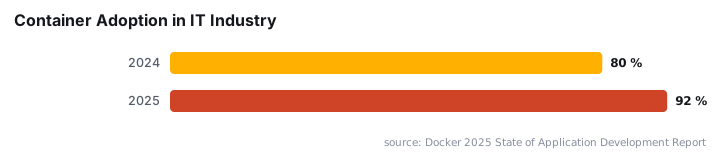
Because containers share the host operating system's kernel rather than running their own, they start faster and consume fewer resources than virtual machines. According to Docker's 2025 State of Application Development Report, container usage soared to 92% in the IT industry in 2025, up from 80% in 2024.
How Does Docker Work?
Docker operates through a client-server architecture where several components interact to manage containerized applications. Understanding these pieces helps administrators troubleshoot issues and design effective deployments. When we tested Docker deployments in our lab environment, grasping this architecture made debugging container networking issues significantly faster.
- Docker Engine: The core runtime consisting of a daemon process (
dockerd) and REST API - Docker Images: Read-only templates built from layered filesystems
- Dockerfile: Text instructions defining how to build an image
- Containers: Running instances created from images
- Registry: Storage and distribution service for images, with Docker Hub as the default public option
The typical workflow starts when developers write a Dockerfile specifying the base image, application code, and dependencies. Docker builds this into an image layer by layer. Teams push images to a registry for sharing. Containers then instantiate from these images on target systems.
A sample Dockerfile might look like:
FROM python:3.11-slim
WORKDIR /app
COPY requirements.txt .
RUN pip install -r requirements.txt
COPY . .
CMD ["python", "app.py"]
How Does Docker Compare to Virtual Machines?
Containers and virtual machines both provide isolation, but they achieve it through fundamentally different mechanisms. VMs virtualize hardware and run complete operating systems. Docker virtualizes the operating system itself, sharing the host kernel across containers.
Aspect | Docker Containers | Virtual Machines |
|---|---|---|
Startup time | Seconds | Minutes |
Resource usage | Lightweight, shared kernel | Heavy, full OS per instance |
Isolation level | Process-level | Hardware-level |
Portability | High across platforms | Lower, platform-dependent |
Security model | Shared kernel | Complete hypervisor isolation |
Best for | Microservices, CI/CD | Different OS requirements, legacy apps |
Containers start in seconds because they do not boot an operating system. They consume less disk space since multiple containers share base image layers through a copy-on-write filesystem. However, VMs provide stronger isolation boundaries, making them preferable for multi-tenant environments with strict security requirements.
This isolation difference matters for security planning. A kernel vulnerability could potentially affect all containers on a host, similar to how CVE-2026-41089 Windows Netlogon vulnerability demonstrated risks in shared system components.
When Should You Use Docker?
Docker fits specific operational scenarios particularly well. Teams adopting microservices architectures benefit most, as each service runs in its own container with defined resource boundaries. CI/CD pipelines gain consistency because the same image tested in staging deploys to production.
- Development environment standardization: New team members run
docker compose upinstead of following lengthy setup documentation - Microservices deployment: Independent scaling and updates for each service without affecting others
- Cloud migration: Portable containers move between on-premises and cloud providers without modification
- Legacy modernization: Containerizing older applications enables deployment on modern infrastructure
Stateful applications like databases require additional planning around persistent storage volumes. Networking complexity increases in multi-host deployments, often necessitating orchestration tools like Kubernetes. Organizations managing hybrid environments should also review Windows Server 2025 June Update KB5094125 for DNS and security considerations affecting container networking.
What Are Common Misconceptions About Docker?
Several misunderstandings persist around container technology. Clearing these up helps teams make better architectural decisions and avoid security pitfalls.
"Containers are lightweight VMs": This oversimplification obscures important security differences. Containers share the host kernel, meaning a kernel vulnerability potentially affects all containers on that host. VMs maintain complete isolation through the hypervisor layer.
"Docker solves all dependency problems": While Docker eliminates many environment inconsistencies, it introduces its own complexity. Teams must manage image versions, registry access, and orchestration. Base images require regular updates for security patches, especially given that NIST enriched nearly 42,000 CVEs in 2025 with CVE submissions increasing 263% between 2020 and 2025.
"Containers are inherently insecure": Properly configured containers with minimal base images, non-root users, and read-only filesystems can be quite secure. Poor practices like running as root or using outdated images create vulnerabilities, not containerization itself. Supply chain attacks remain a concern; see how npm 12 blocks install scripts by default to combat similar risks in JavaScript ecosystems.
How Do You Secure Docker Containers?
Container security requires proactive vulnerability management and proper configuration. Sysdig's 2024 research found that 86% of workloads running in production contain patchable vulnerabilities of high or greater severity. This statistic underscores the need for continuous scanning.
Docker Scout aggregates 22 advisory sources including NVD, CISA KEV, EPSS, GitHub Advisory Database, and 13 Linux distribution security trackers. Use it to identify vulnerable packages in your images before deployment.
Key security practices include:
- Use minimal base images like Alpine or distroless variants
- Run containers as non-root users
- Scan images in CI/CD pipelines before registry push
- Keep base images updated with security patches
- Implement network policies to restrict container communication
Organizations should also monitor broader vulnerability trends. The June 2026 Patch Tuesday fixing 3 zero-days and 206 CVEs illustrates the pace of security updates IT teams must track.
What Is Docker's Adoption and Ecosystem Scale?
Docker's ecosystem has grown massively. Docker Hub has recorded 318 billion all-time pulls, representing a 145% year-over-year increase. In 2024 alone, more than 15 billion container images were downloaded from Docker Hub.
Developer workflows continue shifting toward containerized environments. Docker's 2025 survey of over 4,500 developers revealed that 64% now use non-local environments as their primary development setup, up from 36% in 2024. Cloud-based and remote development setups drive this change.
This scale creates both opportunity and responsibility. With billions of image pulls, a single compromised base image can affect thousands of deployments. Security teams should verify image provenance and use signed images where possible.
Frequently asked questions
Is Docker free to use?+
Docker offers both free and paid tiers. Docker Desktop has free personal and small business options, with paid subscriptions for larger organizations. Docker Engine itself remains open source. Most core functionality is available without cost for individual developers and small teams.
Do Docker containers replace virtual machines?+
Not entirely. Containers and VMs serve different purposes. Docker excels at microservices, rapid deployment, and development consistency. VMs remain better suited for running different operating systems, legacy applications requiring full isolation, or workloads with strict security requirements. Many organizations use both.
Can Docker run on Windows?+
Yes. Docker Desktop runs on Windows 10 and 11, using either WSL 2 (Windows Subsystem for Linux) or Hyper-V. Windows containers also exist for Windows-native applications. Most Docker tutorials focus on Linux containers, which run on Windows through a lightweight Linux VM.
What is the difference between a Docker image and a container?+
A Docker image is a read-only template containing application code, libraries, and configuration. A container is a running instance of that image. Think of an image as a class definition and a container as an object instantiated from that class. Multiple containers can run from the same image.