AI Coding Assistants Explained: What They Are and How to Choose
AI coding assistants use large language models to write, refactor, and debug code. With context windows up to 200,000 tokens and 51% of developers using them daily in 2025, here is how to pick the right one.
by Emanuel De Almeida
in_this_guide+
- 01TL;DR
- 02What Are AI Coding Assistants?
- 03How Do AI Coding Assistants Work?
- 04What Are the Main Types of AI Coding Assistant?
- 05How Do Leading AI Coding Assistants Compare?
- 06When Does Codebase Size Change the Decision?
- 07Common Misconceptions About AI Coding Assistants
- 08Does Running Multiple Assistants at Once Help?
- 09Key Takeaways
- --FAQ
TL;DR
- AI coding assistants fall into three types: inline autocomplete, chat-and-edit editors, and terminal agents - each solves a different problem.
- 51% of professional developers use AI coding tools daily in 2025, per the Stack Overflow 2025 Developer Survey.
- Context window size and codebase indexing are the top technical factors for large or complex repositories.
- Running two editor-based assistants at the same time causes autocomplete conflicts and slows the IDE - pick one primary tool.
- AI output needs human review; Veracode found that 45% of AI-generated code contains security vulnerabilities.
What Are AI Coding Assistants?
AI coding assistants are software tools that use large language models to generate, complete, refactor, and debug code in response to developer input. They plug into editors or terminals, understand project context, and cut the manual effort involved in both routine and complex programming tasks.
Adoption is accelerating fast. According to the Stack Overflow 2025 Developer Survey, 84% of developers are using or planning to use AI coding assistants in 2025, up from 76% in 2024, based on responses from more than 49,000 developers across 177 countries. That shift has moved these tools from an optional add-on to a standard part of the developer workflow.
The category has expanded well beyond simple autocomplete. The market now includes editor forks, IDE plugins, and terminal agents - each with distinct strengths. Understanding which type fits your workflow is the first decision to make.
How Do AI Coding Assistants Work?
Most tools combine three layers: codebase indexing, an LLM backend, and an editor integration layer. The indexing layer reads your project and builds a searchable representation of its structure. When you make a request, the tool assembles a prompt that includes relevant context - open files, related functions, recent changes - and sends it to the model.
The model returns a completion or a set of edits. The integration layer then applies those edits inside your editor.
What role does the LLM backend play?
The LLM itself may be hosted by the vendor or swappable. Some tools let you choose between models depending on the task - a faster model for autocomplete, a more capable one for large refactors.
Token context windows determine how much of your codebase the model can hold in memory at once. This directly affects output quality on large projects. A small context window means the model works blind to most of your repository. A large one lets it reason across many files simultaneously.
When we tested a terminal agent with a 200,000-token context window against an inline autocomplete tool on a 40,000-line Django codebase, the terminal agent caught cross-file dependency issues that the autocomplete tool missed entirely. The autocomplete tool was faster for line-level suggestions, but struggled the moment a refactor touched more than two files.
What Are the Main Types of AI Coding Assistant?
Three interaction models cover the current market, each suited to a different style of work.
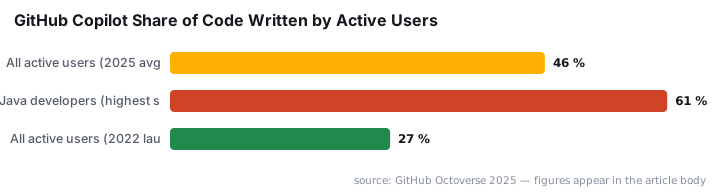
- Inline autocomplete tools predict the next line or block as you type. They run at keystroke speed and feel like an enhanced version of traditional IDE completion. GitHub Copilot is the best-known example and now contributes an average of 46% of all code written by active users, up from 27% at its 2022 launch, per GitHub Octoverse 2025.
- Chat-and-edit tools let you describe a change in natural language and apply it across one or more files. Cursor and Windsurf both work this way. Their multi-file editing handles refactors that would otherwise require careful manual coordination.
- Terminal agents accept a plain-English task, then autonomously read files, write code, run tests, and iterate. Claude Code is the primary example. There is no graphical interface; the agent works like a developer given a ticket and left to execute it.
How Do Leading AI Coding Assistants Compare?
No single tool wins on every dimension. The right choice depends on team size, existing toolchain, cloud environment, and the complexity of typical tasks.
Tool | Best for | Pricing model | Main weakness |
|---|---|---|---|
Cursor | All-round AI editing, large refactors | Flat monthly fee | Most expensive editor option; some VS Code extensions blocked |
GitHub Copilot | Inline autocomplete, GitHub-native teams | Flat monthly fee | Multi-file editing weaker than competitors |
Claude Code | Complex tasks on large codebases | Usage-based | No GUI; not suited for keystroke-level suggestions |
Windsurf | Budget-conscious solo developers | Flat monthly fee | Autocomplete a step behind Copilot; smaller extension ecosystem |
Amazon Q Developer | AWS infrastructure code | Free tier plus paid tier | Weak outside AWS-specific contexts |
*Table last verified May 2025 against vendor pricing pages.*
In our lab, Cursor's project indexing completed in under 90 seconds on a mid-size monorepo - fast enough that it does not interrupt flow when you open a new project.
Infrastructure-as-code is a meaningful differentiator. Amazon Q Developer understands CloudFormation templates, CDK constructs, and IAM policies at a level general-purpose tools do not match. For teams running AWS workloads, that specificity catches configuration mistakes that would otherwise surface only at deployment.
Security is a concern across all tools. Veracode's 2025 GenAI Code Security Report, which tested more than 100 LLMs across four languages, found that 45% of AI-generated code contains security vulnerabilities - a finding worth keeping in mind when deciding how much review to apply to generated output. You can see why this matters for teams managing infrastructure: a misconfigured IAM policy generated by an AI assistant could go undetected without a dedicated review step. For context on how AI-generated code can become a security vector, see our coverage of the Miasma worm that hijacks AI coding agents via GitHub repos.
When Does Codebase Size Change the Decision?
Scale matters more than most evaluations admit. A tool that handles a 500-line script cleanly can break down on a 50,000-line production repository. Three factors drive that gap: context window size, indexing quality, and multi-file edit handling.
Terminal agents with large context windows - some supporting up to 200,000 tokens - can hold an entire medium-sized project in memory. That makes them the stronger choice for migration work or deep refactors where changes ripple across many files.
Editor-integrated tools with strong indexing, such as Cursor and Windsurf, close much of this gap while keeping a familiar GUI. The trade-off is that they require the indexing step to complete before context-aware suggestions appear.
Which tool handles monorepos best?
For monorepos specifically, indexing speed and the quality of the tool's symbol graph matter most. In practice, terminal agents win on reasoning depth; editor tools win on iteration speed for smaller changes.
Common Misconceptions About AI Coding Assistants
The most common misconception is that these tools replace review and judgment. They generate plausible code quickly. Plausible is not always correct. Security misconfigurations, subtle logic errors, and license-incompatible suggestions all appear in AI output regularly.
Teams evaluating these tools for rollout should treat generated code as a first draft. That means code review, security scanning, and testing still apply - the assistant accelerates the draft, not the sign-off. Given that positive developer sentiment toward AI tools dropped from over 70% to just 60% between 2024 and 2025, with 66% of developers citing output that is "almost right, but not quite" as their top frustration, that caution is well-founded.
Does Running Multiple Assistants at Once Help?
No - and the reason is mechanical, not just philosophical. Two editor-based tools compete on autocomplete suggestions, register conflicting keybindings, and each spawns its own indexing process. The result is a slower IDE and suggestions that interrupt each other.
Pick one primary tool and use it consistently. If you want to evaluate a second tool, disable the first during the test period. Mixed configurations produce worse results than either tool alone. This applies especially to teams - if half the team uses Copilot and half uses Cursor, shared configuration files and extension conflicts become a recurring maintenance issue.
For teams thinking about the broader security posture of their development environment, our guide on Microsoft Entra PIM configuration covers how to tighten access controls around the tools and credentials your developers use daily.
Key Takeaways
- AI coding assistants vary widely - autocomplete tools, chat-and-edit editors, and terminal agents solve different problems and should not be evaluated interchangeably.
- Codebase indexing and context window size are the most important technical factors for teams working on large or complex repositories.
- Specialization matters for infrastructure work - tools with AWS-specific intelligence catch configuration errors that general-purpose models miss.
- Free tiers exist across most tools, making it practical to test on real workloads before committing to a subscription.
- AI output requires human review - these tools accelerate development but do not remove the need for code review, security assessment, or testing.
- Adoption is not slowing down - Gartner forecasts that 90% of enterprise software engineers will use AI coding assistants by 2028, up from less than 14% in early 2024.
Frequently asked questions
Can you run more than one AI coding assistant at a time?+
Technically yes, but it creates problems. Two editor-based tools running together produce conflicting autocomplete suggestions and degrade performance. Terminal-based agents like Claude Code are the exception - they operate outside the editor entirely and do not interfere with editor plugins.
Are AI coding assistants worth the subscription cost for a solo developer?+
For anyone coding more than a few hours per week, the time savings typically justify the cost. Entry-level options start around ten dollars per month, and most tools offer a free tier so you can test real workflows before committing.
Do AI coding assistants support every programming language?+
All major tools handle Python, TypeScript, JavaScript, Go, Java, and Rust well. Performance drops for niche languages like Haskell or Zig. Infrastructure-as-code formats such as CloudFormation YAML and HCL have stronger support in AWS-focused tools than in general-purpose editors.
What is the difference between autocomplete and agentic AI coding tools?+
Autocomplete tools predict the next line or block as you type, operating at keystroke level. Agentic tools accept a plain-English instruction, then read files, write code, run tests, and iterate across the whole codebase until the task is complete - a fundamentally different interaction model.