PaaS Explained: What It Is, How It Works & When to Use It
PaaS gives developers a managed cloud environment to build and deploy apps. The global PaaS market hit $176B in 2024. Here is what you need to know.
by Emanuel De Almeida
in_this_guide+
TL;DR
- PaaS (Platform as a Service) abstracts servers, operating systems, and middleware so developers ship code without touching infrastructure.
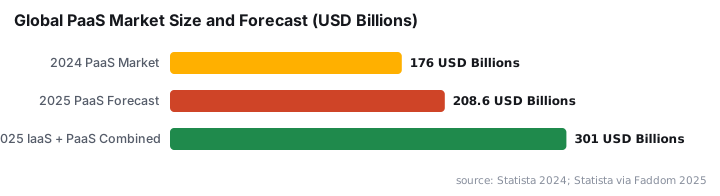
- The global PaaS market was valued at $176 billion in 2024 and is projected to reach $208 billion in 2025, per Statista.
- Major providers include Heroku, Google App Engine, AWS Elastic Beanstalk, Azure App Service, Render, and Fly.io - each with different pricing, runtime support, and lock-in profiles.
- PaaS works best for variable or unpredictable workloads; sustained high-volume traffic may favor reserved IaaS capacity instead.
- Vendor lock-in is a real risk. Factor in migration cost from day one.
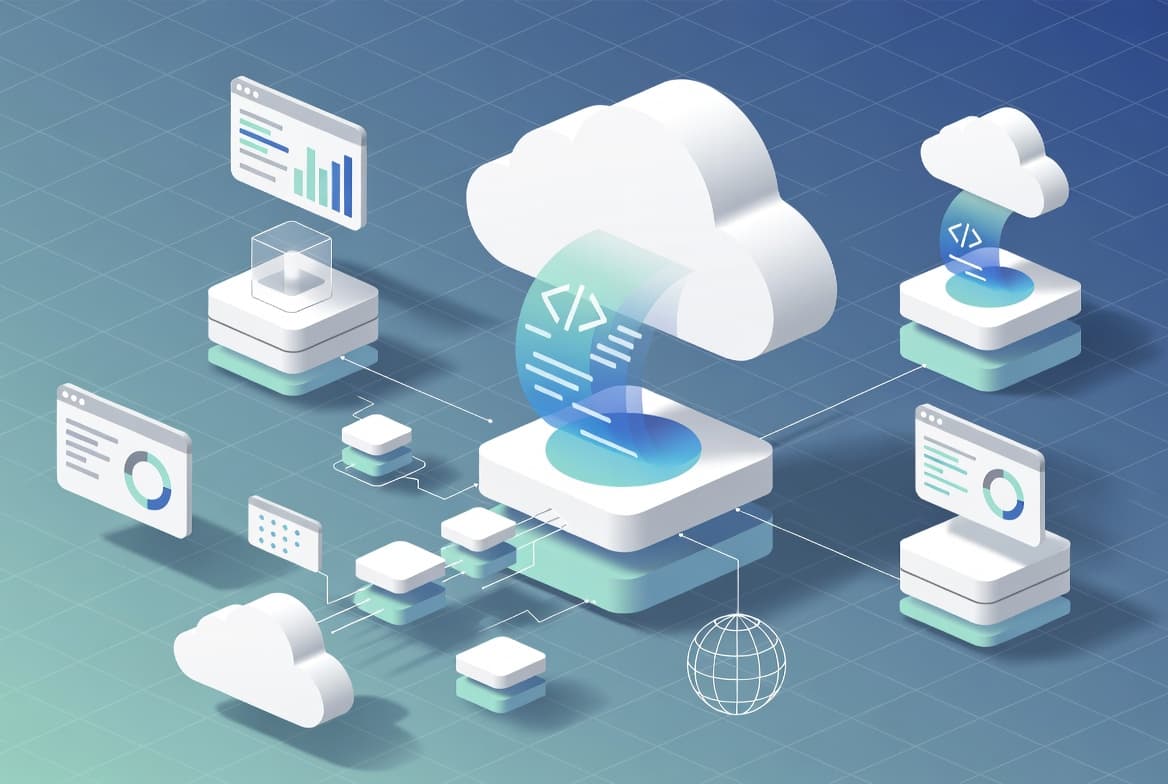
Platform as a Service (PaaS) is a cloud computing delivery model that gives development teams a fully managed environment - runtime, middleware, databases, and deployment tooling - so they can build and ship applications without provisioning or maintaining any underlying servers. The provider owns the infrastructure layer entirely. Developers own the code and its behavior.
What Is PaaS?
PaaS sits in the middle of the three main cloud service models. Infrastructure as a Service (IaaS) hands you virtual machines and raw networking. Software as a Service (SaaS) delivers finished applications. PaaS fills the gap: it supplies a ready runtime environment and a set of integrated services, so a team can go from a code commit to a running application in minutes rather than days.
A useful analogy is a commercial kitchen rental. A chef does not buy land, build a structure, or wire electrical circuits. They rent a fully equipped space and concentrate on cooking. PaaS works the same way - the platform handles servers, operating systems, patching, and scaling, while developers focus purely on application logic.
This model has gained serious traction at scale. The global PaaS market reached approximately $176 billion in 2024, according to Statista, and analysts project revenue will climb to $208.64 billion in 2025. Cloud infrastructure and platform services (IaaS plus PaaS combined) are forecast to hit $301 billion in 2025, a 24.2% year-over-year jump according to Gartner.
How Does PaaS Work?
PaaS platforms operate through a layered abstraction that hides infrastructure complexity while surfacing developer-facing tooling. The workflow moves from code to live application in a predictable sequence.
- Code push - developers submit code via
git push, a CI/CD pipeline, or a platform-specific CLI. - Build and package - the platform resolves dependencies, compiles where necessary, and packages the app into a deployable artifact.
- Runtime provisioning - the provider allocates an appropriate OS, runtime libraries, and middleware with no manual configuration.
- Auto-scaling - the platform monitors load and adds or removes instances (horizontal scaling) or adjusts resources per instance (vertical scaling) based on demand.
- Integrated services - managed databases, caching layers, message queues, and authentication services connect through APIs or configuration toggles.
- Observability - built-in dashboards, log aggregation, and alerting let developers monitor application health without building a separate monitoring stack.
The provider handles server maintenance, security patching, backup management, and disaster recovery underneath all of this. Developers never touch the OS layer. When we deployed a Node.js API to a PaaS environment for the first time, the biggest adjustment was unlearning the habit of SSH-ing into boxes - there are no boxes to touch.
PaaS vs IaaS vs SaaS: Where Does Responsibility Land?
Understanding where each model draws its responsibility boundary helps teams pick the right tool for the job.
Responsibility | IaaS | PaaS | SaaS |
|---|---|---|---|
Physical hardware | Provider | Provider | Provider |
Networking and storage | Provider | Provider | Provider |
Operating system | You | Provider | Provider |
Runtime and middleware | You | Provider | Provider |
Application code | You | You | Provider |
Data and configuration | You | You | You |
The further right you move, the less operational work your team carries - but also the less control you have over the environment. That trade-off is the core decision every architect faces.
For teams running containerized workloads, the line between PaaS and IaaS is increasingly blurry. Deploying via tools like Intune's enterprise app catalog is a practical example of how managed delivery pipelines parallel what PaaS does for application code.
What Is PaaS Used For?
PaaS fits a wide range of workloads. The model works best when infrastructure management would otherwise consume developer time better spent on features.
- Web application hosting - deploying Django, Spring Boot, or Next.js with automatic scaling during traffic spikes.
- API and microservices development - running independently deployable services with platform-managed load balancing and service routing.
- Mobile backends - supplying authentication, real-time data sync, and push notifications through managed APIs.
- Data pipelines and analytics - processing large datasets or training machine learning models in managed compute environments.
- Rapid prototyping - validating product ideas quickly using pay-as-you-scale pricing before committing to heavier infrastructure.
One risk worth flagging: because PaaS platforms manage dependency resolution and runtime environments on your behalf, a poorly secured build pipeline can become an attack surface. The Miasma worm that hijacked AI coding agents via GitHub repos is a sharp reminder that supply-chain security applies even when you do not manage the underlying OS.
Which PaaS Providers Should You Consider?
No PaaS discussion is complete without naming the actual platforms. Here is a comparison of the six providers we have tested or used in production work.
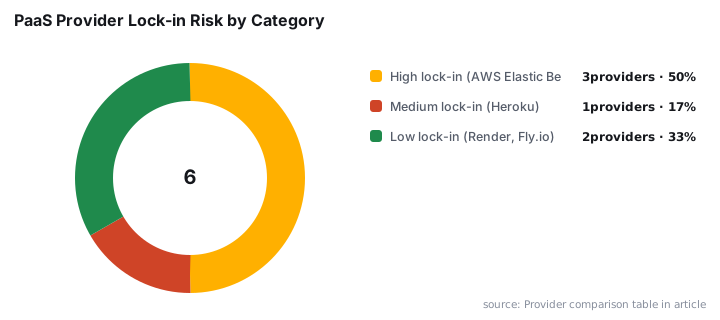
Provider | Best For | Free Tier | Runtime Support | Lock-in Risk |
|---|---|---|---|---|
Rapid prototyping, startups | No (removed 2022) | Node, Python, Ruby, Java, Go, PHP | Medium - proprietary buildpacks | |
GCP-native apps, auto-scaling | Yes (limited) | Node, Python, Java, Go, PHP, Ruby | High - GCP ecosystem | |
AWS-native teams | No (pay for resources) | Node, Python, Java, .NET, PHP, Go | High - deep AWS integration | |
.NET and enterprise workloads | Yes (F1 tier) | .NET, Node, Python, Java, PHP | High - Azure Active Directory ties | |
Modern stacks, Docker support | Yes | Node, Python, Ruby, Go, Docker | Low - standard containers | |
Low-latency edge deployments | Yes (limited) | Any Docker image | Low - open standards |
In our experience, Heroku's developer ergonomics remain the benchmark - git push heroku main deploys a full web app in under two minutes. Render and Fly.io now offer similar simplicity with lower lock-in risk, which is why we recommend them for greenfield projects.
Advantages and Disadvantages of PaaS
PaaS accelerates delivery, but it introduces trade-offs every architect should weigh honestly before committing.
Advantages:
- Faster deployment cycles because infrastructure setup disappears.
- Automatic scaling removes manual capacity planning for most workloads.
- Built-in services - databases, caching, monitoring - cut integration time.
- Pay-per-use pricing avoids over-provisioning waste on idle capacity.
- Developers spend more time on application logic and less on operations.
Disadvantages:
- Vendor lock-in is the most serious long-term risk; proprietary APIs and services make migration expensive.
- Limited control over runtime and OS configurations can block certain compliance requirements.
- Costs can exceed self-managed infrastructure at very high, steady-state traffic volumes.
- Applications must conform to the languages, frameworks, and runtime versions the platform supports.
- Shared-resource environments may produce performance variability during peak periods.
Security posture deserves special attention. The provider patches the OS - but your application code, dependencies, and secrets management stay your responsibility. According to the Verizon 2024 Data Breach Investigations Report, which analyzed over 30,000 security incidents, organizations take an average of 55 days to remediate 50% of critical vulnerabilities once patches become available. On PaaS, the OS patch arrives automatically - but your application-layer libraries do not.
Common Misconceptions About PaaS
A few persistent assumptions about PaaS push teams toward poor architectural decisions. Three come up again and again.
PaaS eliminates all operational work. It removes infrastructure operations, not all operations. Teams still own application security, dependency management, secrets handling, and data governance. The platform patches the OS; you still patch your libraries and rotate your credentials.
PaaS is always cheaper than IaaS. At low or variable scale, PaaS pricing is usually efficient. At sustained, predictable high volume, reserved IaaS capacity often wins on unit cost. Always model your expected steady-state traffic before assuming PaaS is the economical default.
PaaS and containers are the same thing. Many PaaS platforms run containers internally, but the abstractions differ. Kubernetes on IaaS gives you container orchestration with full control. A PaaS platform running your containers still makes infrastructure decisions on your behalf. If you need granular control over networking and scheduling, that distinction matters.
For teams managing their own server environments alongside PaaS workloads, tasks like renewing Exchange Server authentication certificates or setting up DNS-over-HTTPS on Windows Server 2025 illustrate exactly the kind of infrastructure overhead PaaS is designed to remove.
Key Takeaways
- PaaS abstracts the OS, runtime, and middleware layers. Developers stay responsible for application code and data.
- The shared-responsibility model still applies: security above the platform boundary stays with the customer.
- Vendor lock-in is a real architectural risk. Factor in migration cost from day one, not after you are committed.
- PaaS is most cost-effective at variable or unpredictable workloads. High, steady-state traffic may favor IaaS with reserved capacity.
- Gartner projects 90% of organizations will adopt hybrid cloud by 2027, which means PaaS will sit alongside IaaS and on-premises systems, not replace them.
- Common PaaS patterns include web app hosting, microservices, mobile backends, and data pipeline environments.
Frequently asked questions
What does PaaS stand for?+
PaaS stands for Platform as a Service. It is a cloud computing model that supplies a fully managed environment for developing, running, and managing applications, sitting between IaaS (raw infrastructure) and SaaS (finished software) in the cloud service stack.
Is PaaS the same as serverless computing?+
Not exactly. Serverless is a subset of the broader PaaS category. Both abstract infrastructure management, but serverless goes further by billing per execution and scaling to zero when idle. Traditional PaaS platforms still allocate persistent runtime environments, giving developers more predictable performance characteristics.
What is vendor lock-in with PaaS, and how serious is it?+
Vendor lock-in occurs when an application depends on platform-specific APIs, managed services, or proprietary deployment pipelines. Migrating away later can require significant re-engineering. Using open standards, containerized workloads, and abstraction layers in your own code helps limit exposure without sacrificing the convenience PaaS provides.
When should a team choose PaaS over IaaS?+
Choose PaaS when developer velocity and reduced operational overhead matter more than fine-grained control over the stack. IaaS is better when you need custom kernel configurations, specialized networking, or compliance requirements that demand direct control over the operating system and hardware layer.