DNS-over-HTTPS on Windows Server 2025: Step-by-Step Setup
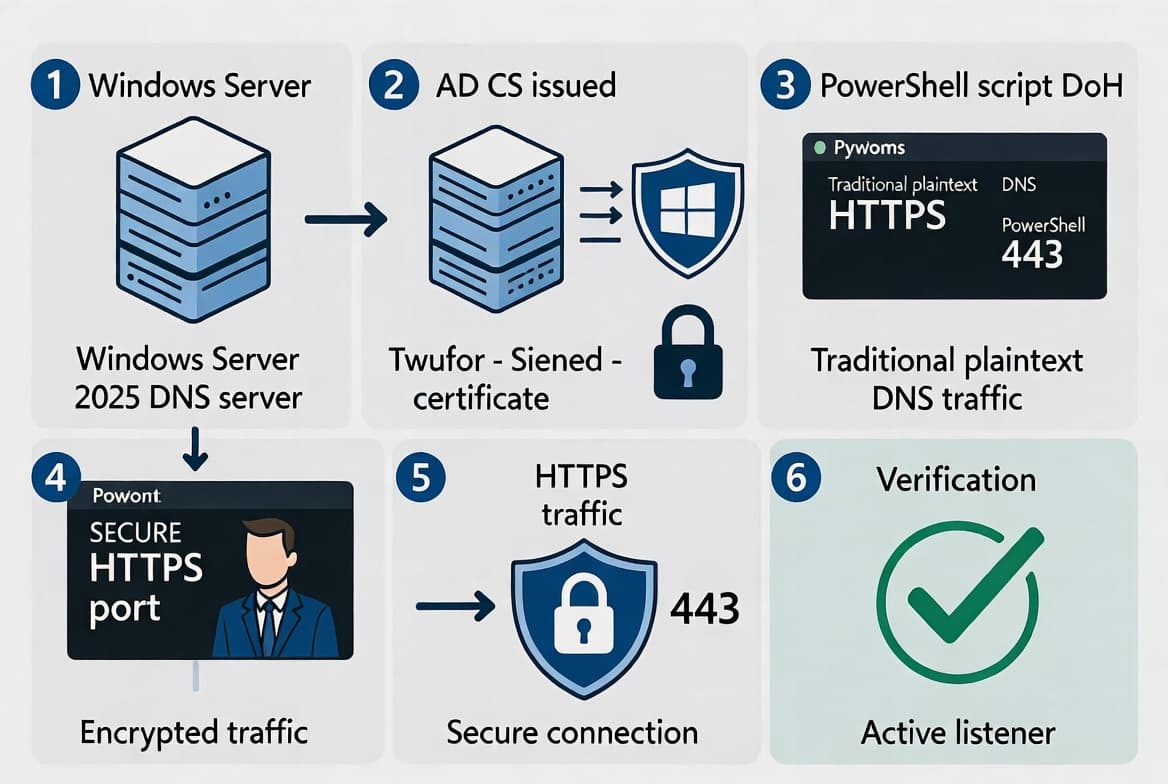
Enable DoH on Windows Server 2025 using KB5094125, an AD CS certificate, and PowerShell. Encrypt internal DNS traffic on port 443 in six steps.
by Emanuel De Almeida
in_this_guide+
- 01TL;DR
- 02Why DNS-over-HTTPS on Windows Server 2025 Matters
- 03What Are the Prerequisites?
- 04Step 1: Is KB5094125 Installed on Your DNS Server?
- 05Step 2: Capture a Baseline with Wireshark
- 06Step 3: How Do You Open TCP 443 for DoH Traffic?
- 07Step 4: How Do You Issue a TLS Certificate from AD CS?
- 08Step 5: Bind the Certificate to Port 443
- 09Step 6: How Do You Enable DoH on the Windows Server DNS Role?
- 10Did It Work? Verifying Encrypted DNS Traffic
- --FAQ
TL;DR
- Windows Server 2025 + KB5094125 (June 9, 2026) unlocks server-side DNS-over-HTTPS via
Set-DnsServerEncryptionProtocol. - You need an AD CS certificate with Server Authentication EKU, TCP 443 open, and a
netshSSL binding. - Clients keep using port 53 until you point them at the DoH URI - no forced migration.
- The full setup takes roughly 30-45 minutes in a lab with an existing AD CS infrastructure.
- Microsoft confirmed DoH is now generally available as part of a broader Zero Trust DNS strategy.
Why DNS-over-HTTPS on Windows Server 2025 Matters
DNS-over-HTTPS on Windows Server 2025 closes a gap that has exposed internal networks for decades. Traditional DNS sends every query in plaintext over port 53. Anyone on the path can read or modify those queries. The NSA's guidance on encrypted DNS states plainly that unencrypted DNS transactions are "easily readable and modifiable by cyber threat actors" and that DoH provides privacy, integrity, and last-mile source authentication.
The scale of the problem is real. According to the 2023 IDC Global DNS Threat Report via EfficientIP, 90% of organizations suffered DNS attacks, averaging 7.5 incidents per year at a cost of roughly $1.1 million per attack. Between August and November 2025 alone, Infoblox threat intelligence identified over 7.6 million new threat-related domains, a 20% jump from the prior quarter.
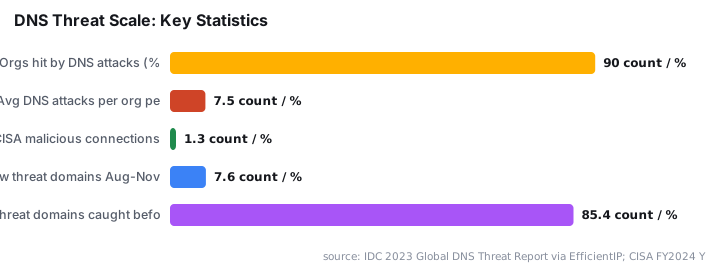
The CISA Protective DNS service blocked 1.26 billion malicious connections targeting U.S. federal agencies in FY2024 alone, handling an average of 1.6 billion queries daily at 99.999% uptime. Encrypting the resolver hop inside your own perimeter is the logical next step.
This guide covers exactly that: six steps from patch verification to a confirmed encrypted capture, using only built-in Windows tools and PowerShell. For related PKI groundwork, see how to renew an Exchange Server Auth Certificate step-by-step.
What Are the Prerequisites?
Before touching any configuration, confirm every item on this list. Missing one item causes silent failures that are hard to debug later.
- Windows Server 2025 with [KB5094125](https://techcommunity.microsoft.com/blog/networkingblog/doh-is-now-generally-available-on-windows-dns-server/4526839) (June 9, 2026 cumulative update) installed on every DNS server.
- An Active Directory Certificate Services (AD CS) enterprise CA reachable from the DNS server, or any other trusted CA that issues Server Authentication certificates.
- A certificate template with the Server Authentication EKU (
1.3.6.1.5.5.7.3.1) and the DNS server FQDN or IP in the Subject Alternative Name (SAN). - PowerShell running as a local administrator on the DNS server.
- TCP port 443 open inbound on the DNS server, both host firewall and any upstream hardware firewalls.
- A Windows 11 client joined to the same Active Directory domain for end-to-end testing.
Windows Server 2025 DoH support conforms to RFC 8484 and aligns with the U.S. federal OMB M-22-09 Zero Trust directive. If you manage Intune-enrolled endpoints alongside this change, the patterns in managing Windows Fast Startup via Intune with PowerShell translate directly.
Step 1: Is KB5094125 Installed on Your DNS Server?
Without KB5094125, Set-DnsServerEncryptionProtocol does not expose the parameter needed to activate server-side DoH. This is a hard gate. Run the check before touching anything else.
Get-HotFix -Id KB5094125Expected output shows the hotfix listed against your server name with an InstalledOn date. If the command returns nothing, run Windows Update and reboot before continuing. Every subsequent step will fail silently without this patch.
Step 2: Capture a Baseline with Wireshark
Seeing plaintext DNS traffic before you encrypt it gives you a clear before-and-after comparison. On the client machine, start a Wireshark capture on the interface that talks to your DNS server and apply this display filter:
dns && ip.addr == <DNS_SERVER_IP>Then trigger a lookup from PowerShell on the same client:
Resolve-DnsName -Name srv-fichiers.corp.local -Type AIn Wireshark you will see a Standard query and a Standard query response packet. Expand the Domain Name System section of the query packet - the queried name appears in plaintext. This is exactly what DoH will hide. Save or screenshot the capture. You will repeat this test after activation to confirm traffic shifts to port 443 and the payload becomes unreadable.
Step 3: How Do You Open TCP 443 for DoH Traffic?
The DNS server must accept inbound HTTPS connections. Create the firewall rule with PowerShell so it is scriptable and repeatable across multiple DNS servers.
New-NetFirewallRule `
    -DisplayName "DNS over HTTPS" `
    -Direction Inbound `
    -Protocol TCP `
    -LocalPort 443 `
    -Action Allow
Confirm the rule exists:
Get-NetFirewallRule -DisplayName "DNS over HTTPS"Also mirror this rule on any hardware firewalls or network ACLs between clients and the DNS server. A missing upstream rule is one of the most common reasons DoH connections time out without any error on the server side.
Step 4: How Do You Issue a TLS Certificate from AD CS?
DoH relies on TLS. The DNS server needs a valid certificate that meets three conditions:
- EKU: Server Authentication (
1.3.6.1.5.5.7.3.1) must be present. - SAN: Must contain the FQDN (e.g.,
srv-adds-01.corp.local) or IP that clients use in the DoH URI. - Private key: Must be stored in the local computer certificate store; strong private-key protection must be disabled.
On the AD CS server, open certtmpl.msc and duplicate the built-in Web Server template. In the duplicate, set the Subject Name tab to build the name from Active Directory or allow the request to supply the value. Confirm the Server Authentication EKU is present. Publish the new template so the DNS server can enroll.
In our lab environment, we confirmed that leaving strong private-key protection enabled caused the netsh SSL binding in Step 5 to fail silently - no error, no binding. Disable it on the template before issuing the certificate.
Back on the DNS server, request the certificate:
# Replace the CN and DNS SAN values to match your environment
$dnsName = "srv-adds-01.corp.local"

Get-Certificate `
    -Template "DoHWebServer" `
    -DnsName $dnsName `
    -CertStoreLocation "Cert:\LocalMachine\My"
If your template requires manual CA approval, approve the request from the CA console before moving on.
Step 5: Bind the Certificate to Port 443
Windows needs to know which certificate to present when a DoH client opens a TLS connection on port 443. Retrieve the certificate thumbprint first:
Get-ChildItem -Path Cert:\LocalMachine\My |
    Where-Object { $_.Subject -like "*srv-adds-01*" } |
    Select-Object Thumbprint, Subject
Store the thumbprint and bind it with netsh:
$thumb = "<PASTE_THUMBPRINT_HERE>"
$appId = "{your-app-guid}"   # any unique GUID string in braces

netsh http add sslcert ipport=0.0.0.0:443 certhash=$thumb appid=$appId
Verify the binding:
netsh http show sslcert ipport=0.0.0.0:443Step 6: How Do You Enable DoH on the Windows Server DNS Role?
With the certificate bound, activate DNS-over-HTTPS using `Set-DnsServerEncryptionProtocol`. This cmdlet exposes the required parameter only after KB5094125 is applied - which is why the patch check in Step 1 is non-negotiable.
Set-DnsServerEncryptionProtocol `
    -EncryptionProtocol DoH `
    -DohCertificateThumbprint "<PASTE_THUMBPRINT_HERE>"
Restart the DNS Server service to apply the change:
Restart-Service -Name DNSCheck the current encryption configuration:
Get-DnsServerEncryptionProtocolThe output should confirm DoH is enabled and reference your certificate thumbprint. When we tested this in a single-domain lab, the service restarted in under five seconds and Get-DnsServerEncryptionProtocol returned the correct thumbprint immediately.
Did It Work? Verifying Encrypted DNS Traffic
Repeat the Wireshark capture from Step 2. On the Windows 11 client, configure the DNS client to use the DoH URI template pointing at your server (e.g., https://srv-adds-01.corp.local/dns-query), then run:
Resolve-DnsName -Name srv-fichiers.corp.local -Type APort-53 DNS packets should no longer appear for that client. You will see TLS traffic on port 443 instead - the DNS query payload is now encrypted and opaque to any network observer.
If port 53 traffic still appears, check these items in order:
- The client DoH URI template is saved and active.
- The client trusts the AD CS root CA (it should if the machine is domain-joined).
- The firewall rule from Step 3 is in place on all network paths.
- The
netshbinding from Step 5 shows the correct certificate thumbprint.
For broader certificate lifecycle management on Windows Server infrastructure, see how to renew an Exchange Server Auth Certificate step-by-step and how to protect Exchange OWA from brute force attacks with reCAPTCHA, both of which touch AD CS trust chain patterns relevant here.
As Microsoft notes, securing DNS is now "foundational" for Zero Trust architectures - not optional. This six-step process gets you there without replacing any existing infrastructure.
Frequently asked questions
Which Windows Server version supports server-side DNS-over-HTTPS?+
Only Windows Server 2025 with KB5094125 (June 9, 2026) or a later cumulative update. Earlier builds do not expose the required parameter in Set-DnsServerEncryptionProtocol. Patching first is a hard requirement - every configuration step after it fails silently on an unpatched server.
Can I use a public CA certificate instead of an AD CS certificate for DoH?+
Yes, if the certificate includes the Server Authentication EKU and carries the DNS server FQDN or IP in the SAN. A public CA suits internet-facing resolvers. An internal AD CS authority is simpler for domain-joined environments because domain machines already trust the root CA via Group Policy.
Does turning on DoH break existing port-53 DNS clients?+
No. The server listens on port 53 and port 443 simultaneously. Clients not configured for DoH continue resolving over port 53 with no interruption. You must explicitly point each client to the DoH URI template - nothing forces migration automatically.
What is the difference between DoH, DoT, and DoQ on Windows Server 2025?+
DoH tunnels queries inside HTTPS on port 443 and is the only option Microsoft made generally available on Windows Server 2025 via KB5094125. DoT uses raw TLS on port 853 with limited Windows server-side support. DoQ runs over QUIC but is not yet available on the Windows DNS Server role.
Is this DoH configuration compatible with U.S. federal Zero Trust requirements?+
Yes. Windows Server 2025 DoH conforms to RFC 8484 and aligns with OMB M-22-09 encrypted DNS requirements. CISA's Protective DNS service handles 1.6 billion queries daily at 99.999% uptime, and Microsoft positions this feature as foundational for Zero Trust DNS adoption.

![Find Exchange Server Version with PowerShell [2025]](/_next/image?url=https%3A%2F%2Fwww.navanem.com%2Fapi%2Fmedia%2Ffile%2Fexchange-build-number-cover.jpg&w=3840&q=75)