Cloud Computing Explained: Definition, Models & How It Works
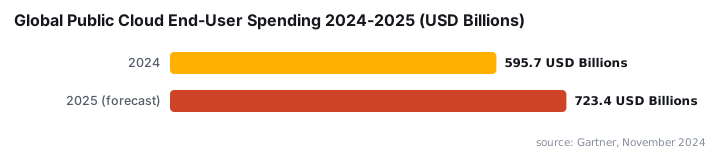
Cloud computing delivers IT services over the internet on demand. Global public cloud spending hit $723.4B in 2025, up 21.5% year-over-year, per Gartner.
by Emanuel De Almeida
in_this_guide+
- 01TL;DR
- 02What Is Cloud Computing?
- 03How Does Cloud Computing Work?
- 04What Are the Main Cloud Service Models?
- 05What Are the Key Advantages and Disadvantages?
- 06Cloud Computing vs. Traditional On-Premises Infrastructure
- 07Common Misconceptions About Cloud Computing
- 08Frequently Asked Questions About Cloud Computing
- --FAQ
TL;DR
- Cloud computing delivers servers, storage, databases, and software over the internet on a pay-as-you-use basis, replacing capital hardware spend with operational expenditure.
- NIST SP 800-145 defines cloud via five characteristics: on-demand self-service, broad network access, resource pooling, rapid elasticity, and measured service.
- IaaS, PaaS, and SaaS differ by how much of the stack the provider manages - security is always a shared responsibility, and misconfigurations remain the customer's problem.
Cloud computing is the on-demand delivery of computing services - servers, storage, databases, networking, and software - over the internet, billed on a pay-as-you-use model. Organizations stop owning physical infrastructure and instead consume it as a utility, much like electricity from a power grid. Scale up or down instantly; pay only for what runs.
According to Gartner, worldwide end-user spending on public cloud services reached $723.4 billion in 2025, up 21.5% from $595.7 billion in 2024. That growth rate signals a structural shift in how organizations procure and operate IT infrastructure, not a temporary trend.
What Is Cloud Computing?
Cloud computing abstracts physical hardware into software-defined services that any authorized user can reach through an API or web console. Rather than procuring servers weeks in advance, a sysadmin provisions a virtual machine in minutes. The model works because providers pool massive hardware resources across thousands of tenants, spreading fixed costs that no single organization could justify alone.
NIST SP 800-145 formally defines cloud computing through five essential characteristics, three service models, and four deployment models. If a hosted service lacks those five traits, it is outsourcing - not cloud. That distinction matters when evaluating vendor claims and compliance scope.
The five NIST characteristics are:
- On-demand self-service - Users provision resources without human interaction from the provider.
- Broad network access - Services reach any device over standard network protocols.
- Resource pooling - Provider resources serve multiple tenants dynamically, with no fixed physical assignment.
- Rapid elasticity - Capacity scales up or down automatically, appearing unlimited to the user.
- Measured service - Usage is metered and billed transparently, like a utility.
How Does Cloud Computing Work?
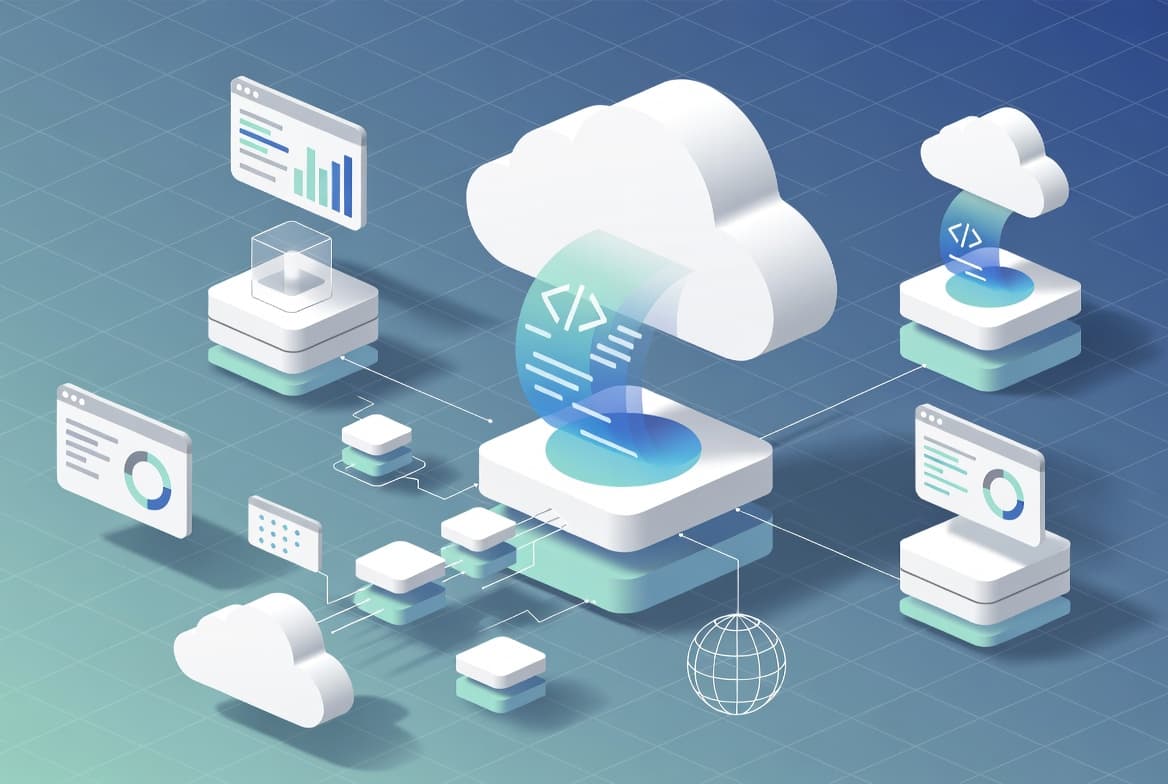
Cloud platforms build in layers, each hiding the complexity of the layer below it. Understanding that stack helps sysadmins reason about where their responsibilities start and stop. Every layer adds abstraction, and that abstraction makes the utility model possible.
- Physical layer - Provider-operated data centers house thousands of servers, storage arrays, and networking gear, distributed globally for low latency.
- Virtualization layer - Hypervisor software partitions physical hardware into isolated virtual machines or containers, letting multiple tenants share the same host securely.
- Orchestration layer - Platforms such as Kubernetes automate workload scheduling, auto-scaling, health checks, and rolling deployments across the virtual fleet.
- Service API layer - REST APIs and SDKs expose infrastructure as programmable resources; a single HTTP call can provision a database or a load balancer.
- Management console layer - Web interfaces let operators interact with resources visually, without writing code.
High-speed internet connections and content delivery networks sit across all layers, keeping latency low from any location. When we reviewed cloud migration projects across mid-sized organizations, teams consistently underestimated the orchestration layer - getting VMs running is straightforward, but automating scaling and failover across availability zones takes deliberate design.
What Are the Main Cloud Service Models?
Three delivery models define how much of the stack the provider manages versus the customer. Choosing the wrong model causes wasted spend and operational friction - and that choice is often made too early, before workload requirements are fully understood.
Model | Provider Manages | Customer Manages | Typical Example |
|---|---|---|---|
IaaS (Infrastructure as a Service) | Physical hardware, virtualization, networking | OS, middleware, runtime, apps, data | Virtual machines, block storage |
PaaS (Platform as a Service) | Everything in IaaS plus OS and runtime | Application code and data | Managed Kubernetes, serverless functions |
SaaS (Software as a Service) | The entire stack | Configuration, user access, data input | Cloud ERP, collaboration suites |
Serverless computing - where functions execute in response to events with no server provisioning at all - sits at the far end of the PaaS spectrum. It has become a standard pattern for event-driven workloads where paying per invocation is more economical than reserving capacity.
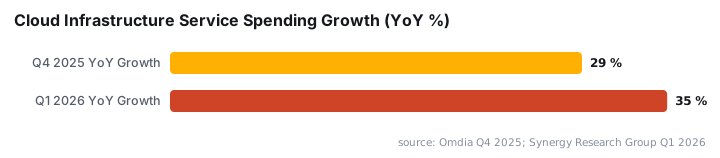
Cloud infrastructure investment reflects this adoption. Synergy Research Group via Statista reported that global cloud infrastructure service spending hit $129 billion in Q1 2026, a 35% year-over-year increase, and is on track to exceed $500 billion for the full year.
What Are the Key Advantages and Disadvantages?
Cloud computing removes upfront capital expenditure on hardware, but it introduces new operational concerns that sysadmins must plan for. Both sides of the equation deserve attention during any architecture review.
Advantages:
- Cost alignment - Pay-as-you-use pricing ties spending directly to actual consumption rather than peak-capacity guesses.
- Elasticity - Traffic spikes and seasonal demand get handled by adjusting resource allocation at the console, not by rack-and-stack work.
- Reliability - Leading providers publish uptime SLAs at or above 99.9%, supported by geographic redundancy and automatic failover.
- Managed services access - AI inference, analytics pipelines, and managed databases become available without specialized hardware investment.
- Reduced maintenance burden - The provider handles hardware refresh, firmware updates, and data center facilities.
Disadvantages:
- Internet dependency - Any connectivity outage breaks access to cloud-hosted workloads; on-premises fallback paths need explicit design.
- Vendor lock-in - Proprietary managed services create migration friction if you later want to move providers or repatriate workloads.
- Reduced infrastructure control - Compliance frameworks requiring specific hardware configurations or physical media destruction may not map cleanly to shared infrastructure.
- Security responsibility shift - The provider secures the underlying platform; misconfigured buckets, overprivileged IAM roles, and unencrypted data remain the customer's problem.
Cloud-conscious intrusions grew 26% in 2024 and then accelerated to 37% growth in 2025, according to StationX citing CrowdStrike data. That trajectory underscores why treating cloud security as "someone else's job" is a miscalculation. For practical examples of identity misconfigurations causing real breaches, see how broken Entra access controls exposed FIFA World Cup streams and how a Klue OAuth breach exposed Salesforce data via token theft.
Cloud Computing vs. Traditional On-Premises Infrastructure
The clearest practical difference is time-to-resource. Procuring a physical server historically took days to weeks. A cloud VM takes seconds. That gap changes how teams architect for growth, handle failures, and staff operations.
On-premises suits workloads with predictable, constant load where full hardware control is a compliance requirement. Cloud suits variable workloads, development environments, disaster recovery targets, and any scenario where elasticity or geographic distribution matters.
Many organizations run both simultaneously - a pattern called hybrid cloud. CIO Dive, citing Gartner, reports that 90% of organizations will adopt a hybrid cloud approach through 2027, and that 95% of new digital workloads will deploy on cloud-native platforms by 2026, up from just 30% in 2021. Hybrid architecture is not a transitional state; for most enterprises it has become the permanent operating model.
Managing identities across hybrid environments requires careful configuration. Step-by-step guides such as Azure AD Password Writeback setup and deploying trusted root certificates with Intune cover the authentication and certificate trust pieces that hybrid deployments depend on.
Common Misconceptions About Cloud Computing
Several myths persist even among experienced IT teams and can lead to poor architectural decisions. Knowing them ahead of a migration saves expensive rework.
- "Cloud is always cheaper" - It is cheaper when utilization is variable. A steady-state workload running 24/7 at full capacity can cost more in cloud than on owned hardware over a multi-year horizon.
- "The provider handles all security" - Providers secure the infrastructure. You still own identity management, encryption key custody, network segmentation, and application-layer controls. Attackers who compromise cloud credentials - as seen in the FortiBleed leak that exposed 73,932 VPN credentials - exploit exactly that gap.
- "Cloud means public cloud" - Private cloud (dedicated infrastructure operated by a provider or internally) and hybrid cloud are equally valid deployment models under the NIST definition.
- "Migrating to cloud is a one-time project" - Cloud operations require ongoing architectural review, cost governance, and skills development. It is an operating model, not a migration destination.
For teams managing cloud-connected endpoints, disabling Remember MFA on trusted devices in Microsoft Entra ID is a low-effort control that reduces credential exposure risk in shared or semi-trusted environments.
Frequently asked questions
What is the simplest definition of cloud computing?+
Cloud computing means renting computing resources - servers, storage, databases, networking, and software - from a third-party provider over the internet and paying only for what you actually use, rather than buying and maintaining physical hardware yourself.
What are the five NIST characteristics of cloud computing?+
The National Institute of Standards and Technology defines cloud computing by five characteristics: on-demand self-service, broad network access, resource pooling, rapid elasticity, and measured service. A hosted service that lacks these traits is not true cloud computing.
What is the difference between IaaS, PaaS, and SaaS?+
IaaS gives you raw virtual infrastructure you manage yourself. PaaS adds a managed runtime so you focus on application code only. SaaS delivers fully managed software through a browser. Each model shifts progressively more operational responsibility to the provider.
Is cloud computing secure enough for enterprise workloads?+
Major providers invest heavily in physical and logical security and publish detailed compliance certifications. The main risk is misconfiguration on the customer side, not the provider's data center. Security is a shared responsibility, and your team still owns identity, access, and data classification.