DICOM Explained: What It Is, How It Works, and Why IT Teams Care
DICOM defines both the file format and 5 network service classes powering every PACS and imaging modality. Only 0.14% of exposed servers use TLS.
by Emanuel De Almeida
in_this_guide+
- 01TL;DR
- 02What is DICOM?
- 03How Does DICOM Work?
- 04What Are the Core Components of a DICOM Environment?
- 05What is DICOM Used For?
- 06Does DICOM Security Actually Work in Practice?
- 07How Does DICOM Compare to Proprietary Imaging Formats?
- 08What Are the Main Limitations of DICOM?
- 09What Did DICOM Adoption Get Right?
- --FAQ
TL;DR
- DICOM is both a file format and a network protocol suite - it covers a medical image's full journey from scanner to display.
- Every DICOM object bundles pixel data with standardized metadata, keeping patient context permanently attached.
- Core service classes (
C-STORE,C-FIND,C-GET,C-MOVE,C-PRINT) run over TCP/IP between modalities, archives, and workstations. - Security features exist in the standard but are almost universally unused - Trend Micro found only 0.14% of exposed DICOM servers use TLS.
- Storage size, vendor implementation variation, and misconfigured access controls are the primary operational challenges.
What is DICOM?
DICOM - Digital Imaging and Communications in Medicine - is the international standard that defines how medical images are formatted, stored, transmitted, and displayed. The National Electrical Manufacturers Association (NEMA) developed it, and ISO recognizes it. Think of it as the HTTP of medical imaging: any compliant device can read an image produced by any other compliant device, regardless of manufacturer.
What separates DICOM from a simple file format is scope. The standard covers the binary structure of image data and the metadata envelope that travels with every image - patient demographics, study date, acquisition parameters, and equipment identifiers. That envelope is what makes automated workflows, cross-facility sharing, and AI-assisted diagnosis possible. According to NEMA's official DICOM standard page, the specification spans multiple parts covering everything from information object definitions to security profiles.
How Does DICOM Work?
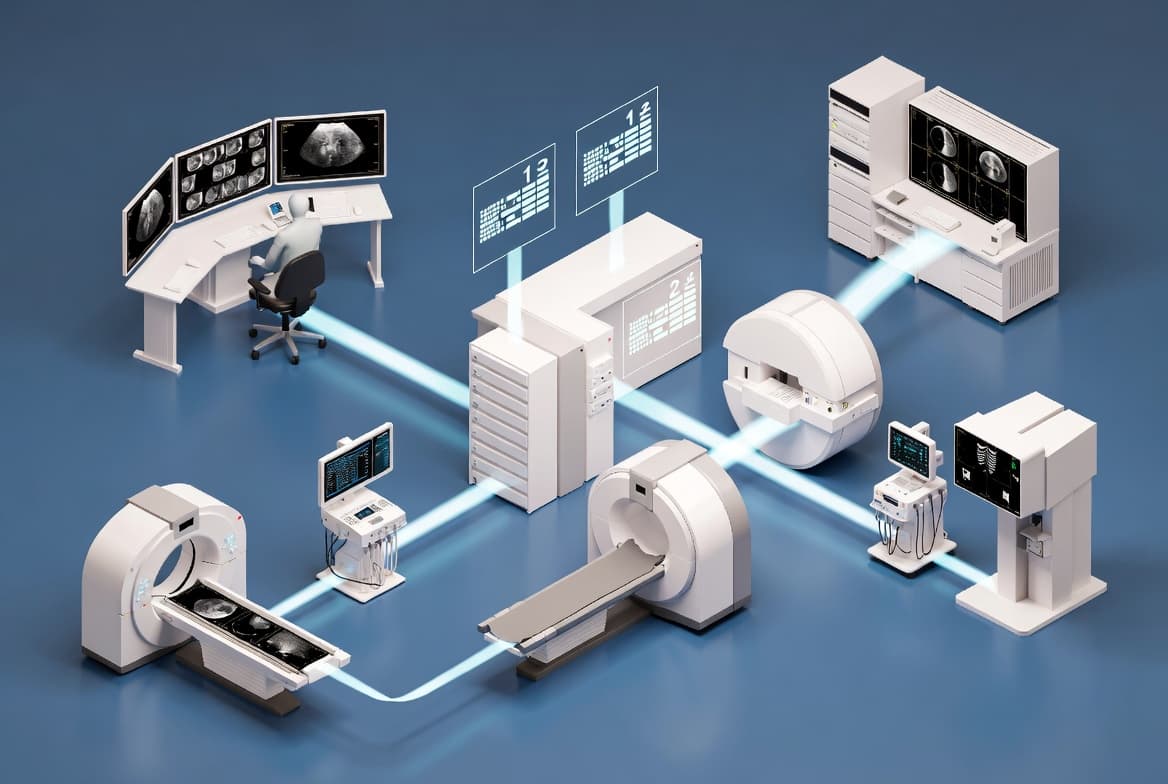
DICOM uses a client-server, object-oriented architecture. The scanner encapsulates each image in a DICOM object - a self-contained unit that binds pixel data to structured metadata. The standard organizes metadata into data elements, each identified by a unique numeric tag, so any compliant system can parse the same fields reliably without guesswork or vendor-specific drivers.
Five named service classes handle the most common operations:
C-STORE- sends a DICOM object from one system to another (for example, a scanner pushing to a PACS)C-FIND- queries a remote system for matching studies or seriesC-GET- retrieves image objects directly to the requesting systemC-MOVE- instructs a remote system to send objects to a third destinationC-PRINT- sends images to a DICOM-capable printer or hard-copy device
All five services run over standard TCP/IP with a DICOM-specific application layer on top. That layered design means DICOM traffic travels across ordinary hospital networks without specialist transport infrastructure.
The end-to-end flow looks like this:
- An imaging modality (CT, MRI, ultrasound) acquires the study and wraps it in one or more DICOM objects.
- The modality uses
C-STOREto push the objects to a PACS over the network. - The PACS indexes the metadata and stores pixel data in an optimized archive.
- A reading workstation issues a
C-FINDquery, retrieves matching objects, and renders them with calibrated display and measurement tools.
What Are the Core Components of a DICOM Environment?
A functioning DICOM environment involves several distinct components, each with a defined role. Healthcare IT teams are responsible for configuring and maintaining all of them - not just the archive.
- Modalities - the imaging devices themselves (CT, MRI, X-ray, ultrasound, PET). Each generates DICOM objects at acquisition time.
- PACS (Picture Archiving and Communication System) - the central archive. Stores millions of DICOM objects and serves them to workstations on demand.
- DICOM worklist - a scheduling service that pushes patient and order data to modalities before a scan begins, cutting manual data entry and transcription errors.
- Viewing workstations - software clients that retrieve and render DICOM objects with windowing, measurement, and annotation tools.
- DICOM router or gateway - middleware that translates between DICOM versions, bridges network segments, or converts legacy proprietary formats to DICOM.
When we have worked through PACS deployments, the DICOM worklist connection is consistently the first integration point to break after a hospital information system upgrade. Patient identifiers shift, and the modality receives blank or mismatched worklist entries - often going unnoticed until a radiologist flags a study filed under the wrong MRN. That single failure point illustrates why end-to-end conformance testing matters before any HIS change goes live.
What is DICOM Used For?
The standard supports a wider range of use cases than many IT professionals expect when they first encounter it.
- Long-term archiving - standardized objects remain readable regardless of vendor changes, supporting patient care over decades.
- Radiology workflow automation - worklist integration means scanners receive patient context automatically, images route to the correct radiologist, and prior studies surface for comparison without manual steps.
- Telemedicine and remote reading - a rural facility captures an X-ray and transmits it via DICOM protocols to a specialist at a distant center, with all metadata and image quality preserved end to end.
- Medical AI and machine learning - AI pipelines consume DICOM objects directly. The embedded metadata provides structured context - acquisition parameters, patient age, modality type - that training and validation pipelines depend on.
- Multi-vendor integration - a hospital running scanners from three different manufacturers can feed all output into a single PACS and view everything on one workstation type.
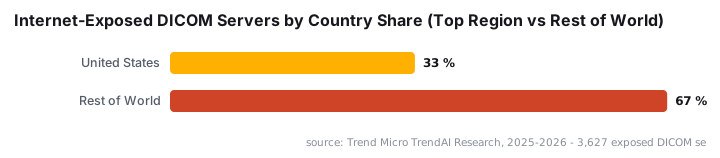
The security exposure that accompanies this wide deployment is significant. Trend Micro research identified 3,627 DICOM servers across more than 100 countries directly reachable from the public internet as of late 2025, with 33% (1,189 servers) located in the United States. That exposure has grown by approximately 246-286% since 2017.
Healthcare breach costs make that exposure costly. IBM's Cost of a Data Breach Report 2024 found healthcare recorded the highest average breach cost of any industry for the 14th consecutive year - $9.77 million per incident, more than double the global cross-industry average of $4.88 million.
Does DICOM Security Actually Work in Practice?
DICOM includes provisions for encryption and access control. The problem is that almost no one enables them on internet-facing systems. That gap between specification and deployment is where real risk lives.
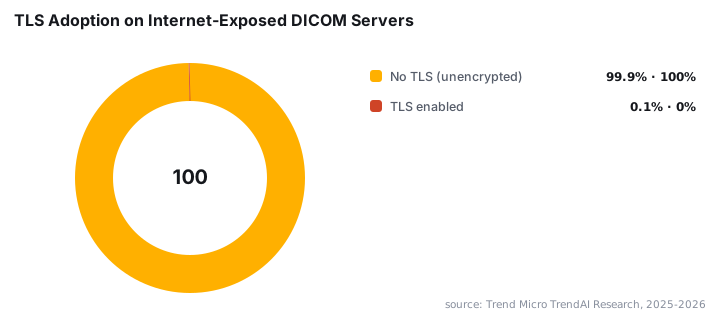
Trend Micro found that only 0.14% of exposed DICOM servers use TLS encryption and 99.56% accept connections without AE Title validation - the protocol's built-in access control mechanism. Default deployments ship open, and teams rarely lock them down after go-live.
The attack surface is actively probed. Censinet and Forescout Vedere Labs reported that between May 2023 and May 2024, honeypots simulating medical environments recorded 1.6 million simulated attacks - roughly one every 20 seconds - with 23,000 interactions specifically targeting DICOM protocols.
Vulnerabilities appear in the software stack too. CISA advisory ICSMA-25-345-01 warned in December 2025 that a crafted malicious DICOM file could crash applications using the Grassroots DICOM (GDCM) library (CVE-2025-11266), causing a denial-of-service condition. A separate February 2025 advisory covered an improper certificate validation flaw (CVE-2025-1001) in RadiAnt DICOM Viewer that could enable man-in-the-middle attacks on imaging systems.
For teams managing Windows-based DICOM workstations, hardening the local attack surface matters too. Disabling unnecessary remote management channels is a practical starting point - see our guide on disabling WinRM Basic Authentication via Intune for a step-by-step approach that applies directly to imaging workstation fleets.
How Does DICOM Compare to Proprietary Imaging Formats?
Proprietary formats can offer tighter integration within a single vendor's ecosystem. The trade-off is lock-in and interoperability risk that most healthcare organizations cannot accept long-term.
Attribute | DICOM | Proprietary Format |
|---|---|---|
Interoperability | Any compliant system | Vendor-specific reader required |
Metadata standard | Defined by international standard | Varies by vendor |
Long-term readability | High - standard is stable | Depends on vendor support |
AI / analytics access | Direct, no conversion needed | Often requires an export step |
Regulatory acceptance | Widely mandated in healthcare | May not satisfy compliance requirements |
For teams responsible for network-level security across heterogeneous imaging environments, the same discipline that applies to general IT infrastructure applies here. Supply chain integrity matters as much in healthcare IT as anywhere else - the Klue OAuth supply chain attack that hit LastPass Salesforce data is a useful reference point for how third-party integrations introduce risk, a pattern that mirrors DICOM gateway and router deployments.
What Are the Main Limitations of DICOM?
DICOM solves many problems but creates real operational challenges that IT teams should plan for before deployment, not after.
- Complexity of correct implementation - the standard is extensive. Incomplete or non-conformant implementations cause subtle interoperability failures that are difficult to diagnose without conformance statement review.
- Storage and bandwidth demands - high-resolution and multi-dimensional studies produce very large objects. A busy radiology department generates substantial storage growth every year, and network infrastructure must handle peak transfer loads.
- Implementation variation - the standard permits optional features and vendor extensions. Two fully DICOM-compliant systems can still behave differently in edge cases.
- Security configuration gap - DICOM includes encryption and access control, but teams must configure those features deliberately. Default deployments leave them disabled.
HIPAA Journal data puts the stakes plainly: between 2009 and 2025, more than one billion Americans (1,013,066,481) have had protected health information exposed via large healthcare breaches, with an average of 792,226 individuals affected every day in 2024 alone.
For teams managing endpoint policy on imaging workstations, Intune-based controls offer a repeatable path to baseline hardening. Our Intune unattended remote help guide covers how to access Windows devices without user interaction - directly useful for maintaining DICOM workstations during off-hours without disrupting clinical workflows.
What Did DICOM Adoption Get Right?
Despite its operational complexity, the standard solved a problem that was genuinely intractable before it existed. Pre-DICOM, imaging data was locked inside proprietary silos. Moving a patient between facilities meant physically transporting films or re-scanning entirely.
The DICOM standard published by NEMA now underpins every modern PACS, teleradiology platform, and AI-assisted diagnostic tool. That shared foundation is what makes cross-facility reads, AI model training on large datasets, and long-term archiving across vendor generations possible. The standard's stability - maintained backward compatibility over decades - is its most underappreciated engineering achievement.
IT teams taking on DICOM environments for the first time should read NEMA's conformance statement guidance. Every vendor publishes a DICOM Conformance Statement that details exactly which service classes and optional features their product supports. Reviewing two conformance statements side by side before integration saves significantly more time than debugging a failed C-STORE association in production.
Frequently asked questions
What does DICOM stand for?+
DICOM stands for Digital Imaging and Communications in Medicine. It is an international standard developed by the National Electrical Manufacturers Association (NEMA) and recognized by ISO, covering both the file format for medical images and the network protocols used to transmit them between systems.
Is DICOM a file format or a protocol?+
DICOM is both. It defines the file format that wraps image data together with patient and study metadata, and it defines application-layer network protocols for operations like storing, querying, and retrieving images between compliant systems over a standard TCP/IP network.
What is a PACS and how does it relate to DICOM?+
A Picture Archiving and Communication System (PACS) is the storage and retrieval platform used by radiology departments. DICOM is the language PACS speaks - every image ingested, stored, and served by a PACS is a DICOM object, making the two technologies deeply interdependent in clinical environments.
Why are DICOM files so large?+
DICOM objects embed full-resolution pixel data alongside rich metadata. High-resolution modalities such as CT and MRI can produce multi-dimensional image series, sometimes hundreds of slices per study. That combination of lossless quality and embedded context drives file sizes that can strain storage and network capacity significantly.