Storage Area Network (SAN) Explained: How It Works
A SAN is a dedicated high-speed network giving servers block-level storage access separate from LAN traffic, enabling sub-millisecond latency for Oracle, VMware, and HPC workloads at scale.
by Emanuel De Almeida
TL;DR
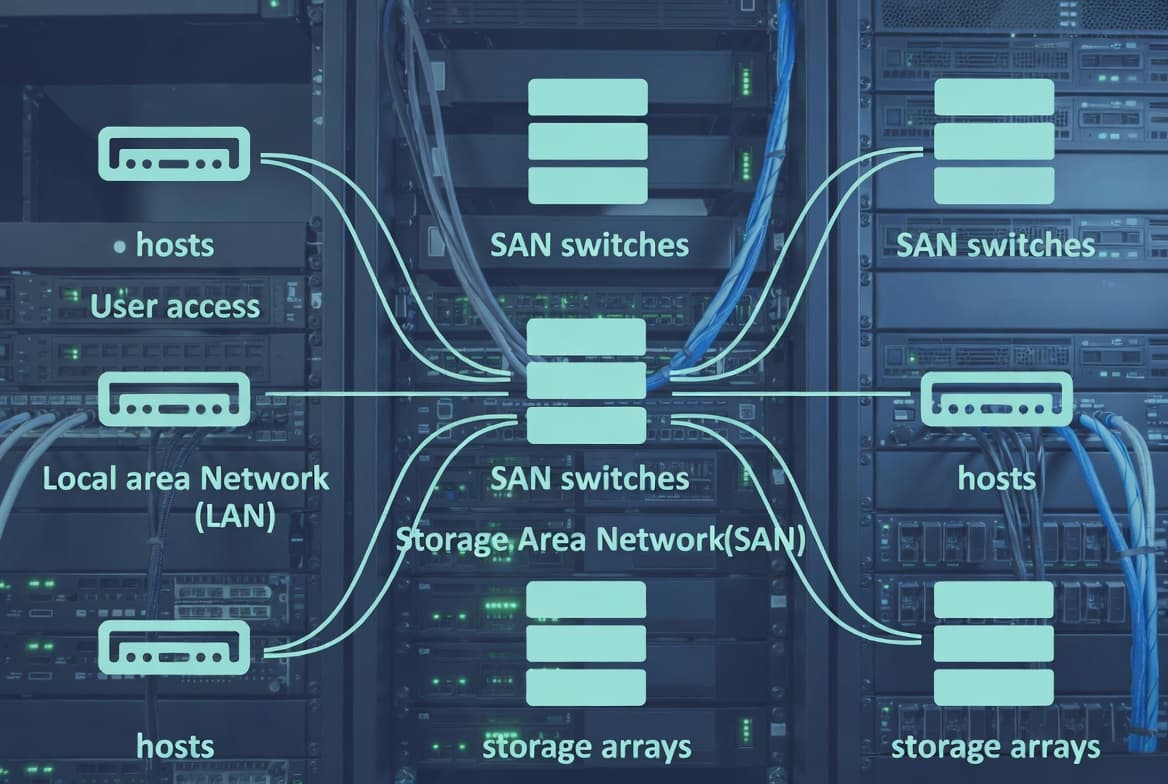
- A Storage Area Network isolates storage traffic from LAN traffic, presenting shared disks as if they were locally attached to each server.
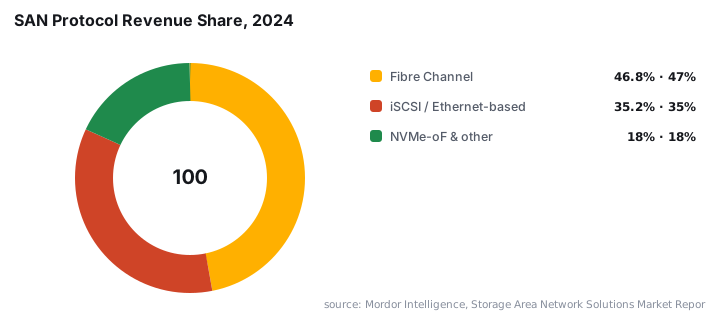
- Fibre Channel held 46.83% of SAN market revenue in 2024 and remains the dominant protocol for latency-sensitive production workloads.
- iSCSI runs over standard Ethernet, cutting hardware costs significantly while staying viable for most enterprise workloads on 10 GbE or faster links.
- NVMe-oF is the fastest-growing SAN protocol, with early deployments cutting latency by 50% versus legacy SCSI queues.
- The global SAN market was valued at $21.92 billion in 2024 and is projected to reach $34.33 billion by 2033.
A Storage Area Network is a dedicated, high-speed network built exclusively to carry storage traffic between servers and shared storage devices. It presents storage as raw block-level volumes that each server's operating system sees as locally attached drives, even though the physical hardware may sit elsewhere in the data center. The SAN market reflects that value: Grand View Research valued it at $21.92 billion in 2024, projecting growth to $34.33 billion by 2033 at a 5.2% CAGR.
What is a Storage Area Network?
A SAN isolates storage communication from general-purpose LAN traffic. Rather than having each server manage its own directly attached disks, a SAN consolidates storage onto shared arrays that multiple servers can reach simultaneously. The architecture works like a dedicated highway bypass, keeping heavy storage I/O off the roads that carry everyday network activity, as described in the full SAN definition and guide on Anavem.
The distinction from file-level protocols matters practically. Protocols like NFS or SMB hand a client a ready-made file system. A SAN hands a server raw blocks. The server's own OS formats and manages them just as it would a local disk, giving it full control over I/O patterns. That control is why tier-1 transactional workloads consistently favor block storage over file-based alternatives.
Large enterprises account for approximately 65% of global SAN demand in 2025, driven by finance, healthcare, and telecommunications sectors that require scalable, high-performance storage, according to Coherent Market Insights.
How does a SAN work?
A SAN connects initiators (servers) to targets (storage arrays) through a switching fabric. Several components cooperate to make this happen reliably at speed.
- SAN fabric: the switching infrastructure, built with Fibre Channel switches or Ethernet switches for iSCSI, providing multiple redundant paths between servers and storage.
- Host Bus Adapters (HBAs): specialized cards installed in servers that handle low-level protocol processing and expose storage volumes to the operating system.
- Storage controllers: intelligent devices managing physical disk arrays, executing RAID operations, caching reads and writes, and presenting Logical Unit Numbers (LUNs) to the network.
- LUN masking and zoning: access-control layers that determine which servers can reach which storage volumes, enforcing both security and logical organization.
When a server issues a read or write request, the request leaves the HBA and traverses the fabric. It reaches the appropriate storage controller, then data returns along the same path. The entire exchange happens at the block level, meaning latency stays predictable and throughput scales with fabric capacity rather than general network congestion.
Modern SAN platforms also support thin provisioning, which allocates storage capacity on demand rather than pre-reserving it. Many platforms add storage virtualization, pooling physical arrays into flexible logical resources that administrators can resize without downtime.
What are the main types of SAN protocol?
Three protocols cover the vast majority of enterprise SAN deployments, each with distinct performance and cost trade-offs.
Fibre Channel (FC) uses dedicated FC switches and HBAs to deliver very low latency and deterministic performance. It has traditionally been the choice for tier-1 transactional workloads where I/O consistency defines application success. The trade-off is cost: FC hardware is proprietary and requires specialist skills. FC retained 46.83% of SAN market revenue in 2024, making it the dominant protocol by revenue share, per Mordor Intelligence. FC Gen 7 delivers up to 64 Gbps per port, keeping it ahead of Ethernet alternatives for the most demanding workloads.
iSCSI encapsulates SCSI storage commands inside standard TCP/IP packets, allowing SANs to run over existing Ethernet infrastructure. This reduces hardware costs significantly and lets teams use familiar networking tools. Latency is higher than FC but acceptable for many enterprise workloads, particularly on 10 GbE or faster networks where round-trip times typically fall in the 150-300 µs range for well-tuned deployments.
NVMe over Fabrics (NVMe-oF) is the fastest-growing segment, expanding at a 6.31% CAGR. Early deployments show 50% latency cuts and 2× throughput for analytics workloads previously bottlenecked by SCSI queue limits, according to Mordor Intelligence. It is gaining traction in AI/ML and real-time analytics pipelines.
Fibre Channel over Ethernet (FCoE) converges FC traffic onto high-speed Ethernet links, reducing cabling while retaining FC semantics. It appears less frequently than pure FC or iSCSI but suits environments trying to simplify physical infrastructure without abandoning FC investments.
The SNIA Storage Networking Industry Association publishes protocol interoperability standards and technical primers that are worth consulting before selecting a SAN architecture.
SAN vs NAS vs DAS: which storage model fits your workload?
Choosing a storage architecture depends on access patterns, budget, and scalability requirements. The table below summarizes the key differences.
Feature | SAN | NAS | DAS |
|---|---|---|---|
Access method | Block-level | File-level | Block-level |
Network | Dedicated storage fabric | Standard IP network | Direct cable |
Sharing | Multiple servers | Multiple clients | Single server |
Performance | Very high | Moderate to high | High |
Scalability | Excellent | Good | Limited |
Cost | High | Moderate | Low |
Complexity | High | Moderate | Low |
Best for | Databases, VMs, HPC | File shares, home directories | Single-server workloads |
DAS (Direct-Attached Storage) is fast but cannot be shared. Adding a second server means duplicating hardware entirely. NAS suits collaborative file access but adds file-system overhead that high-IOPS databases feel under load. SAN excels where many servers need concurrent, high-speed block access to the same pool of storage.
When we work through storage architecture reviews with enterprise clients, the question that most quickly narrows the choice is simple: how many servers need simultaneous write access to the same volume? If the answer is more than one, SAN or a distributed block solution is the practical path forward.
The block storage market as a whole grew from $20.16 billion in 2024 to $23.82 billion in 2025, with projections reaching $77.26 billion by 2032 at an 18.28% CAGR, per Research and Markets. That growth reflects how central block-level I/O has become across virtualization, AI, and cloud-native infrastructure.
When should you deploy a SAN?
SANs are best justified when workloads demand performance and availability that simpler storage models cannot sustain.
- Enterprise databases: Oracle, SQL Server, and PostgreSQL under heavy transaction loads need consistent IOPS and low latency. SAN shared storage also enables database clustering and fast failover between nodes.
- Virtualization platforms: VMware vSphere and Microsoft Hyper-V depend on shared block storage to enable live VM migration between hosts without downtime. For Intune-managed environments, see configuring OneDrive Files On-Demand via Intune as a complementary file-tier strategy alongside block storage.
- High-performance computing (HPC): scientific simulations and financial modeling require parallel access by many compute nodes to large datasets simultaneously.
- Media production: video editing and 3D rendering pipelines generate large files that multiple team members must access concurrently without copying data locally.
- Backup and disaster recovery: centralized SAN snapshots create point-in-time copies efficiently, and SAN replication can mirror data to a remote site. Proper storage segmentation also reduces breach containment time: IBM's 2025 Cost of a Data Breach Report found breaches spanning multiple environments cost $5.05 million on average and took 276 days to resolve, underscoring why storage isolation matters for security posture.
For environments running MSP services for Swiss SMBs, understanding when SAN complexity is genuinely justified versus when NAS suffices is one of the most common storage architecture decisions IT teams face.
What are the main disadvantages of SAN?
SAN technology carries real trade-offs that any infrastructure team must weigh honestly.
Cost is the most significant barrier. Fibre Channel hardware, software licenses, and the specialist skills to operate them represent substantial capital and operational expenditure. Even iSCSI SANs require careful network design to avoid performance degradation under load.
Cost extends beyond hardware purchase price. Power, cooling, rack space, and annual maintenance contracts all compound. Total cost of ownership calculations frequently surprise teams that price only the initial array.
Complexity follows directly from the architecture. Zoning, LUN masking, multipathing, and firmware management all demand expertise. Misconfiguration can cause data unavailability or, in the worst cases, data exposure between tenants on the same fabric. That risk is not theoretical: storage misconfigurations appear repeatedly in breach post-mortems.
Vendor lock-in is a persistent concern. Proprietary management tools and hardware mean switching vendors involves significant migration effort. Evaluating interoperability standards before committing to a platform is a step teams should never skip.
Key SAN takeaways
- A SAN presents shared storage as block-level volumes, giving each server the performance profile of locally attached disks while enabling centralized management.
- Fibre Channel delivers the lowest latency at up to 64 Gbps per port. iSCSI runs over standard Ethernet at lower cost. Choose based on performance requirements and existing infrastructure investment.
- LUN masking and zoning are not optional extras. They are the primary access-control mechanisms protecting multi-tenant SAN environments from cross-host data exposure.
- SAN is the right fit for databases, virtualization, and HPC. NAS or object storage is often more practical for general file sharing or smaller deployments.
- Total cost of ownership includes hardware, software, power, cooling, and staff expertise, all of which are higher for SAN than for NAS or DAS.
Frequently asked questions
What is the difference between a SAN and a NAS?+
A SAN delivers block-level storage over a dedicated network, so the server's own file system manages data organization. A NAS delivers file-level storage over a standard IP network, handling file system duties itself. SANs suit high-IOPS workloads; NAS suits shared file access across many clients.
Do I need special hardware to connect to a SAN?+
For Fibre Channel SANs, servers require a Host Bus Adapter (HBA), a specialized card that handles FC protocol communication. iSCSI SANs can use standard Ethernet NICs, though dedicated NICs or software initiators are common. Both approaches also require compatible SAN switches.
What is LUN masking and why does it matter?+
A LUN (Logical Unit Number) is the addressable storage unit a SAN presents to a server. LUN masking is an access-control mechanism that restricts which servers can see which LUNs, preventing one host from accidentally or maliciously reading another host's storage volumes.
Is a SAN suitable for small businesses?+
Traditionally, SAN infrastructure carried significant upfront cost and operational complexity, making it most practical for mid-size to large enterprises. iSCSI-based SANs have lowered the entry point by running over standard Ethernet, but NAS or cloud storage often remains more cost-effective for smaller environments.