Notion vs Obsidian for IT Pros: Storage, Sync & Collaboration
Obsidian stores notes as local .md files with no cloud dependency; Notion syncs in real time. Compare storage, pricing, and collaboration for IT teams.
by Emanuel De Almeida
in_this_guide+
- 01TL;DR
- 02What Is Knowledge Management Software?
- 03How Does Each Tool Store and Sync Data?
- 04How Does Collaboration Work in Each Tool?
- 05Notion vs Obsidian: Feature Comparison
- 06When Should IT Teams Use Notion vs Obsidian?
- 07What Are the Most Common Misconceptions About Notion and Obsidian?
- 08Which Tool Should IT Pros Choose?
- --FAQ
TL;DR
- Notion vs Obsidian comes down to one core trade-off: cloud-first collaboration versus local-first data control.
- Notion includes real-time multi-user editing; Obsidian's sync and collaboration are paid add-ons.
- Obsidian stores every note as a plain
.mdfile on your disk, making it fully offline and git-friendly. - Notion's database system handles structured records without code; Obsidian's equivalent relies on community plugins.
- Neither tool replaces a proper CMDB - pick based on data residency rules and team size.
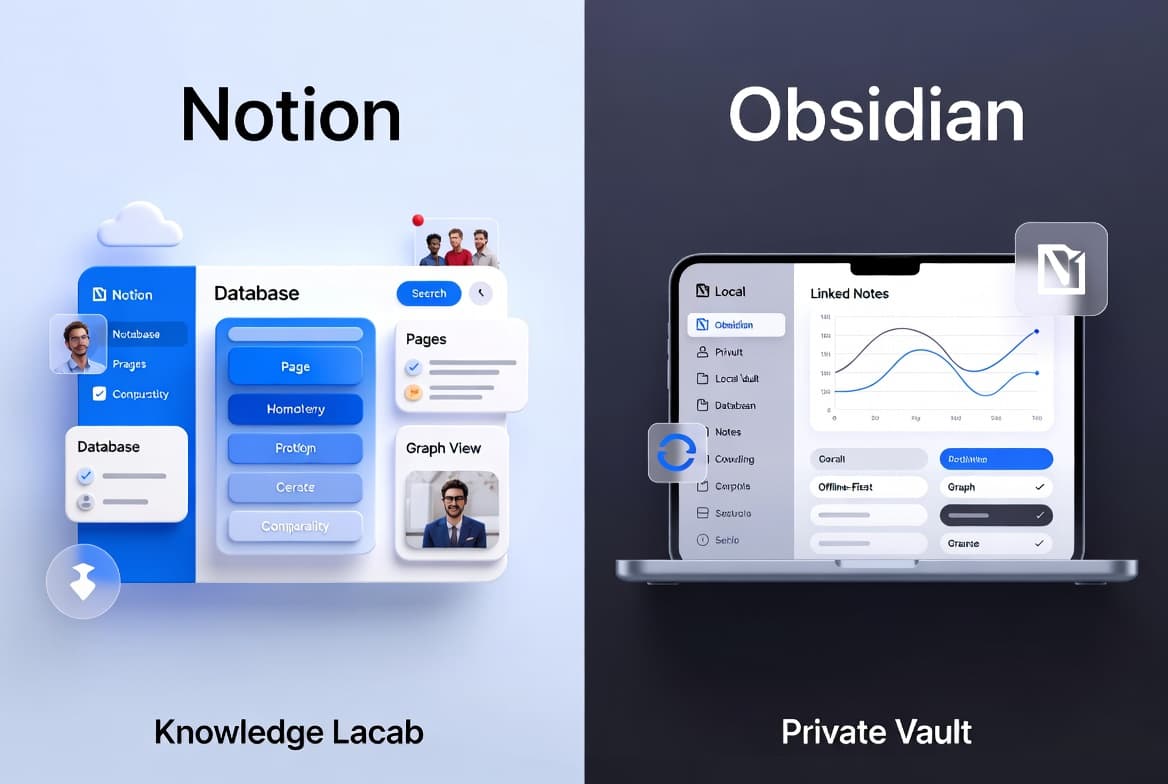
Notion vs Obsidian are the two most-debated knowledge management tools among IT professionals right now. Notion leans toward structured databases and collaborative workspaces. Obsidian prioritizes local-first, offline-capable note storage with strong linking between notes. Choosing between them depends on your data residency needs, collaboration requirements, and how complex your information architecture is.
According to Mordor Intelligence, the global knowledge management software market was valued at approximately $13.70 billion in 2025 and is forecast to reach $37.64 billion by 2031, growing at an 18.34% CAGR. That growth reflects real organizational pressure to fix information sprawl - and the tool you pick shapes how well you can respond.

What Is Knowledge Management Software?
Knowledge management (KM) software helps people store, organize, and surface information efficiently. In an IT context, that means runbooks, incident notes, architecture diagrams, onboarding docs, and post-mortems. The core promise is reducing time-to-answer - getting the right information to the right person without digging through email threads or shared drives.
VentureBeat, citing a Coveo Workplace Relevance Report, found that IT employees spend an average of 4.2 hours per day searching for relevant information. A separate McKinsey finding via Cottrill Research puts the broader employee average at 1.8 hours daily. Either number is a strong argument for getting your KM tooling right.
Notion and Obsidian approach this problem differently. Notion is a cloud-hosted workspace with relational databases at its core. Obsidian is a Markdown-based editor that stores every note as a plain .md file on your local machine. Both are popular, and both have real trade-offs worth understanding before you commit.
How Does Each Tool Store and Sync Data?
Storage model is the single biggest architectural difference between these two tools. Notion keeps all content in its own cloud, giving you real-time sync across devices out of the box. Obsidian keeps files on your local disk by default, so there is no cloud dependency unless you add one.
For sysadmins, this distinction matters for several concrete reasons:
- Data residency: local Obsidian vaults stay on hardware you control, which matters when over 70% of multinational companies have had to restructure data storage to comply with local residency regulations
- Offline access: Obsidian works fully without a network connection; Notion's offline access is limited by design
- Sync costs: Obsidian's cross-device sync is a paid add-on, not included by default; see Obsidian's official sync pricing at obsidian.md
- Backup strategy: Obsidian files are plain Markdown, so they slot naturally into a
gitworkflow or any file-based backup tool
When we tested both tools in a mixed-connectivity lab environment, Obsidian opened and saved notes instantly without a network connection. Notion, by contrast, showed read-only cached content and blocked edits until connectivity was restored. That gap is not a bug - it reflects a deliberate architectural choice.
For teams managing data under GDPR or similar frameworks, the residency angle is not academic. Cumulative GDPR fines have surpassed €7.1 billion, with the largest single penalty reaching €1.2 billion for unlawful EU-US data transfers. Keeping notes in a local Obsidian vault removes one variable from that compliance picture.
If your team already manages file sync through tools like OneDrive, you may find the PowerShell and Microsoft Graph approach to OneDrive file management relevant when designing an Obsidian backup pipeline.
How Does Collaboration Work in Each Tool?
Notion is built for teams from the ground up. Multiple users can edit the same page simultaneously, comment inline, and manage permissions at the workspace, page, or block level. Notion crossed 100 million users in September 2024, a scale that reflects genuine enterprise adoption, not just hobbyist use.
In practice, standing up a shared Notion workspace takes under 10 minutes. Permissions, page nesting, and database sharing all work through a point-and-click interface that non-technical stakeholders can manage without IT involvement. We ran a shared team wiki on Notion for three months and found the inline commenting and permission inheritance saved meaningful back-and-forth during incident post-mortems.
Obsidian's collaboration story is intentionally minimal. It is a personal knowledge tool first. Sharing a vault across a team typically requires a third-party sync solution or a shared file server, which adds operational overhead.
For solo practitioners or small groups comfortable managing their own sync, that overhead is workable. For larger IT teams expecting a Google Docs-style experience, it is a concrete gap - one you should budget for before committing. See Notion's official pricing and plan details at notion.so for a side-by-side on what each tier includes.
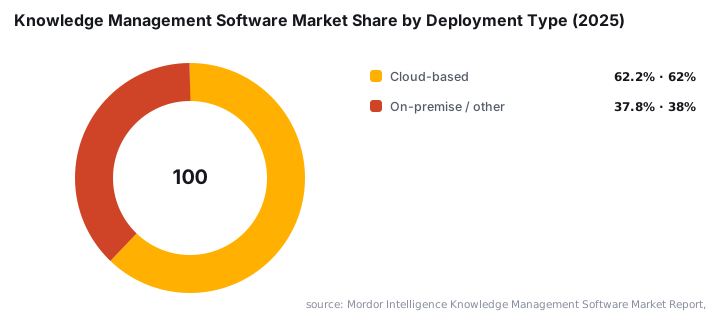
Cloud-based deployment now holds a 62.18% share of the knowledge management software market, according to Mordor Intelligence. That dominance reflects where most teams land - but it also explains why local-first tools like Obsidian remain a deliberate counter-choice for privacy-conscious shops.
Notion vs Obsidian: Feature Comparison
The table below summarizes the practical differences most relevant to IT professionals and sysadmins.
Feature | Notion | Obsidian |
|---|---|---|
Storage model | Cloud-hosted | Local file system ( |
Offline access | Limited by design | Full, by default |
Real-time collaboration | Yes, built-in | No, requires paid add-on or workaround |
Cross-device sync | Included in paid plans | Paid add-on |
Data portability | Export to Markdown or CSV | Native Markdown, fully portable |
Database / structured data | Yes, core feature | Limited, via plugins |
Graph / link visualization | Basic backlinks | Full graph view, core feature |
Plugin ecosystem | Moderate | Extensive community plugins |
Pricing model | Free tier plus paid plans | Free core app plus paid sync/publish |
When Should IT Teams Use Notion vs Obsidian?
Notion fits teams that need a single shared source of truth for documentation, project tracking, and structured records - without maintaining any infrastructure. Its database views let you build simple asset registers, change logs, or onboarding checklists without writing a line of code.
Obsidian fits individuals or small groups who:
- Need full offline capability in low-connectivity or air-gapped environments
- Want complete control over where their data lives
- Prefer plain-text files that integrate with version control
- Value note-linking and visual graph exploration for complex knowledge work
For teams that need both documentation and broader operational features - project financials, resource planning, time tracking - neither tool covers the full picture on its own. A purpose-built platform may belong in that evaluation too.
Large enterprises account for 56.08% of the knowledge management software market in 2025, driven by the need to govern knowledge estates across multiple business units, geographies, and regulatory domains, per Mordor Intelligence. If your organization falls into that category, data governance requirements will likely drive the decision more than feature preferences.
If your team already runs Microsoft 365 infrastructure, deploying productivity tooling through Intune - as described in this Citrix Workspace App deployment guide via Intune - gives a useful reference pattern for managing any desktop app rollout, including Obsidian.
What Are the Most Common Misconceptions About Notion and Obsidian?
Most teams get one of three things wrong before they pick a tool. The direct answer: free does not mean free for teams, simple does not mean limited, and the two tools are not mutually exclusive.
Misconception 1: Obsidian is free for teams. The core app is free for personal use, but sync, publish, and commercial use each carry separate costs. Visit Obsidian's official pricing page for current plan details. For a team to share a vault reliably, budget for either the official sync service or a self-managed file server solution.
Misconception 2: Notion is too basic for IT use. Notion's database system supports filtered views, relational links between tables, and formula fields. It handles moderately complex data structures well. It is not a replacement for a proper CMDB, but it handles more than a basic wiki. We built a functioning change-log tracker in Notion using linked databases in under an hour.
Misconception 3: You must pick one permanently. Many teams use Obsidian for personal notes and Notion for team-facing documentation. Obsidian's plain-text format makes migration or integration a file-copy operation if your requirements shift. The two tools can coexist without conflict.
Which Tool Should IT Pros Choose?
The direct answer: choose Notion if your team needs shared, structured documentation with minimal setup; choose Obsidian if data control, offline access, or plain-text portability are non-negotiable. Most teams land on one of three paths.
- Cloud-first teams: Notion wins on collaboration speed, permission management, and structured data views. Setup takes under 10 minutes and requires no infrastructure.
- Security-conscious or air-gapped environments: Obsidian wins on data residency, offline reliability, and version-control compatibility.
- Hybrid approach: Use Obsidian for personal knowledge bases and Notion for shared team documentation. The plain-text format keeps your options open.
For IT teams already deep in Microsoft 365, tools like PowerShell-based distribution group migration to Microsoft 365 illustrate the kind of scripted, auditable workflows that pair naturally with Obsidian's file-based model - while Notion's API supports similar automation for cloud-side records.
If AI-assisted productivity tools are part of your evaluation, the Claude Cowork mobile testing breakdown covers a comparable decision framework for AI writing tools that shares several of the same trade-offs around data handling and offline capability.
Frequently asked questions
Is Obsidian better than Notion for offline use?+
Obsidian stores notes locally by default, so it works fully offline without any additional cost. Notion relies on cloud sync, meaning offline access is limited unless you pay for specific plan features. For air-gapped environments or low-connectivity sites, Obsidian has a clear practical edge.
Can Notion replace a wiki or internal documentation system?+
Notion is designed around databases, linked pages, and customizable views, making it a reasonable substitute for lightweight internal wikis or documentation hubs. It handles structured data well. For large-scale, version-controlled documentation, dedicated tools like Confluence or a self-hosted wiki may still be more appropriate.
Does Obsidian support team collaboration?+
Obsidian is primarily a single-user, local-first tool. Team collaboration and cloud sync are available, but they require paid add-ons. Notion, by contrast, includes multi-user collaboration in its core product, making it the more natural choice for teams working on shared documentation.
What should IT teams consider when choosing between the two?+
Key factors include data residency requirements, whether the team needs real-time collaboration, budget for paid sync features, and the complexity of the information being managed. Teams with strict data control policies may prefer Obsidian's local storage, while cross-functional teams often benefit from Notion's built-in sharing.