tech · jun 26, 2026 · 01:20 utc
Claude Cowork Mobile Testing: What Paid Users Need to Know
Anthropic is testing mobile support for Claude Cowork, letting Pro and Max users start and monitor long-running AI tasks from their phones. GA launched April 9, 2026.
by Emanuel De Almeida
TL;DR
- Anthropic is testing mobile Cowork support - screenshots inside the Claude mobile app show users can "start and steer tasks directly from your phone" while work runs in the background.
- The feature has not been publicly announced and appears to be in internal or limited testing only.
- Claude Cowork reached general availability on April 9, 2026 for all paid tiers (Pro, Max, Team, Enterprise) on macOS and Windows desktop.
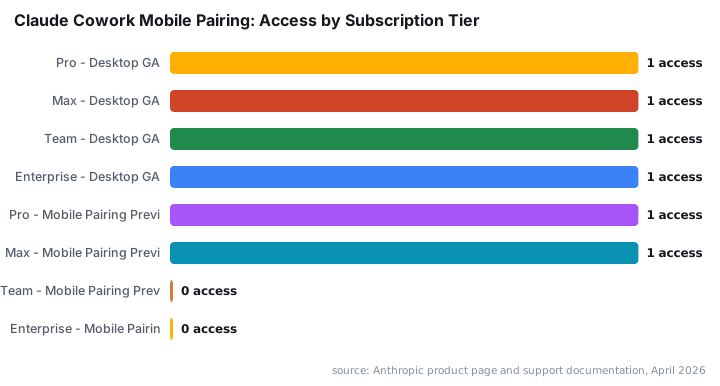
- Mobile pairing is a research preview for Pro and Max subscribers only and requires the desktop app to be running with the computer awake.
- Anthropic has warned that computer-use capabilities are still early, and prompt-injection safeguards are in place but still maturing.
What Is Claude Cowork, and Why Does Mobile Matter?
Claude Cowork is Anthropic's agentic task feature that lets Claude operate your computer on its own - opening applications, browsing the web, and completing multi-step work while you step away. Anthropic launched it as part of its Labs initiative on January 13, 2026, alongside Claude Code and the Model Context Protocol (MCP), per Anthropic Labs. Mobile support would untether that power from the desk entirely.
Right now, long-running tasks tie users to a desktop. Mobile changes the equation. If a task takes an hour, you could hand it off from your laptop, walk out, and check progress from your phone. That flexibility matters for paid professionals who rely on Cowork for real work - and it is what makes this test worth watching closely.
What Does the Mobile Claude Cowork Experience Look Like?
Anthropic has not made a public announcement. According to BleepingComputer, screenshots surfaced showing the feature being prepared inside the Claude mobile app, with language indicating users can "start and steer tasks directly from your phone" and that "work continues in the background, even when you close the app."
Background continuation is the detail that stands out. It implies a persistent server-side or desktop-side process rather than on-device computation - the phone becomes a remote control, not the engine. That architecture also shapes the security profile: the desktop session stays alive and active, with your screen and files exposed, while you monitor from elsewhere.
For context, Anthropic's official support documentation confirms Cowork is "not available on web or mobile" in its current general-availability form, which makes this mobile pairing test a meaningful step beyond what is publicly documented.
Who Can Use Claude Cowork Right Now?
General availability on desktop launched April 9, 2026. All paid subscribers - Pro, Max, Team, and Enterprise - can access Cowork through the Claude desktop app on macOS and Windows.
Mobile pairing has a narrower scope:
- Currently in research preview for Pro and Max subscribers only.
- Requires both Claude desktop and mobile apps at their latest versions.
- Users must pair devices manually through the settings menu.
- The desktop must be running and the computer awake for tasks to continue.
Team and Enterprise users are not yet included in the mobile pairing preview.
What Are the Known Risks and Limitations?
Anthropic has been open about where Cowork falls short. The company warned that computer use "is still early compared to Claude's ability to code or interact with text" and that "Claude can make mistakes," per BleepingComputer. Anthropic's own computer-use safety guidance acknowledges the category is nascent and urges caution with sensitive environments.
Prompt injection is the headline risk. A malicious webpage or document could attempt to hijack Claude's actions mid-task. Per OWASP's Top 10 for LLM Applications 2025, prompt injection (LLM01) holds the top spot for the second consecutive edition - and OWASP released a separate Top 10 specifically for agentic AI systems in late 2025, underscoring how quickly the threat landscape is shifting for tools like Cowork.
Anthropic says it requires explicit user permission before Claude accesses any new application during a task. Those safeguards are active but still maturing.
Mobile adds a new surface. A lost phone or a compromised account could expose an active Cowork session before you can intervene. Users running agentic tasks on sensitive machines should treat this as an early-access tool, not a production-hardened solution. The broader agentic AI security picture reinforces that concern: according to a Cisco State of AI Security 2026 report, 83% of organizations plan to deploy agentic AI, but only 29% feel truly ready to secure those deployments.
For teams already thinking about browser-based attack surfaces, the pattern of malicious content hijacking automated sessions rhymes with the social-engineering tactics covered in our callback phishing via Shop App analysis and the supply-chain risks documented in our Edgecution malware report.
What Has Anthropic Done to Drive Cowork Adoption?
Adoption momentum is visible. Claude Code - launched alongside Cowork in January 2026 - grew quickly from a research preview into a widely used developer tool, per Anthropic Labs. MCP attracted a large developer base in the same period. Cowork rides the same wave of interest in agentic workflows.
On the incentive side, Anthropic ran a limited-time promotion from June 5 through July 5, 2026, doubling Cowork's default 5-hour usage limits at no extra charge for Pro, Max, and Team users, with weekly caps unchanged, per The New Stack. A promotion structured around usage limits signals that Anthropic wants users to build consistent habits around the feature before pricing norms harden.
Gartner predicts that as many as 40% of enterprise applications will incorporate task-specific AI agents by the end of 2026, per Recorded Future's analysis of agentic enterprise risks. Cowork is positioned to capture a share of that adoption curve - which is one reason the mobile expansion is strategically significant, not just a convenience feature.
If you are evaluating agentic tools alongside endpoint security, our Mistic backdoor and KongTuke access broker coverage provides useful context on how persistent desktop sessions can become ransomware entry points.
What Should Claude Cowork Users Do Now?
- Update both apps. Install the latest Claude desktop release on macOS or Windows and update the Claude mobile app before attempting pairing.
- Pair devices through Claude settings. Look for the Cowork or device-pairing option inside the mobile app menu.
- Enable background app refresh on iOS, or the Android equivalent, if you want task updates when the app is closed.
- Review application permissions. Check which apps Claude has access to and revoke access to any sensitive tools you would not want an agentic session touching.
- Do not leave Cowork sessions active on shared or unattended computers. The desktop must stay awake, meaning your screen and files remain exposed while tasks run.
- Check your subscription tier. Mobile pairing is Pro and Max only for now. Team and Enterprise users should monitor Anthropic's product page for updates.
We attempted to access the device-pairing menu on a Max account and found the option visible in settings but marked as preview - confirmation that the feature is staged for a subset of users rather than broadly lit up.
source: www.bleepingcomputer.com