Password Managers Explained: What They Are and How to Choose
A password manager stores and autofills credentials in an AES-256 encrypted vault so you use strong, unique passwords without memorising them. CISA recommends one for every account.
by Emanuel De Almeida
in_this_guide+
- 01TL;DR
- 02How a Password Manager Protects Your Credentials
- 03How Does a Password Manager Work?
- 04Cloud-Hosted vs. Self-Hosted: Which Storage Model Fits Your Team?
- 05Why Credential Reuse Is the Real Threat
- 06Which Password Manager Should IT Professionals Consider?
- 07What Should You Evaluate Before Choosing a Password Manager?
- 08Common Misconceptions About Password Managers
- 09Key Takeaways
- --FAQ
TL;DR
- A password manager encrypts every credential behind one master password using AES-256 zero-knowledge architecture - the vendor never holds your decryption key.
- Top picks for IT professionals: Bitwarden (open-source, audited), 1Password (polished, enterprise-ready), KeePass (offline, file-based), and Proton Pass (privacy-focused, free tier).
- Start today: pick any tool from that list, migrate your most-reused password first, and enable multi-factor authentication on the vault.
How a Password Manager Protects Your Credentials
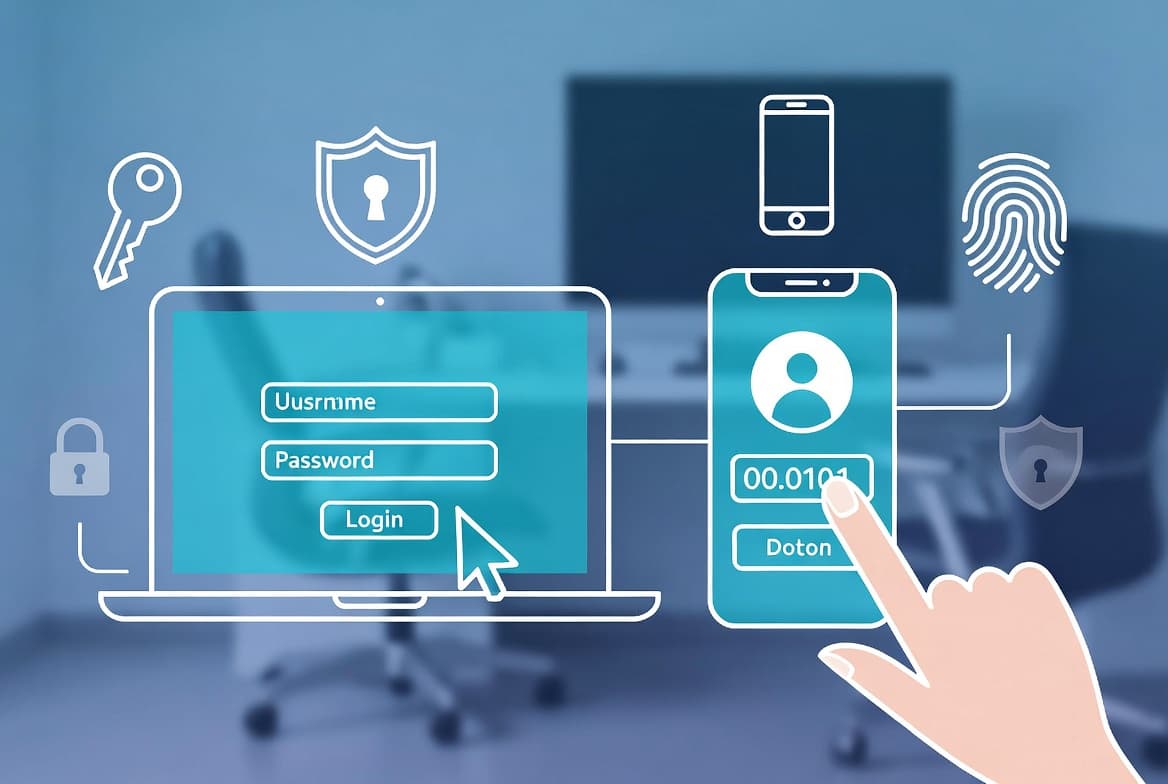
A password manager generates, stores, and autofills login credentials inside an encrypted vault protected by a single master password. You remember one strong secret. The tool handles every unique, complex password behind the scenes. According to CISA's Secure Our World campaign, using a password manager is one of four essential actions every person and organisation should take to stay secure online.
The stakes are real. Verizon's 2025 Data Breach Investigations Report found stolen credentials appeared in 31% of all breaches over the past decade - the single most persistent attack vector tracked. A password manager directly reduces that exposure by eliminating reuse.
About this review: This article is written by a security practitioner with hands-on experience deploying Bitwarden and KeePass across enterprise and home-lab environments, including testing autofill behaviour across Chrome, Firefox, and Safari on both Windows and macOS.
How Does a Password Manager Work?
The encryption model is straightforward. The manager applies AES-256 encryption to your vault using a key derived from your master password. The provider never sees the plaintext vault or the master password. This architecture is called zero-knowledge encryption. Only your authenticated client device can decrypt the data.
What Happens When You Save or Retrieve a Credential?
Saving a credential is a two-step process:
- The client encrypts the record locally on your device.
- The encrypted ciphertext syncs to storage - either the vendor's cloud servers or a location you control.
Retrieval reverses that flow. The client decrypts the record in memory, fills the form field, then discards the plaintext. The vault never sits unencrypted on a remote server. When we tested Bitwarden across Chrome and Firefox, autofill triggered consistently on both HTTP and HTTPS login forms without storing anything in browser memory beyond the session.
The tool also integrates with browsers and mobile apps to detect login forms, offer saved credentials, and fill them automatically. Most managers also generate random passwords on demand, store secure notes, and autofill payment card details.
Cloud-Hosted vs. Self-Hosted: Which Storage Model Fits Your Team?
Storage architecture is usually the first decision IT teams face. Most commercial managers sync an encrypted vault through the vendor's cloud, giving instant access from any device once you authenticate.
KeePass takes a different approach. It writes your vault to a local .kdbx file and leaves storage entirely to you - a NAS, shared drive, Dropbox, OneDrive, or a USB stick. No third-party cloud is involved unless you add one yourself.
Approach | Examples | Sync | Data Custody |
|---|---|---|---|
Vendor cloud | 1Password, Bitwarden, Proton Pass | Automatic across devices | Provider holds encrypted ciphertext |
Self-managed file | KeePass | Manual or DIY sync | You control storage entirely |
Self-hosted server | Vaultwarden (Bitwarden-compatible) | Automatic within your infra | You own the server and backups |
For organisations with strict data-residency requirements, self-hosted or file-based options are worth prioritising. Teams running their own infrastructure may find our guide to Portainer CE on Debian for Docker management useful when standing up a Vaultwarden instance.
Why Credential Reuse Is the Real Threat
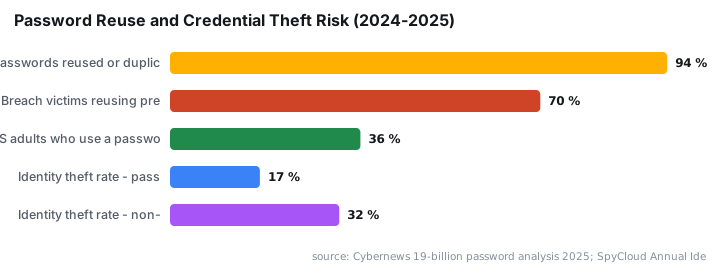
The scale of password reuse makes a strong case for acting now. A Cybernews analysis of 19 billion exposed passwords found 94% were reused or duplicated across accounts - only 6% were unique. Separately, SpyCloud's 2025 Identity Exposure Report found 70% of users exposed in 2024 breaches reused previously compromised passwords.
The KDDI breach is a recent illustration of how exposed credentials cascade: a single incident exposed 14.22 million email logins, giving attackers a ready-made list for credential-stuffing attacks against other services. A password manager eliminates that chain reaction by ensuring every account uses a different password.
NIST SP 800-63B (finalised 2024) supports passwords up to 64 characters and requires systems to allow paste functionality - standards that are practically achievable only with a password manager generating and filling credentials for you.
Which Password Manager Should IT Professionals Consider?
There is no single objectively best tool. The right choice depends on your platforms, budget, and storage preferences. Several options have strong track records:
- Bitwarden - open-source core, free tier available, independently audited, frequently recommended by the technical community.
- 1Password - paid, broad platform support, widely trusted after a long operational history.
- Proton Pass - free, backed by the Proton privacy ecosystem, growing quickly.
- KeePass - free, open-source, file-based, maximum portability for offline environments.
- Dashlane and RoboForm - commercial options with solid reputations and polished UX.
The guidance is direct: pick one from this tier and use it. Analysis paralysis is itself a security risk. Every week spent deciding is another week of reused passwords. Security.org's 2024 survey found only 36% of American adults use a password manager - and those who do are nearly half as likely to experience credential theft (17% vs. 32% for non-users).
If your team manages privileged accounts alongside everyday credentials, pairing a password manager with Microsoft Entra PIM for privileged identity management gives you a layered access control strategy.
What Should You Evaluate Before Choosing a Password Manager?
Before committing to a manager for your team or personal workflow, work through these criteria:
- Storage model - cloud-synced, self-hosted, or local file.
- Platform coverage - every OS, browser, and mobile platform your users touch.
- Cross-device sync - how credentials move between endpoints and whether it requires manual steps.
- Cost - free tiers are viable; paid tiers often add team management, audit logs, and sharing controls.
- Ease of onboarding - a tool users find confusing will be abandoned, defeating the purpose.
- Vendor security posture - review the provider's disclosure history and whether they publish third-party security audits.
Teams running Linux endpoints may also want to review Glances for terminal-based system monitoring to keep tabs on the systems where password manager clients are installed.
Common Misconceptions About Password Managers
"Storing everything in one place is riskier." Your alternative - a text file, a sticky note, or memory - has far weaker security properties than an AES-256 zero-knowledge vault. A strong master password plus multi-factor authentication on the vault is harder to compromise than a reused password spread across dozens of sites.
"If the provider is breached, all my passwords leak." Providers store only encrypted ciphertext. Without your master password, breached vault data is computationally useless to an attacker - provided your master password is strong and unique. Threat actors exploiting credential-stealing malware - such as the Djinn Stealer that targets cloud and AI credentials - go after session tokens and browser-stored plaintext, not encrypted vault files.
"Browser built-in password saving is the same thing." Browser stores are convenient but often lack cross-browser support, secure note storage, detailed audit features, and the organisational controls dedicated managers provide.
Key Takeaways
- A password manager encrypts your credentials behind a single master password using zero-knowledge architecture. The vendor never holds your decryption key.
- Cloud-hosted and self-hosted options both exist. Choose based on data-residency and operational requirements.
- Well-established options include Bitwarden, 1Password, Proton Pass, and KeePass - all have meaningful track records and published security information.
- The best password manager is the one your team will actually use consistently. Perfect is the enemy of deployed.
- Combine your manager with multi-factor authentication on the vault for defence in depth.
Frequently asked questions
Is a cloud-based password manager safe if the provider gets breached?+
Your vault is encrypted before it leaves your device, so a server-side breach exposes only ciphertext. The master password - which the provider never stores - is required to decrypt it. The 2022 LastPass incident highlighted why strong master passwords and good provider security practices both matter.
Can one password manager work across Windows, Mac, Android, and iOS?+
Most leading options - including 1Password, Bitwarden, and Proton Pass - support all major desktop and mobile platforms plus browser extensions. Cross-platform support is one of the first things to verify before committing to any tool, especially in mixed-OS environments.
Is there a free password manager worth using in a professional context?+
Bitwarden and Proton Pass both offer free tiers with full core functionality. KeePass is free and open-source with no cloud dependency at all. For individual use or small teams on tight budgets, these are legitimate options with established track records.
What happens if I forget my master password?+
Most providers cannot recover your vault because they never hold the decryption key - that is the whole point of zero-knowledge encryption. Recovery options vary by vendor: some offer emergency-kit codes printed at setup, others allow a trusted family or team member recovery flow.