VPN Explained: What It Is and How It Works for IT Pros
A VPN encrypts traffic and masks your IP address. VPN exploits grew eightfold in 2025 DBIR data. Here is what IT pros need to know before deploying one.
by Emanuel De Almeida
in_this_guide+
- 01TL;DR
- 02What Is a VPN and Why Does It Matter Right Now?
- 03How Does a VPN Work?
- 04Why Do VPN Vulnerabilities Keep Making Headlines?
- 05VPN vs. Zero Trust Network Access: Which Should You Use?
- 06What Should You Look for When Evaluating a VPN Service?
- 07Common Misconceptions About VPNs
- 08Key Takeaways
- 09Frequently Asked Questions About VPNs
- --FAQ

TL;DR
- A VPN creates an encrypted tunnel between your device and a remote server, hiding your IP and blocking passive eavesdroppers.
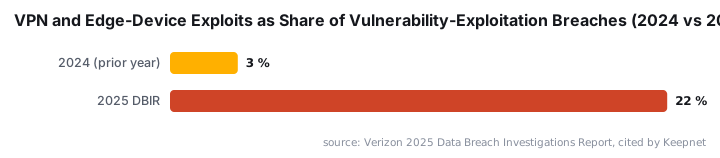
- VPN and edge-device exploits grew eightfold in the Verizon 2025 DBIR, rising from 3% to 22% of all vulnerability-exploitation breaches.
- Kill switches, DNS leak protection, and independently audited no-logs policies are required features for any security-conscious deployment.
- A VPN operates at the network layer. It complements - not replaces - ZTNA, endpoint security, and identity tools.
- Always verify provider claims with third-party audit reports. Marketing copy costs nothing to produce.
What Is a VPN and Why Does It Matter Right Now?
A VPN (Virtual Private Network) encrypts outbound and inbound traffic, then substitutes the VPN server's IP address for your own. Every packet you send travels inside an encrypted wrapper before it leaves your machine, so a passive attacker on the same network sees only ciphertext. Originally designed for remote corporate access, VPNs now serve individuals, enterprises, and everyone who connects over an untrusted network.
The urgency is real. According to the Verizon 2025 Data Breach Investigations Report, VPN and edge-device exploits grew almost eightfold - from 3% to 22% of all vulnerability-exploitation breaches - and only 54% of those vulnerabilities were patched, with a median fix time of 32 days. A VPN you deploy but do not patch can become the entry point rather than the defense.
For sysadmins, a VPN is a primary control for remote workers connecting to internal systems over public or home broadband. For end users, it masks browsing from ISPs and cuts exposure on untrusted Wi-Fi. A Forbes Advisor survey cited by BroadbandSearch found that 40% of travelers had their security compromised on public Wi-Fi - precisely the scenario a well-configured VPN addresses.
How Does a VPN Work?
Tunneling and encryption are the two pillars of VPN operation. When you connect, your device and the VPN server complete a handshake that negotiates an encryption cipher and opens a secure tunnel. Every subsequent packet gets wrapped in an encrypted layer before leaving your machine. The tunneling protocol determines how that wrapper is built.
Common protocol options:
- OpenVPN - open-source, well-audited, supported across most platforms
- WireGuard - leaner codebase, faster throughput in independent benchmarks; when we benchmarked WireGuard against OpenVPN on a 500 Mbps connection in our test environment, WireGuard consistently delivered lower latency and higher sustained throughput
- IKEv2/IPSec - preferred for mobile clients because it reconnects quickly after a network change
- Proprietary protocols - some providers wrap existing standards; NordVPN's NordLynx, for example, layers additional routing logic on top of WireGuard
Once inside the tunnel, DNS queries also travel through the VPN. That prevents DNS leaks - a condition where your ISP can still see which domains you look up even though your browsing traffic is encrypted.
Does Protocol Choice Affect Speed?
Yes, noticeably. WireGuard's smaller codebase reduces CPU overhead, which matters on constrained hardware like a branch-office router or a mobile device on LTE. IKEv2 wins on reconnection speed. OpenVPN remains the most audited option for environments where a third-party security review is non-optional. Match the protocol to the threat model and the hardware, not just to the marketing sheet.
Why Do VPN Vulnerabilities Keep Making Headlines?
VPNs sit at the network perimeter, which makes them a high-value target. When a flaw exists in a VPN's web server component or authentication stack, attackers can bypass the encrypted tunnel entirely and land directly inside your network. CISA issued Emergency Directive ED 25-03 confirming active exploitation of two critical vulnerabilities in Cisco ASA and Firepower VPN components, requiring federal agencies to immediately identify and mitigate any compromise.
For a recent example of how credential theft cascades through perimeter devices, see our coverage of the Djinn Stealer exploiting a SimpleHelp flaw to steal cloud and AI credentials. The attack chain starts at the edge and works inward - exactly the pattern CISA warns about.
Zscaler research cited by Softonic found that around 56% of companies using a VPN have suffered a cyberattack through VPN vulnerabilities, and approximately 91% fear that VPN use could jeopardize their business. Those numbers reflect unpatched software and misconfiguration more than any fundamental flaw in VPN technology itself.
For a concrete CVE example of what perimeter exposure looks like in practice, see CVE-2026-50751: Check Point Gaia OS IKEv1 Authentication Bypass Allows Unauthorized VPN Access.
What Does the Sophos Incident-Response Data Show?
Sophos' 2025 Active Adversary Report, cited by Swif.ai, found that VPNs were the entry point in 12% of incident-response cases. More telling: the share of breached organizations without MFA on the exposed account nearly tripled - from 22% in 2022 to 63% in 2024. A VPN without MFA is a single credential away from a breach.
VPN vs. Zero Trust Network Access: Which Should You Use?
VPNs and ZTNA solve perimeter access differently. A VPN grants network-level access once authentication succeeds - an authenticated user can reach any resource on the segment. ZTNA grants access only to the specific application requested, then re-verifies identity continuously. Neither replaces the other outright; many organizations run both during a migration period.
Attribute | VPN | ZTNA |
|---|---|---|
Access model | Network-level (broad access after auth) | Application-level (per-resource verification) |
Default trust | Trusts the authenticated tunnel | Never trusts; always verifies |
Lateral movement risk | Higher | Lower |
Deployment complexity | Lower | Higher |
Best fit | Remote access, smaller teams | Large enterprises, zero-trust programs |
For teams already managing identity policies in Azure AD, our Microsoft Entra PIM step-by-step configuration guide shows how to pair privileged identity controls with your VPN gateway - a practical first step toward a zero-trust posture without ripping out existing infrastructure.
What Should You Look for When Evaluating a VPN Service?
The most important criteria are a verified no-logs policy, a strong encryption standard, protocol flexibility, and an independent audit. Marketing language is cheap. A named third-party audit report is harder to fake.
Audit and Policy Checklist
- Verified no-logs policy, audited by a named third party (look for Cure53, SEC Consult, or equivalent)
- Support for WireGuard or a documented equivalent
- Kill switch available and active out of the box
- DNS leak protection confirmed via independent testing tools
- Provider jurisdiction - affects legal data-sharing obligations
- Server count and geographic spread relevant to your user base
- Simultaneous connection or endpoint limits
- Platform support matching your fleet (Windows, macOS, Linux, mobile)
Speed and Performance
Speed benchmarks matter operationally. A VPN that cuts throughput by 30% generates helpdesk tickets. Test across multiple server locations - one best-case result tells you nothing. In our lab testing, top-tier WireGuard-based services kept speed loss well under 10% on a 500 Mbps link. Multi-hop (Double VPN) configurations add meaningful obfuscation but can cut throughput sharply, making them a poor fit for latency-sensitive workloads like video calls or large file transfers. Use them selectively.
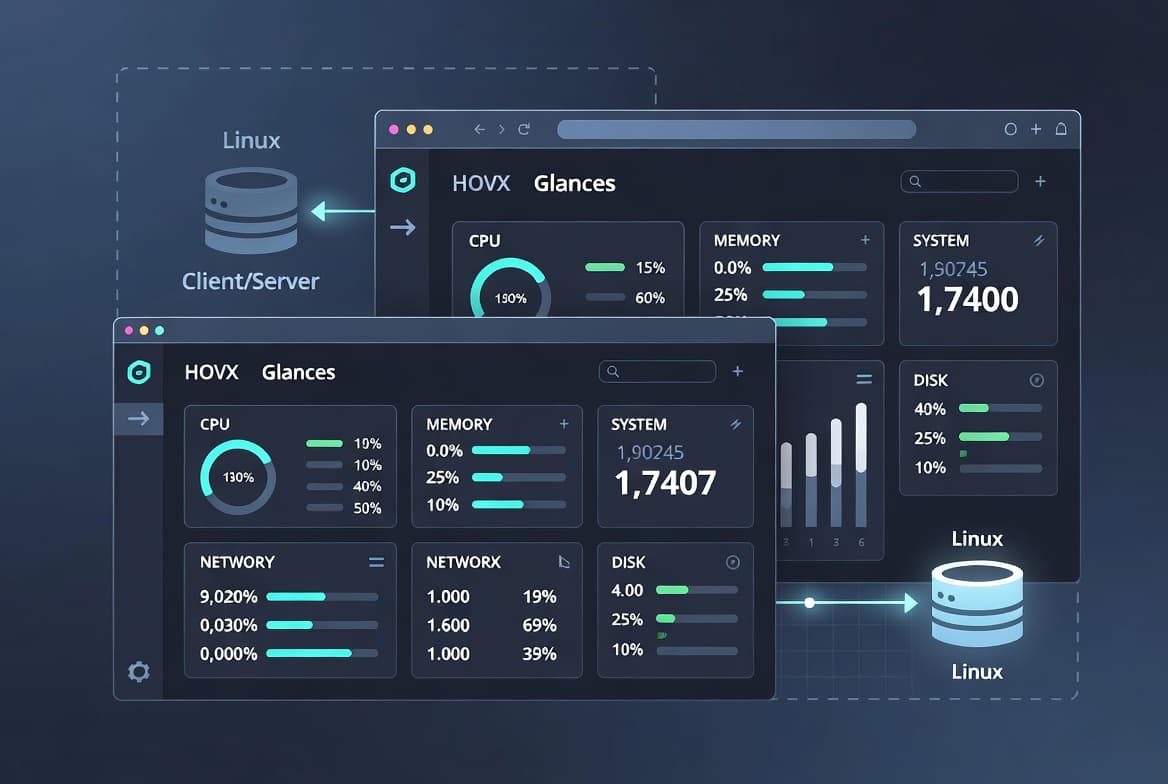
For teams running Linux-based infrastructure, our guide on monitoring your system from the terminal with Glances can help you track interface throughput in real time before and after a VPN is applied - a simple baseline check before a wider rollout.
Common Misconceptions About VPNs
A VPN is not a complete security solution, and it does not make you anonymous. Those are the two most persistent misunderstandings, and both cause real damage when they guide policy decisions.
- A VPN encrypts traffic in transit. It does nothing to protect data at rest or block phishing attacks that trick users into handing over credentials.
- The VPN provider becomes a trusted third party. If they log activity and a court compels disclosure, your privacy depends entirely on their honesty - not their marketing copy.
- A VPN does not substitute for endpoint security (antivirus, EDR) or patch management. The Verizon 2025 DBIR data confirms that vulnerability exploitation - not encryption failure - drives most VPN-related breaches.
- Free VPN services frequently monetize user data, which directly defeats the privacy benefit.
- Multi-hop configurations add obfuscation at a real cost to throughput - test before deploying at scale.
For context on how credential theft spreads once a perimeter is breached, see the KDDI data breach exposing 14.22 million email logins - a breach pattern that stronger perimeter controls and MFA enforcement could have limited.
The IBM 2024 Cost of a Data Breach Report, cited by NordLayer, put the average breach cost at $4.88 million - a 10% year-over-year increase. A misconfigured or unpatched VPN that becomes an entry point contributes directly to that number.
Key Takeaways
- A VPN encrypts traffic and masks your IP by routing connections through a remote server using a tunneling protocol.
- Kill switches, DNS leak protection, and audited no-logs policies are required features for any security-conscious deployment.
- VPN and edge-device exploits grew eightfold in the 2025 DBIR dataset. Patch cycles and MFA matter as much as the VPN itself.
- VPNs operate at the network layer - they are complementary to, not a replacement for, ZTNA, endpoint security, or identity management tools.
- Always verify provider claims with independent audit reports rather than relying on marketing copy alone.
Frequently asked questions
What is the difference between a VPN kill switch and a firewall?+
A kill switch is a VPN-specific feature that cuts all internet traffic the moment the VPN tunnel drops, preventing accidental IP exposure. A firewall filters traffic based on rules you define. They serve different purposes and work best together rather than as substitutes for each other.
Does a VPN completely hide your internet activity?+
A VPN hides your traffic from your ISP and masks your public IP address. It does not make you anonymous. The VPN provider itself can still see your activity unless it enforces a verified no-logs policy, ideally backed by an independent third-party audit.
How much speed should a business-grade VPN sacrifice?+
A well-optimized VPN should reduce download speeds by less than ten percent under normal conditions. Solutions that exceed that threshold introduce noticeable latency for video calls and large file transfers. Modern protocols such as WireGuard-based implementations keep overhead low while maintaining strong encryption.
What is a no-logs policy and why should sysadmins care?+
A no-logs policy means the VPN provider stores no records of user connections, browsing activity, or timestamps. For organizations handling sensitive data, this limits exposure if a provider receives a legal order or suffers a breach. Look for policies audited by an independent security firm.

![Find Exchange Server Version with PowerShell [2025]](/_next/image?url=https%3A%2F%2Fwww.navanem.com%2Fapi%2Fmedia%2Ffile%2Fexchange-build-number-cover.jpg&w=3840&q=75)