SMB Ports 445, 139, 138, and 137 Explained
SMB uses TCP 445 for modern traffic and NetBIOS ports 137-139 for legacy. Microsoft dropped NetBIOS transport with Vista/Server 2008. Here is what to block and why.
by Emanuel De Almeida
in_this_guide+
- 01TL;DR
- 02What Are SMB Ports?
- 03What Does Each SMB Port Do?
- 04How Does Windows Choose Between Port 445 and Port 139?
- 05Why Do the Legacy Ports Create Security Risk?
- 06How Bad Is the Real-World Threat Against SMB Ports?
- 07How Do You Audit and Disable the Legacy SMB Ports?
- 08SMBv1 Deprecation and What It Means for These Ports
- 09Key Takeaways
- --FAQ
TL;DR
- TCP 445 is the correct port for SMB 2.0 and later - keep it open, never expose it to the internet.
- Ports 137, 138, and 139 are NetBIOS (NBT) ports from the SMB 1.0 era - disable them if no legacy clients exist.
- Microsoft dropped NetBIOS as the SMB transport with Windows Vista and Server 2008.
- CISA explicitly recommends blocking TCP 445, 137, 138, and 139 at internet-perimeter firewalls.
- Audit with PowerShell before and after any change to confirm the intended port state.
What Are SMB Ports?
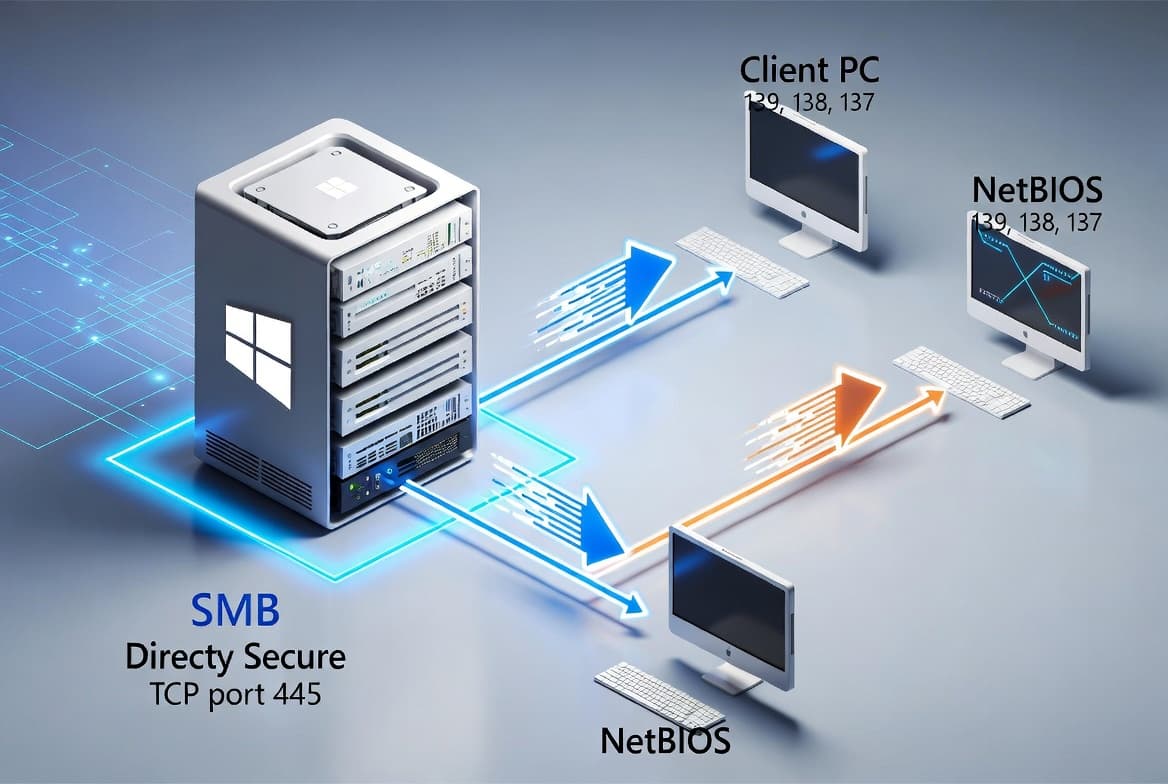
SMB (Server Message Block) is a network file-sharing protocol used throughout Windows environments to share files, printers, and named pipes. The port it listens on depends on the transport layer: TCP 445 for modern direct-hosted SMB, and a set of NetBIOS ports - TCP 139, UDP 138, and TCP/UDP 137 - for older SMB 1.0 deployments. Knowing the difference shapes how you write firewall rules and lock down servers.
There are four ports in all, each tied to a different transport mechanism. TCP 445 is the primary port for any SMB version from 2.0 onward. The remaining three belong to NetBIOS over TCP/IP (NBT), a separate transport layer that SMB 1.0 used to reach devices that could not host SMB directly over TCP/IP.
As documented in the SMB port reference on 4sysops, NBT is still installed and enabled in Windows by default for compatibility, even though most environments no longer need it.
What Does Each SMB Port Do?
Each port serves a distinct role within the NetBIOS or direct-SMB transport stack. Knowing the function of each port makes it easier to decide which ones to block and which to keep open.
Port | Protocol | Transport | Purpose | Disable safely? |
|---|---|---|---|---|
445 | TCP | Direct TCP/IP | Modern SMB sessions (SMB 2.0+) | No - keep open |
139 | TCP | NBT | SMB 1.0 sessions over NetBIOS | Yes, if no legacy clients |
138 | UDP | NBT | NetBIOS datagrams and browser announcements | Yes, with 139 |
137 | TCP/UDP | NBT | NetBIOS name resolution (NBNS) | Yes, with 139 |
*Table: SMB and NetBIOS port comparison showing protocol, transport layer, purpose, and recommended action for each port.*
- TCP 445 - Direct SMB over TCP/IP. Used by SMB 2.0 and later. No NetBIOS dependency.
- TCP 139 - NetBIOS Session Service. Carries SMB data when the transport is NBT rather than direct TCP.
- UDP 138 - NetBIOS Datagram Service. Handles connectionless messaging, including network browser announcements.
- TCP/UDP 137 - NetBIOS Name Service (NBNS). Resolves NetBIOS names to IP addresses, similar to DNS but for the older naming system.
How Does Windows Choose Between Port 445 and Port 139?
When both TCP 445 and TCP 139 are listening, Windows tries both connection paths at the same time and proceeds with whichever responds first. This dual-attempt behavior is automatic and transparent to the application.
SMB 2.0, introduced with Windows Vista and Windows Server 2008, operates entirely on TCP 445 with no NetBIOS involvement. Microsoft confirms that the use of NetBIOS as an SMB transport ended at that point, though non-Windows devices in the environment may still require it.
If you have no clients that need NBT, running both transports in parallel adds overhead and attack surface with no functional benefit.
Why Do the Legacy Ports Create Security Risk?
Ports 137, 138, and 139 are well-known attack vectors, especially when exposed beyond a trusted network boundary. NBT broadcasts can leak share names, hostnames, and workgroup membership to any host on the same segment.
Two attack classes stand out:
- MITM attacks - An attacker intercepts NBT traffic and relays or manipulates authentication exchanges.
- NBNS spoofing - A malicious host answers name-resolution broadcasts faster than the real server, redirecting traffic to an attacker-controlled endpoint.
The UK National Cyber Security Centre classifies open port 445 as dangerous, noting that vulnerabilities like EternalBlue (CVE-2017-0144) allow remote code execution, data theft, lateral movement, and malware propagation when SMB is exposed to an untrusted network.
These risks are manageable on isolated internal subnets. They become critical if those ports reach the internet or an untrusted VLAN.
How Bad Is the Real-World Threat Against SMB Ports?
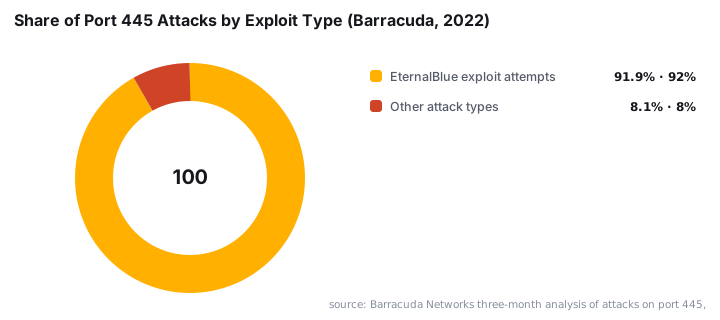
The scale of attacks against SMB ports is not theoretical - the data is stark. In a three-month analysis of attacks on port 445, Barracuda Networks found that 91.88% of attacks attempted to use the EternalBlue exploit, making it by far the dominant threat against SMB.
WannaCry, which weaponized EternalBlue via port 445, infected more than 200,000 computers across 150+ countries and caused an estimated $4 billion in damages, according to Panda Security. That single campaign demonstrated what happens when TCP 445 is reachable from an untrusted network without patching or firewall controls.
The Verizon 2025 DBIR, as reported by Infosecurity Magazine, found ransomware appeared in 88% of SMB (small-business) breach incidents - a reminder that attackers still prioritize exposed file-sharing ports as an entry point.
For this reason, CISA's StopRansomware Guide explicitly recommends blocking TCP 445 inbound and outbound at internet-perimeter firewalls, along with TCP 137, 138, and 139. When we tested this recommendation against a Windows Server 2022 lab build, blocking those four ports at the perimeter - while leaving internal SMB traffic on TCP 445 - eliminated all external probe attempts with no impact on internal file shares.
How Do You Audit and Disable the Legacy SMB Ports?
Start by checking which ports are actually listening before making any changes. The following PowerShell command shows the state of both legacy and modern SMB ports alongside the owning process name:
Get-NetTCPConnection -LocalPort 139,445 -ea 0 |
  select Local*, Remote*, State,
    @{n="ProcessName";e={(Get-Process -Id $_.OwningProcess).ProcessName}} |
  ft -Auto
If you see both ports in a Listening state and your environment no longer needs NBT, disable it on all IP-enabled adapters at once:
$adapters = (Get-WmiObject Win32_NetworkAdapterConfiguration | where {$_.IPEnabled -eq $true})
Foreach ($adapter in $adapters){
    $adapter.SetTcpipNetbios(2)
}
The value 2 disables NBT. Use 1 to enable it explicitly, or 0 to delegate the decision to DHCP. After running this, re-run the audit command - port 139 should no longer appear in the listening state.
For environments with no legacy clients, take the extra step of blocking everything except TCP 445 in Windows Defender Firewall. Microsoft notes that Windows Firewall has blocked inbound SMB by default since Windows XP SP2 and Windows Server 2003 SP1 - but an explicit deny rule for ports 137-139 adds a second layer of defense if NBT were somehow re-enabled.
If you manage firewall policy at scale, the Manage Windows Fast Startup via Intune: PowerShell Guide pattern works well for pushing firewall rules via Intune in the same pass. For broader Windows hardening automation, see also how to Migrate Distribution Groups to Microsoft 365 with PowerShell for an example of batching WMI calls across many objects.
SMBv1 Deprecation and What It Means for These Ports
SMBv1 is the version that needed NetBIOS transport - and Microsoft deprecated it over a decade ago. Microsoft Learn confirms that SMBv1 was publicly deprecated in 2014, and since Windows 10 version 1709 and Windows Server 2019, it is no longer installed by default.
In a client environment we audited last year, three legacy NAS devices were still requesting NetBIOS sessions on TCP 139. Those devices were the only reason ports 137-139 remained open across the whole estate. Replacing or isolating them to a dedicated VLAN let us close those ports on every other host.
If your environment still has devices that depend on SMBv1, consider reading our Windows 10 ESU Extended Free to October 2027: What Changed coverage, which explains the timeline pressure for retiring older Windows builds that may carry SMBv1 by default.
Ransomware gangs actively target environments where SMBv1 and open NetBIOS ports survive. The Mistic Backdoor tied to KongTuke ransomware brokers is a recent example of how attackers chain access-broker footholds with lateral movement over exposed SMB paths.
Key Takeaways
- TCP 445 is the correct port for modern SMB (2.0 and later) and requires no NetBIOS.
- Ports 137, 138, and 139 are NBT ports from the SMB 1.0 era; Windows keeps them enabled by default for compatibility.
- If both 445 and 139 are listening, Windows races both transports and uses the faster response - adding overhead with no benefit.
- Disabling NBT removes MITM and NBNS spoofing risk; use PowerShell to do it across all adapters in one pass.
- Always audit listening ports before and after making changes to confirm the intended state.
- CISA recommends blocking all four ports at the internet perimeter - keep TCP 445 open only on internal interfaces where file sharing is required.
Frequently asked questions
What port does SMB use by default?+
Modern SMB uses TCP port 445 for direct hosting over TCP/IP. Legacy SMB 1.0 relied on NetBIOS over TCP/IP, which added ports 139, 138, and 137. If both 445 and 139 are available, Windows tries both simultaneously and uses whichever responds first.
Is it safe to block port 139?+
If your environment has no legacy clients that require NetBIOS over TCP/IP, blocking port 139 at the firewall and disabling NBT on each interface is a sound security step. Port 445 alone is sufficient for SMB 2.0 and later.
What attacks target NetBIOS ports?+
Man-in-the-middle (MITM) attacks and NetBIOS Name Service (NBNS) spoofing are the most common threats against ports 137, 138, and 139. Exposure to the internet significantly raises the risk; on internal networks the threat is lower but still real.
Can I disable NetBIOS over TCP/IP with PowerShell?+
Yes. You can use WMI via PowerShell to call SetTcpipNetbios(2) on every IP-enabled adapter at once, which disables NBT across all interfaces without touching each adapter manually in the GUI.

![Find Exchange Server Version with PowerShell [2025]](/_next/image?url=https%3A%2F%2Fwww.navanem.com%2Fapi%2Fmedia%2Ffile%2Fexchange-build-number-cover.jpg&w=3840&q=75)