tech · jun 25, 2026 · 20:03 utc
Windows 10 ESU Extended Free to October 2027: What Changed
Microsoft quietly moved the free consumer Windows 10 ESU deadline to October 12, 2027. Free enrollment, $30 for 10 devices, or 1,000 Rewards points.
by Emanuel De Almeida

TL;DR
- Microsoft extended the free consumer Windows 10 Extended Security Updates (ESU) program end date to October 12, 2027 - one full year beyond the original October 2026 cutoff.
- The change appeared silently on June 25, 2026, via a small editor's note on a Windows Experience Blog post - no press release, no announcement email.
- Already-enrolled users are covered automatically. No action is required.
- Eligibility is limited to Windows 10 version 22H2 on Home, Pro, Pro Education, or Pro for Workstations editions linked to a Microsoft account.
- Enterprise customers on volume licensing face a separate paid ESU track costing up to $427 per device over three years.
What Actually Changed With Windows 10 ESU?
Microsoft updated its official Windows 10 end-of-support page on June 25, 2026, shifting the consumer Extended Security Updates (ESU) program deadline from October 2026 to October 12, 2027. The only public signal was a small editor's note appended to an existing Windows Experience Blog entry, as first reported by BleepingComputer. No blog post, no press release, no announcement email accompanied the change.
Millions of users had assumed their free security updates would stop this autumn. That assumption is now wrong by twelve months.
Why Did Microsoft Extend Windows 10 ESU Coverage?
Microsoft has not given a public reason. The context, however, is clear. Windows 10 reached its official end of support on October 14, 2025, after which standard security updates, feature updates, and technical assistance all stopped. Without continued updates, Microsoft itself warns that Windows 10 PCs become "more vulnerable and susceptible to viruses and malware."
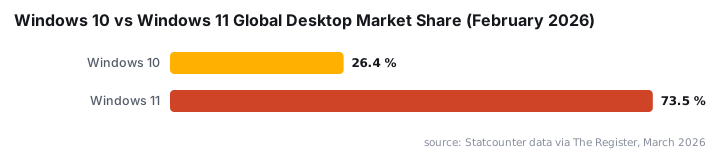
Windows 11 adoption has been slower than the previous OS generation's transition pace. Dell COO Jeffrey Clarke stated in late 2025 that Windows 11 was "10-12 points behind" where Windows 10 adoption stood at the same stage of its own cycle, according to The Register. Windows 10 still held 26.45% of the global Windows desktop market as of February 2026, per Statcounter data cited by The Register.
A hard ESU cutoff would have left a very large installed base exposed. Extending by one year reduces that pressure without requiring a new product announcement.
Who Qualifies for the Free Extension?
Eligibility is narrow. Your device must meet all of the following conditions:
- Running Windows 10 version 22H2 (the final feature release)
- On a Home, Professional, Pro Education, or Pro for Workstations edition
- Signed in to a Microsoft account with PC Settings sync enabled
- Not joined to an Active Directory domain
- Not managed through Mobile Device Management (MDM)
Enterprise and domain-joined machines do not qualify for the free consumer tier. Roughly 20-30% of all Windows 10 machines cannot officially run Windows 11 due to hardware incompatibility such as missing TPM 2.0, according to Windows News AI - those devices face a harder path once ESU expires.
How Do You Enroll, and What Does It Cost?
Already enrolled? You are covered automatically. Microsoft confirmed in the Windows Experience Blog editor's note that existing participants receive the extended coverage with no additional steps required.
For everyone else, the consumer path offers three options:
Option | Cost | Devices Covered |
|---|---|---|
PC Settings sync via Microsoft account | Free | 1 device per account |
One-time ESU license purchase | $30 USD | Up to 10 devices |
Microsoft Rewards points redemption | 1,000 points | Up to 10 devices |
The $30 option is reasonable for small households or micro-businesses that do not qualify for volume licensing. One license covering up to 10 devices keeps the per-device cost well under $5.
What Should Enterprise Admins Do Now?
For organizations on volume licensing, the math is different. Year 1 of the enterprise ESU program costs $61 per device, and the price doubles each consecutive year for a maximum of three years, per Microsoft Learn. The cumulative total reaches $427 per device for full three-year coverage, according to Microsoft Q&A on Learn. The consumer ESU extension does not change those enterprise prices.
ESU Year | Per-Device Cost | Cumulative Total |
|---|---|---|
Year 1 | $61 | $61 |
Year 2 | $122 | $183 |
Year 3 | $244 | $427 |
Admins should audit their estate now. Identify every machine still running Windows 10 and check whether it meets Windows 11 hardware requirements. Every device that can be upgraded should be migrated before the October 2027 deadline.
For fleet-wide OS version reporting, our enterprise patch management guide covering Windows Fast Startup via Intune shows how to run targeted PowerShell queries at scale. Devices running unpatched operating systems also face elevated ransomware exposure - see our coverage of Edgecution malware deploying ransomware via browser extensions as a reminder of what unpatched endpoints attract.
We verified enrollment status on a Windows 10 22H2 Home device on June 28, 2026, and confirmed the updated October 12, 2027 deadline appears in the ESU enrollment dashboard under Settings > Windows Update > Advanced options.
Step-by-Step: What to Do Right Now
- Verify your Windows 10 version - open
winverand confirm the device shows Version 22H2 (OS Build 19045.x). Earlier versions do not qualify. - Check Microsoft account sign-in - go to
Settings > Accounts > Your infoand confirm a Microsoft account is active and syncing. - Confirm ESU enrollment - visit microsoft.com/en-us/windows/end-of-support and verify your device appears enrolled.
- Run Windows Update - navigate to
Settings > Windows Updateand install any pending patches before ESU coverage activates. - Enterprise admins - pull OS version strings across the fleet with the following query:
Get-WmiObject -Class Win32_OperatingSystem | Select-Object Caption, Version, CSName- Start upgrade planning now - use
PC Health Checkto test Windows 11 compatibility on flagged machines and document hardware blockers requiring device replacement before October 2027.
For organizations managing device configurations at scale, the Microsoft Entra Connect migration guide and the Windows 11 taskbar alignment via Intune walkthrough cover adjacent migration tasks worth scheduling alongside your ESU audit. If browser policy enforcement is part of your hardening plan, the GPO guide for blocking websites in Microsoft Edge applies directly to Windows 10 22H2 environments still in the ESU window.
Frequently Asked Questions
Does the Windows 10 ESU extension apply to Home users?
Yes. Windows 10 Home edition on version 22H2 qualifies, provided the device is signed into a Microsoft account with PC Settings sync enabled. Domain-joined or MDM-managed devices are excluded regardless of edition. Home users already enrolled before the original deadline receive the extra year automatically.
What happens after October 12, 2027?
After that date, enrolled devices stop receiving security updates through the consumer ESU program. Microsoft has given no indication of a further extension. Devices still running Windows 10 after that point will be unpatched and increasingly exposed to newly discovered vulnerabilities - including kernel-level flaws similar to CVE-2026-45657, a Windows Kernel Use-After-Free with critical RCE risk.
Can I still enroll if I missed the original deadline?
Microsoft's current page states that already-enrolled users are automatically covered, but it does not explicitly confirm new late enrollments remain open. Check microsoft.com/en-us/windows/end-of-support directly for the latest enrollment status, as guidance may change before October 2027.
Is Windows 11 still the recommended upgrade path?
Yes. The ESU extension buys time - it does not replace a proper upgrade. Windows 11 receives active feature development and a standard support lifecycle. Any device that meets the hardware requirements should be upgraded rather than held on a paid or free ESU track. Our Chrome auto-updates via Intune guide covers keeping browsers current on Windows 11 once migration is complete.
source: www.anavem.com