Configure NTP Time Source on a Windows Domain Controller
Configure an external NTP source on your PDC Emulator to keep Kerberos clock skew under the 5-minute limit - with PowerShell commands and verification steps.
by Emanuel De Almeida
in_this_guide+
- 01TL;DR
- 02Prerequisites
- 03Step 1: Locate the PDC Emulator
- 04How Do I Check the Current NTP Time Source on a Domain Controller?
- 05Step 3: Disable Hypervisor Guest Time Synchronization
- 06How Do I Configure External NTP Peers on the PDC Emulator?
- 07Step 5: Restart the Windows Time Service
- 08Step 6: Force Resynchronization
- 09Step 7: Verify the New Time Source
- 10How Do I Measure NTP Offset and Drift on the PDC Emulator?
- 11Step 9: Propagate Time to Other Domain Controllers
- 12How Do I Confirm the NTP Time Source Configuration Is Working?
- 13Troubleshooting Quick Reference
- --FAQ
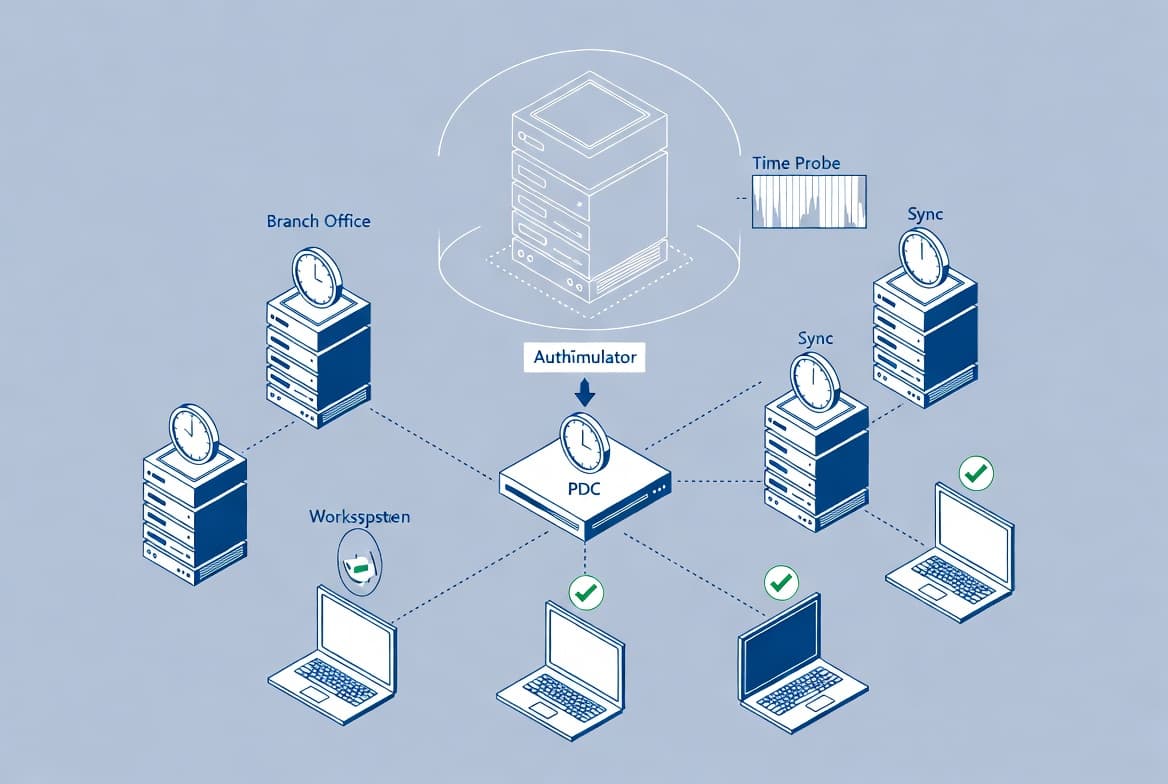
TL;DR
- Run
w32tm /configon the PDC Emulator - not just any domain controller. - Disable VM guest time sync (Hyper-V or VMware) before configuring NTP peers.
- Use four pool addresses with the
0x8flag for redundancy. - Force resync with
w32tm /resync /force, then confirm offset is under 1 second. - Kerberos authentication fails when clocks drift beyond 5 minutes.
Accurate time is not optional in an Active Directory environment. Configuring a reliable NTP time source on the PDC Emulator underpins Kerberos authentication, AD replication, certificate validity, and event log correlation. This tutorial walks you through locating the PDC Emulator, disabling competing hypervisor time sync, pointing W32Time at external NTP servers, and confirming that accurate time flows to every domain controller and client.
According to Microsoft Learn, the W32Time service is essential to Kerberos V5 authentication - any Kerberos-aware application relies on time synchronization between all computers in an authentication request. Domain controllers also need synchronized clocks for accurate data replication.
Prerequisites
- Domain admin credentials (or equivalent) on the PDC Emulator.
- PowerShell or Command Prompt running as Administrator.
- Outbound UDP port 123 open from the PDC Emulator to the internet or your internal NTP appliance. Microsoft Learn confirms W32Time uses UDP port 123 exclusively.
- Knowledge of whether the PDC Emulator runs on Hyper-V, VMware, or bare metal.
- A second domain controller available to validate propagation in Step 9.
Step 1: Locate the PDC Emulator
All configuration must happen on the server holding the PDC Emulator FSMO role, not just any domain controller. Run the following command from any domain-joined machine.
netdom query fsmoNote the hostname next to PDC. Remote into that server for every subsequent step.
How Do I Check the Current NTP Time Source on a Domain Controller?
Before making changes, record the existing configuration so you have a baseline to compare against after the fix. These four queries cover source, peers, status, and full configuration.
w32tm /query /source
w32tm /query /peers
w32tm /query /status
w32tm /query /configuration
If your PDC Emulator sits in a child domain, run the same queries on the root domain PDC as well. On non-PDC domain controllers, /query /peers shows which server they currently sync from.
Step 3: Disable Hypervisor Guest Time Synchronization
Hypervisors like Hyper-V and VMware ship a guest time-sync agent that competes directly with W32Time. When both services try to correct the clock at the same time, you get unpredictable drift rather than stability. Disable the VM Integration Components time provider before touching NTP settings.
In our lab, skipping this step caused the PDC Emulator to oscillate between the hypervisor-corrected time and the NTP-corrected time - producing drift that was worse than before the fix. Always disable guest sync first.
Set-ItemProperty \
  -Path "HKLM:\SYSTEM\CurrentControlSet\Services\W32Time\TimeProviders\VMICTimeProvider" \
  -Name "Enabled" \
  -Value 0
Restart W32Time to apply the registry change immediately.
net stop w32time
net start w32time
Confirm the provider is off. Look for Enabled: 0 (Local) under the VMICTimeProvider section.
w32tm /query /configurationHow Do I Configure External NTP Peers on the PDC Emulator?
Point the PDC Emulator at external NTP servers. The example below uses the public NTP pool - substitute your own internal NTP appliance addresses if your security policy requires keeping time traffic internal.
Keep the `0x8` flag after each peer address. It sets client mode and W32Time requires it to actually use the peer.
w32tm /config /update \
  /manualpeerlist:"0.pool.ntp.org,0x8 1.pool.ntp.org,0x8 2.pool.ntp.org,0x8 3.pool.ntp.org,0x8" \
  /syncfromflags:manual \
  /reliable:yes
Using four pool addresses gives you redundancy. If one upstream server is unreachable or returns bad data, W32Time falls back to the others without manual intervention.
The table below compares common NTP peer options to help you choose the right source for your environment.
Source | Type | Stratum | Best For |
|---|---|---|---|
| Public pool | 2-3 | Internet-connected PDC Emulators |
Internal NTP appliance | On-premises | 1-2 | Air-gapped or high-security environments |
| Microsoft hosted | 2 | Quick testing only, not production |
NIST Internet Time Service | Government | 1 | Environments requiring authenticated NTP |
Step 5: Restart the Windows Time Service
A configuration change via w32tm /config does not fully activate until the service recycles. Stop and start it cleanly.
net stop w32time
net start w32time
Step 6: Force Resynchronization
Tell W32Time to immediately reach out to the newly configured peers rather than waiting for its next scheduled poll.
w32tm /resync /rediscoverIf the clock was significantly out of sync before this change, the service may refuse a gentle resync. Use the /force flag to override that guard.
w32tm /resync /forceStep 7: Verify the New Time Source
Run the same four diagnostic queries from Step 2 again. The `/source` output should now show one of the pool NTP addresses instead of a local or hypervisor source. The /peers output lists all four pool servers and their reachability status.
w32tm /query /source
w32tm /query /peers
w32tm /query /status
w32tm /query /configuration
How Do I Measure NTP Offset and Drift on the PDC Emulator?
The stripchart tool shows the real-time offset between your PDC and the upstream NTP server. W32Time expresses this offset in seconds - a healthy value sits well under one second.
w32tm /stripchart /computer:pool.ntp.orgFor a quick five-sample summary without interactive output, add the /samples and /dataonly flags.
w32tm /stripchart /computer:pool.ntp.org /samples:5 /dataonlyFor full documentation on every configuration flag and validation query, see Microsoft Learn: Windows Time Service Tools and Settings.
Step 9: Propagate Time to Other Domain Controllers
Other domain controllers sync from the PDC Emulator through the AD hierarchy by default. They update automatically within a few minutes. To speed this up, log into each subordinate DC and trigger a manual resync.
w32tm /resyncQuery non-PDC DCs to confirm they pull from the PDC rather than a hypervisor or local clock.
w32tm /query /sourceWhen we tested this on a Windows Server 2022 VM farm with three subordinate DCs, all three updated their source within 90 seconds of the manual resync - no reboots required.
How Do I Confirm the NTP Time Source Configuration Is Working?
Check these signals to confirm the configuration is healthy:
w32tm /query /sourceon the PDC Emulator returns an external NTP hostname, notLocal CMOS ClockorVM IC Time Synchronization Provider.w32tm /query /peersshows all four pool peers with a recentLast Successful Synctimestamp.w32tm /stripchartreports an offset smaller than five seconds (ideally milliseconds).- Other DCs show the PDC Emulator as their source when you run
/sourceon them. - No Kerberos or authentication errors appear in the Security or System event logs after the change.
If w32tm /resync returns an error on a subordinate DC, check that Windows Firewall does not block UDP 123 between DCs. Also confirm the W32Time service runs on that DC.
Microsoft's remediation guidance states that time synchronization failures "can cause a variety of problems, most notably logon failures," and that Kerberos and claims-based SSO can fail due to time disparities. The 5-minute maximum clock skew is a hard Kerberos V5 limit - exceed it and authentication fails with KRB_AP_ERR_SKEW.
Time configuration touches the same trust boundary as certificate deployment and identity policy. For related hardening work, see how to deploy a trusted root certificate with Intune and how to lock Windows logon to the current user via Intune. For broader endpoint policy management, the guide on Intune Scope Tags setup for sysadmins covers role-based access controls that complement time-sync governance. If you manage Outlook or Office baselines alongside AD, configuring default Outlook fonts via Intune remediations shows the same remediation pattern used here.
Troubleshooting Quick Reference
Symptom | Command to Run | Expected Output |
|---|---|---|
Source still shows local clock | | Should show NTP pool hostname |
Peers unreachable | |
|
Offset too high | | Offset well under 1 second |
Subordinate DC not syncing |
| No error returned |
Firewall blocking NTP | | |
Guest sync still active | | |
Frequently asked questions
What happens if the PDC Emulator is a VM and I don't disable guest time sync?+
The hypervisor agent and W32Time both attempt to correct the clock at different intervals. This causes the clock to oscillate unpredictably, producing drift that is often worse than no NTP configuration at all. Always set the VMICTimeProvider registry value to 0 and restart W32Time before configuring external NTP peers.
How do I check NTP sync on a domain client that is not a DC?+
Run `w32tm /query /source` on the client. It should return the name of a domain controller, not a local clock or hypervisor provider. You can also run `w32tm /stripchart /computer:<DC-hostname>` to measure the offset between the client and its DC. An offset under one second is healthy.
What offset is acceptable for Kerberos authentication?+
Microsoft's security policy sets the maximum Kerberos V5 clock skew at 5 minutes. Exceed that limit and authentication fails with KRB_AP_ERR_SKEW. In practice, keep offset well under 1 second. The Windows Server STIG mandates the tolerance be set to 5 minutes or fewer, so aim for millisecond-level accuracy on the PDC Emulator.
Do I need to configure NTP on every domain controller, or just the PDC Emulator?+
Configure external NTP only on the PDC Emulator. All other DCs sync from the PDC Emulator automatically through the AD DS hierarchy. After updating the PDC Emulator, log into each subordinate DC and run `w32tm /resync` to accelerate propagation rather than waiting for the next automatic poll cycle.
![Find Exchange Server Version with PowerShell [2025]](/_next/image?url=https%3A%2F%2Fwww.navanem.com%2Fapi%2Fmedia%2Ffile%2Fexchange-build-number-cover.jpg&w=3840&q=75)