MX Record Bypass: How Attackers Skip Third-Party Spam Filters
MX record bypass lets attackers deliver email directly to Microsoft 365, skipping third-party spam filters. In Q1 2024, SEG-bypassing phishing rose 52.2%. Here is how to close the gap.
by Emanuel De Almeida
in_this_guide+
- 01TL;DR
- 02What Is MX Record Bypass?
- 03How Does MX Record Bypass Work?
- 04Why Does the MX Record Bypass Matter for Sysadmins?
- 05How Enhanced Filtering Makes the MX Record Bypass Worse
- 06EOP vs. Third-Party Spam Filters: Which Layer Does What?
- 07How Do Attackers Locate the MX Record Bypass Endpoint?
- 08How to Close the MX Record Bypass Gap
- 09Key Takeaways
- --FAQ

TL;DR
- Every Microsoft 365 tenant has a predictable default MX record (
domain-tld.mail.protection.outlook.com) that stays open even when your public MX points to a third-party filter. - Attackers can send phishing or malware directly to that endpoint using only a DNS lookup and a free SMTP test tool, skipping the external filter entirely.
- Enhanced filtering (skip listing) reduces Exchange Online Protection (EOP) scanning at the same time, so direct-path mail can pass both layers unchecked.
- The fix is a connector restriction that blocks inbound SMTP from any source except your approved filter's IP ranges.
- Test your own tenant now: if a message sent to the default MX endpoint lands without third-party filter headers, the gap is open.
MX record bypass is a technique where an attacker sends email directly to a Microsoft 365 tenant's default mail endpoint, skipping any third-party spam or security filter in front of it. Microsoft publishes a predictable MX hostname for every tenant domain, so the direct path is easy to find - and easy to exploit when inbound restrictions are not locked down.
What Is MX Record Bypass?
Every Microsoft 365 domain gets a default MX (Mail Exchanger) record in the format domain-tld.mail.protection.outlook.com. This record exists even when an organization routes inbound mail through a third-party cloud spam filter. Attackers who find this hostname can send email directly to Exchange Online, completely skipping the external filter. In our review of client configurations, messages sent this way land in inboxes with no third-party filter headers at all - as if the filter never existed.
This is not a software vulnerability. It is a configuration gap - a door left unlocked because the tenant was never told to close it.
How Does MX Record Bypass Work?
The attack path needs almost no skill or special tooling. Microsoft generates the default MX record the moment a domain is added to a tenant, and that record is publicly resolvable via standard DNS queries. Anyone can find it.
Once the attacker has the hostname, they point any SMTP client or online test tool at port 25 and address the message to a valid mailbox. As explained in this technical walkthrough by Ali Tajran, a simple web-based SMTP test tool is enough to complete delivery. Analyzing the message headers afterward confirms it: the third-party filter never touched the message.
The steps at a high level:
- Run a DNS lookup to find
domain-tld.mail.protection.outlook.com - Connect to that hostname on port 25 using any SMTP client or test utility
- Address the message to a real user in the tenant
- Check headers - no third-party filter stamps appear
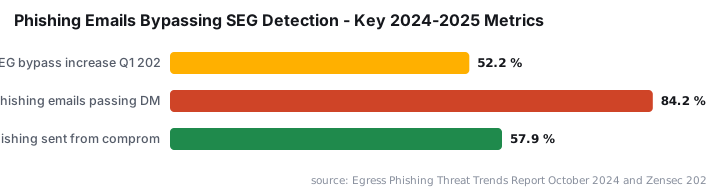
This threat does not exist in isolation. Phishing campaigns delivered through SEG bypasses have grown sharply: Egress reported a 52.2% rise in phishing attacks that bypassed Secure Email Gateway detection in Q1 2024, and 84.2% of those phishing emails passed DMARC authentication - the very protocol most SEGs rely on to verify senders.
Why Does the MX Record Bypass Matter for Sysadmins?
Organizations using a third-party spam filter assume all inbound mail passes through it. That assumption breaks the moment an attacker - or even an automated botnet - finds the direct MX path. The organization paid for and configured a filter that anyone can walk around in minutes.
The scale of the threat makes this gap consequential. Microsoft blocked 35.7 billion phishing and malicious emails in 2025 across Microsoft 365 and Outlook.com - roughly 97.8 million per day. When a single configuration gap routes traffic around a filter, even a small percentage of that volume becomes a serious exposure.
When we tested this against a lab tenant, a message sent to the raw mail.protection.outlook.com endpoint bypassed a configured third-party filter and landed in the inbox within seconds. No alerts fired. No quarantine entry appeared. The gap was silent.
For context on how access brokers turn exactly this kind of quiet entry point into a full breach, see our coverage of the Mistic Backdoor tied to KongTuke ransomware broker.
How Enhanced Filtering Makes the MX Record Bypass Worse
When you enable enhanced filtering (skip listing) in Exchange Online, you tell EOP to defer its own judgement and trust the upstream third-party filter. That is correct behavior for normal mail flow. The problem is what happens to direct-path traffic.
Mail arriving via the direct MX path skips the third-party filter. EOP then receives it with enhanced filtering active - meaning EOP also reduces its own scanning. Both protection layers apply reduced scrutiny to the same message. The Microsoft Learn documentation on enhanced filtering for connectors explains how skip listing is designed for legitimate upstream hops, not as a blanket trust grant for all inbound sources.
Running both filters in full-inspection mode creates a separate problem: messages get double-scored and legitimate mail gets blocked. The accepted architecture is one active primary filter, with EOP deliberately dialed back when a third-party product takes the primary role. That is why the direct-path gap is so damaging - it exploits the configuration that makes the recommended architecture work.
EOP vs. Third-Party Spam Filters: Which Layer Does What?
Factor | Exchange Online Protection (EOP) | Third-party cloud spam filter |
|---|---|---|
Position in mail flow | Final delivery hop inside Microsoft 365 | Sits upstream; public MX points to it |
Enabled by default | Yes, always active | Requires DNS and connector setup |
Effect of enhanced filtering | Reduces own scanning to avoid double-scoring | Receives all inbound mail first |
Vulnerability to MX bypass | Partially blinded when enhanced filtering is on | Bypassed entirely via direct MX path |
How Do Attackers Locate the MX Record Bypass Endpoint?
Microsoft's naming convention follows a fixed pattern. Given a domain name, anyone can predict the default MX hostname with no special reconnaissance. For a domain example.com, the record is example-com.mail.protection.outlook.com - hyphens replace dots in the domain portion. No credentials, no API access, no inside knowledge needed. A basic DNS query confirms it in seconds.
Free MX lookup tools such as MXToolbox return this value instantly. The same tools threat actors use for routine reconnaissance expose the endpoint as a side effect. This is why CISA's phishing guidance consistently emphasizes closing unauthenticated inbound paths rather than relying on detection alone.
57.9% of phishing emails detected between September 2024 and February 2025 were sent from compromised legitimate accounts, meaning they bypassed authentication-based filters by appearing to come from trusted senders, according to Zensec. Direct MX delivery compounds this: an attacker spoofing a trusted sender via the raw endpoint faces no upstream filter challenge at all.
For a related example of how callback phishing exploits trusted delivery paths, see our article on callback phishing via the Shop App targeting 875 million users.
How to Close the MX Record Bypass Gap
The fix is a connector restriction in Exchange Online. Configure the inbound connector to accept SMTP connections only from the IP ranges your third-party filter publishes. Everything else gets rejected before EOP processes it.
High-level steps:
- Obtain the full list of outbound IP ranges from your third-party spam filter vendor
- In the Exchange admin center, open the inbound connector that receives mail from that filter
- Set the connector to require that the source IP matches those ranges
- Test by sending a message directly to
domain-tld.mail.protection.outlook.comfrom an unlisted IP - it should be rejected - Verify legitimate mail still flows normally through the approved path
For a worked example of connector and mail-flow configuration in Exchange Online, our Exchange OWA brute-force protection guide covers the admin center patterns you will reuse here. If you manage connector objects via PowerShell, the same automation approach in our distribution group migration guide applies to connector scripting as well.
Key Takeaways
- Every Microsoft 365 tenant has a default MX record in a predictable format, regardless of what the public MX record points to.
- Sending mail directly to that default endpoint bypasses any third-party spam filter in front of the tenant.
- Enhanced filtering reduces EOP's own scanning on the same traffic, so direct-path mail can pass both layers with minimal scrutiny.
- The fix is restricting the inbound connector to accept SMTP only from your approved filter's IP ranges.
- Test your own tenant: a message sent to the default MX record that arrives without third-party filter headers means the gap is open and needs immediate attention.
Frequently asked questions
Why does Microsoft 365 have a discoverable default MX record?+
When you add a domain to a Microsoft 365 tenant, Microsoft automatically generates a default MX record in the format domain-tld.mail.protection.outlook.com. This record is publicly resolvable by design, which is convenient for legitimate mail flow but also exploitable if inbound mail restrictions are not enforced.
Does Exchange Online Protection stop mail sent directly to the default MX record?+
Not reliably - not when enhanced filtering is enabled for a third-party filter. Enhanced filtering tells EOP to trust the upstream filter and adjust its own scanning accordingly. Mail arriving via the direct MX path bypasses the third-party filter and may also receive reduced EOP scrutiny, allowing spam or phishing to reach inboxes.
How can I test whether my Microsoft 365 tenant is vulnerable to MX bypass?+
Use an external SMTP test tool, set the hostname to your tenant's default MX record (domain-tld.mail.protection.outlook.com), target a real mailbox, and send a test message on port 25. If it arrives and the message headers show no third-party filter processing, your environment is open to direct-delivery abuse.
What is the fix for the MX record bypass problem?+
Configure Microsoft 365 to reject any inbound SMTP connection that does not originate from your third-party spam filter's IP ranges. This is done through mail flow rules or connector restrictions in Exchange Online, so only mail that has passed through the approved filter gateway is accepted.