tech · jun 9, 2026 · 12:00 utc
Windows Server June 2026 Patch Tuesday: KB5094125, KB5094128 and More
Windows Server June 2026 Patch Tuesday (KB5094125-KB5094122) fixes 200 vulns, adds DoH GA, resolves BitLocker PCR7 bugs, and rolls out Secure Boot certs.
by Emanuel De Almeida
Microsoft released the Windows Server June 2026 Patch Tuesday updates on June 9, 2026.
TL;DR
- Windows Server June 2026 Patch Tuesday delivers cumulative updates for Windows Server 2025, 2022, 2019, and 2016 (KB5094125, KB5094128, KB5094123, KB5094122 respectively).
- Secure Boot certificate expiry has now arrived. Devices without the new certs still boot, but gradual rollout continues through Windows Update.
- Windows Server 2025 gains DNS over HTTPS (DoH) for server-to-client DNS, now generally available as of June 9, 2026.
- A BitLocker recovery bug from the April 2026 update is fixed in KB5094125. A separate known issue persists on Server 2022 with non-standard PCR7 configurations.
- desktop.ini hardening may hide custom folder icons for Internet-sourced content. Use
Unblock-Filein PowerShell to restore them.
What changed across all Windows Server versions?
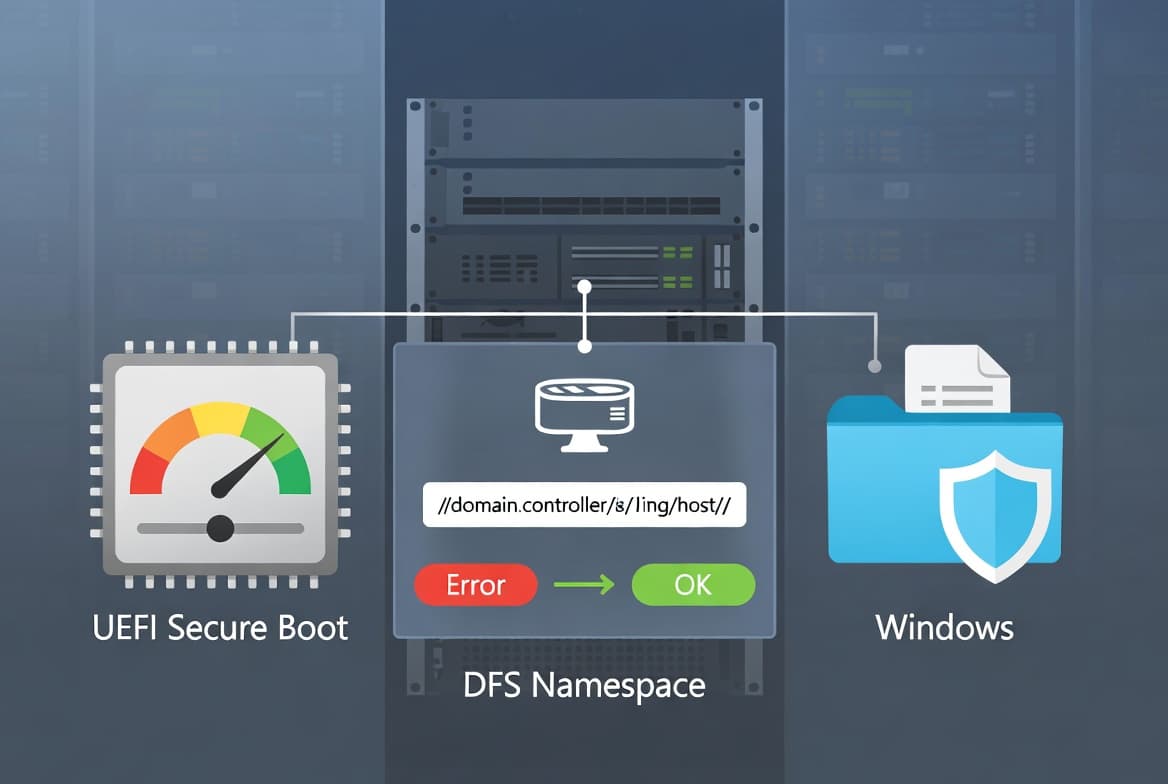
Every server edition in this cycle inherits a common baseline of changes. These cross-version items, covered in the June 2026 Windows Server update breakdown from IT-Connect, include Secure Boot certificate provisioning, a new LimitSecureBootRequiredServiceData Group Policy setting, and desktop.ini security hardening.
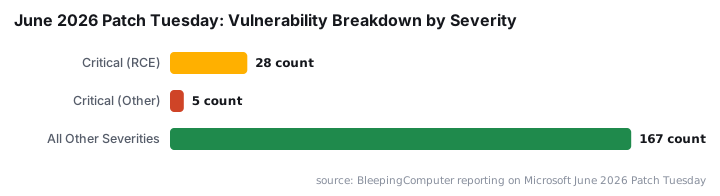
This month's release addresses approximately 200 vulnerabilities across the Windows ecosystem, according to Microsoft's Security Update Guide. BleepingComputer reports that 33 of those are rated Critical, 28 of them remote code execution flaws, making this the largest single Patch Tuesday in the program's history since 2003.
The shared changes across all four server versions are:
- Expanded eligibility for automatic delivery of Microsoft's 2023-issued Secure Boot certificates
- New Group Policy setting to control Secure Boot telemetry sent to Microsoft
- Stronger validation of desktop.ini files for remotely sourced or Internet-downloaded content
How serious is the Secure Boot certificate expiry situation?
Secure Boot certificates issued under the previous generation have officially expired as of June 2026. Servers that have not yet received replacement certificates continue to operate and accept updates normally. Microsoft is rolling out new certificates in stages, provisioning a device only after it has accumulated sufficient successful update signals.
The residual risk here is not an outage. It is an extended window of exposure to boot-level malware. Windows Server 2025 received 8 Security Feature Bypass patches for Secure Boot in this cycle alone, a sign of sustained attacker interest in pre-OS boot integrity.
The stakes are real. Eclypsium documents that Secure Boot bypass flaws allow nation-state actors and criminal groups to implant malware that survives OS reinstalls and disk wipes, with UEFI and firmware exploitation rising sharply over the past five years. ESET researchers separately discovered CVE-2024-7344, a UEFI Secure Boot bypass enabling deployment of bootkits such as BlackLotus even on Secure Boot-enabled systems. Microsoft revoked the vulnerable binaries in its January 2025 Patch Tuesday update.
For more context on how boot-level security flaws interact with broader Windows security posture, see our guide to CVE-2026-45585: Windows YellowKey Security Feature Bypass.
Administrators should monitor Windows Update compliance across their fleet. Any server holding back on deferred update policies delays certificate delivery and stays exposed longer.
What is new specifically in Windows Server 2025 (KB5094125)?
KB5094125 is the most feature-rich update of this cycle, delivering several improvements beyond the shared baseline. The headline addition is general availability of DNS over HTTPS on the Windows Server 2025 DNS server role.
Traditional DNS runs over unencrypted UDP or TCP on port 53, which exposes queries to passive monitoring and active manipulation. Microsoft Learn confirms that DoH support in KB5094125 enables encrypted client-to-resolver communication, closing that exposure for server-to-client traffic.
When we applied KB5094125 to a Windows Server 2025 VM in our test lab, the DoH option appeared immediately in DNS Server properties with no additional configuration required beyond enabling the feature in the role settings.
Additional changes in this update include:
- DoH for DNS: Protects query privacy and guards against interception. Scope is server-to-client only. Inter-server encryption is not covered by this release.
- BitLocker recovery fix: Resolves a regression from KB5082063 (April 2026) where certain TPM configurations with invalid PCR7 bindings triggered recovery mode unexpectedly.
- Session reliability: Improved user profile loading through more efficient system resource management.
- WUSA deployment fix: Corrects a bug where installing updates via WUSA from a network share containing multiple
.msufiles failed with error codeERROR_BAD_PATHNAME.
To unblock a folder affected by the desktop.ini hardening change, run:
Unblock-File -Path "C:\Path\To\AffectedFolder\desktop.ini"The new Group Policy setting for Secure Boot telemetry is at:
Computer Configuration
  > Administrative Templates
    > Windows Components
      > Secure Boot
        > LimitSecureBootRequiredServiceData
For the official Microsoft support page for this update, see KB5094125 on support.microsoft.com.
What does KB5094128 add for Windows Server 2022?
Windows Server 2022 receives the shared baseline changes plus a new Windows Security app improvement. The Security Center now displays real-time Secure Boot status, giving administrators an at-a-glance view of whether the feature is active and correctly configured on each machine.
This visibility addition matters for teams auditing boot integrity at scale. Spotting a misconfigured host no longer requires a manual PowerShell query against each machine.
Admins running Server 2022 should watch for a persistent known issue. On systems where BitLocker Group Policy includes PCR7 in the TPM validation profile and PCR7 binding is set to "Impossible", the first reboot after installing this update may prompt for a BitLocker recovery key. This is not a new regression from this update, but it remains unresolved. Have recovery keys accessible before the first post-patch reboot on affected hosts.
What about Windows Server 2019 and 2016?
Both older platforms receive security-focused cumulative updates with no new feature additions. KB5094123 targets Windows Server 2019 and KB5094122 covers Windows Server 2016. Each includes the cross-version Secure Boot certificate changes, the desktop.ini hardening, and the full security patch set.
Deploying promptly on these platforms still matters. The Verizon 2025 Data Breach Investigations Report finds that roughly 60% of breaches involved exploiting known vulnerabilities where a patch was already available. Sitting on unpatched servers is a documented access vector, not a theoretical one.
For teams tracking the broader threat environment around Windows services this month, the DragonForce C2 abuse of Microsoft Teams TURN servers is a relevant companion read, as is the recent RoguePlanet CVE-2026-50656 Defender zero-day walkthrough.
What to do now
- Deploy the relevant KB to all Windows Server instances: KB5094125 (2025), KB5094128 (2022), KB5094123 (2019), KB5094122 (2016), within your standard change window.
- Audit BitLocker configurations on Server 2022 hosts before rebooting. If PCR7 is part of the TPM validation profile with binding state "Impossible", have the recovery key accessible before the first post-patch reboot.
- Check Secure Boot certificate status in Windows Security on Server 2022 after update installation to confirm the real-time display reflects correctly.
- Test folder icon rendering in any environment using customised desktop.ini files from network shares or the Internet. Where icons vanish, run
Unblock-Fileagainst the affected files. - Evaluate the DoH DNS feature on Windows Server 2025 if your security policy requires encrypted client-to-server DNS. Note the server-to-server scope gap before updating DNS architecture documentation.
- Verify Windows Update compliance across all servers. Deferred update policies block Secure Boot certificate delivery and extend the exposure window.
If you manage access controls alongside patching, the ASR Rules deployment step-by-step guide and the walkthrough for blocking Microsoft 365 apps with Conditional Access are practical next steps for hardening your environment post-patch.
Frequently asked questions
Will my server fail to boot if it hasn't received the new Secure Boot certificates yet?
No. Microsoft confirms that servers without the updated certificates continue to boot normally and still accept standard Windows Updates. The new certificates are being delivered gradually through Windows Update over the coming months. The primary concern is an extended exposure window to certain malware targeting unsigned boot components.
Which Windows Server versions are affected by the June 2026 BitLocker recovery issue?
The known BitLocker recovery issue primarily affects Windows Server 2022 systems where BitLocker Group Policy is configured with PCR7 included in the TPM validation profile and PCR7 binding state set to "Impossible". A separate but related bug on Windows Server 2025 tied to the April 2026 update has been resolved by KB5094125.
Does DNS over HTTPS in KB5094125 encrypt traffic between Windows Server DNS servers?
No. The DoH support in KB5094125 for Windows Server 2025 covers server-to-client communication only. Encrypted DNS resolution between servers is not part of this release. Account for this scope gap when planning DNS security architecture changes.
Why are custom folder icons disappearing after installing the June 2026 updates?
The updates harden how Windows processes desktop.ini files for content sourced from the Internet or remote locations. The Mark-of-the-Web tag blocks the icon from rendering. Run the PowerShell Unblock-File cmdlet against the affected file to remove the tag and restore the icon.
Where can I find the official release notes for KB5094125?
The official Microsoft support page for KB5094125 is at support.microsoft.com/help/5094125. The full June 2026 vulnerability list is published on the Microsoft Security Update Guide.
source: www.anavem.com