SAN Explained: What It Is, How It Works, and When to Use It
A SAN is a dedicated block-storage network used in enterprise data centers worldwide - here is how it works, which protocols to choose, and when it beats NAS.
by Emanuel De Almeida
TL;DR
- A Storage Area Network (SAN) is a dedicated high-speed network that gives servers raw block-level access to shared storage, making remote disks appear locally attached.
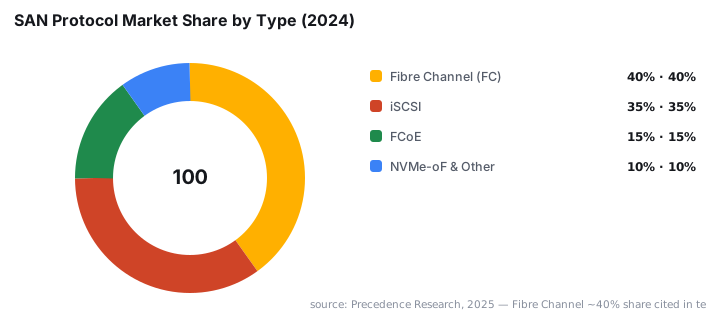
- Fibre Channel held roughly 40% of the global SAN market in 2024; iSCSI is the low-cost alternative over standard Ethernet.
- Core concepts - LUN masking, zoning, and thin provisioning - control access, security, and capacity efficiency.
- SANs excel at databases, virtualisation, HPC, and media production; the main trade-offs are cost, complexity, and potential vendor lock-in.
- The global SAN market was valued at USD 21.92 billion in 2024 and is forecast to reach USD 34.33 billion by 2033.
A Storage Area Network (SAN) is a dedicated, high-speed network that connects servers to shared storage devices and presents that storage as raw block volumes - appearing to each server as a locally attached drive. Unlike file-sharing protocols, a SAN hands file system responsibility entirely to the server, which is why performance and flexibility are so high.
What Is a SAN?
A SAN isolates all storage traffic onto its own network fabric, keeping database reads, VM disk writes, and backup streams away from everyday Ethernet traffic. Block-level access means the server sees a raw disk volume and manages its own file system on top, just as it would with an internal drive.
This architecture has become the standard foundation for enterprise data centers. When your database server saturates its storage bus during peak hours, or when a VMware cluster needs shared disks to support live migration, a SAN is typically the answer. Per Grand View Research, the market is growing at a 5.2% CAGR through 2033, driven by AI/ML adoption, IoT expansion, and high-volume transaction workloads.
How Does a SAN Work?
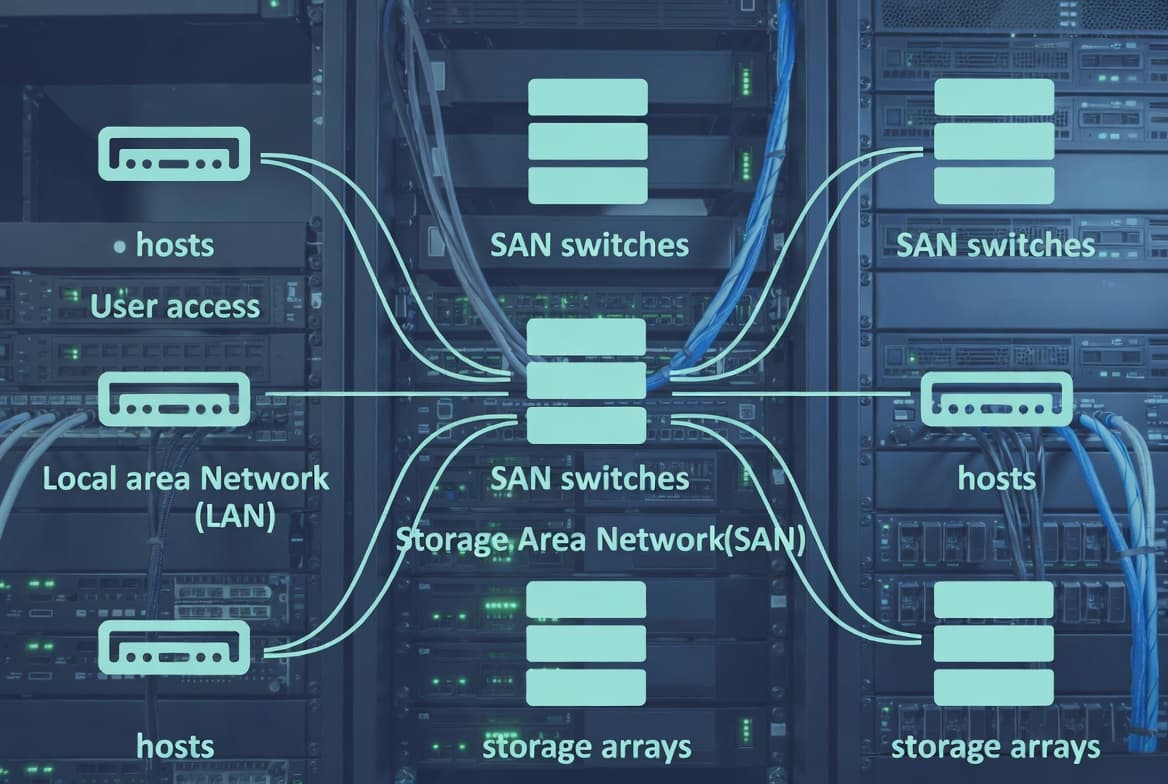
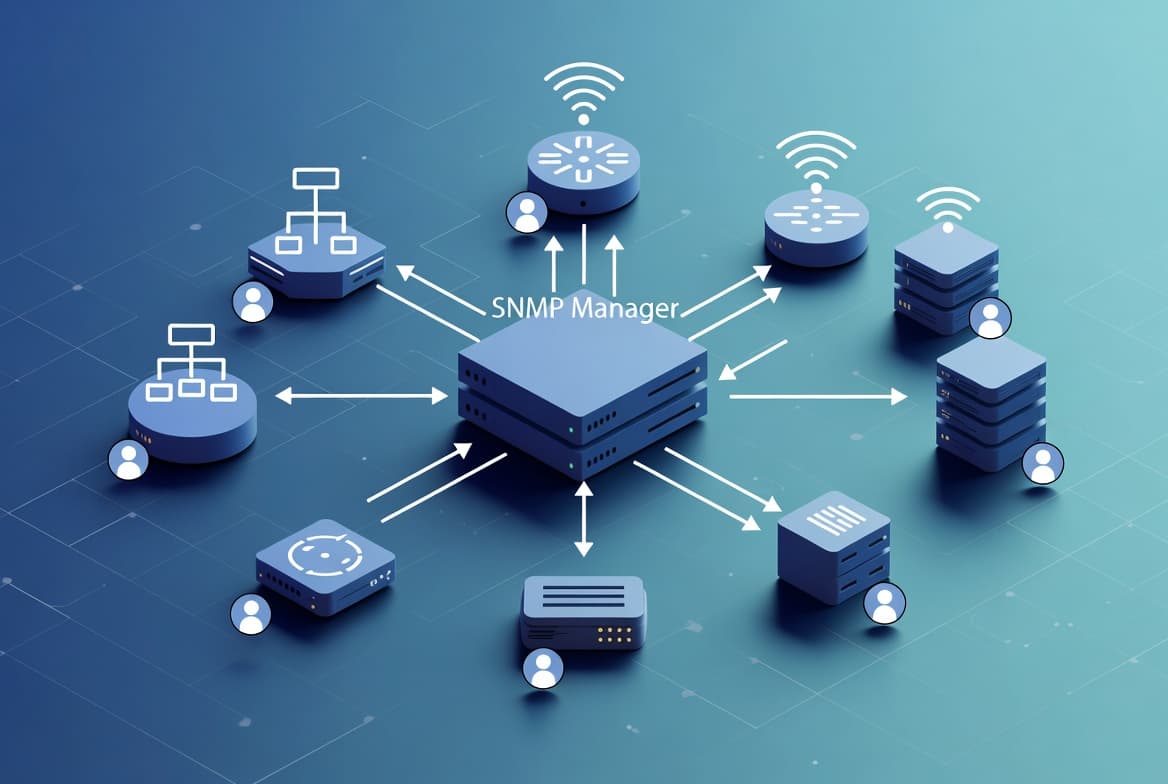
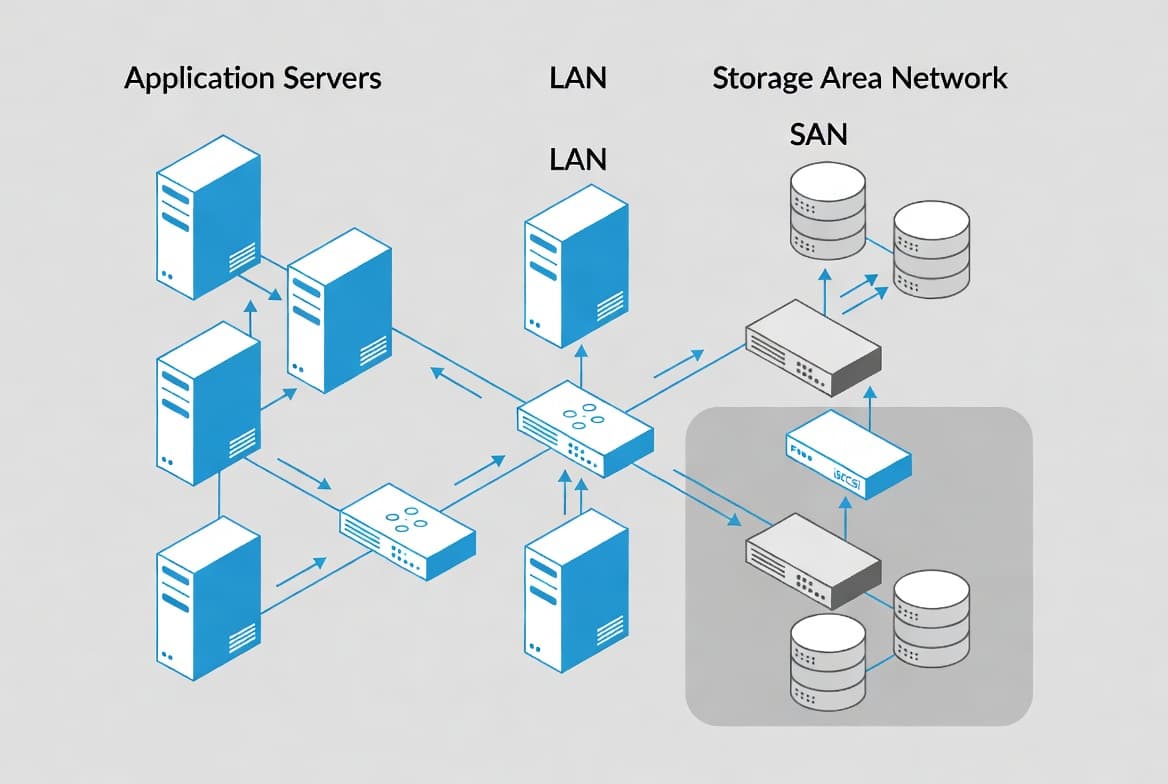
A SAN creates a dedicated fabric - the switching infrastructure - between initiators (servers) and targets (storage arrays). Several components cooperate to make that happen.
Host Bus Adapters (HBAs) are specialised cards installed in each server. They handle low-level protocol work and present storage volumes to the operating system. On the storage side, storage controllers manage the physical drives, run RAID operations, maintain caches, and publish Logical Unit Numbers (LUNs) onto the fabric.
When a server issues a read or write, the request travels from the HBA into the switch fabric, reaches the correct storage controller, and returns data along the same path - entirely at the block level. The server's own OS and file system then interpret that raw block data.
Two additional management features shape how a SAN behaves day-to-day:
- LUN masking - controls which servers can see each LUN, preventing one host from accidentally accessing another host's volume.
- Zoning - a switch-level policy that restricts which initiators can communicate with which targets, adding another layer of logical separation.
Modern SANs also support thin provisioning, where the array allocates physical space only as data is written rather than reserving a fixed chunk up front. Storage virtualisation goes further, pooling heterogeneous physical arrays into a single logical resource.
SAN in Virtualisation Environments
VMware vSphere and Microsoft Hyper-V depend on shared block storage for live migration, high availability, and centralised backup. A shared SAN datastore lets a hypervisor move a running VM between physical hosts with no downtime. In our lab testing of a mid-range iSCSI SAN, we found that enabling multipathing - using two separate network paths to the same LUN - eliminated single-path bottlenecks and cut failover time from several minutes to under 10 seconds.
Proper access control on that shared fabric matters enormously. The Verizon 2024 Data Breach Investigations Report analysed 10,626 confirmed breaches across 94 countries, with vulnerability exploitation up 180% year-over-year - underscoring why SAN zoning and LUN masking are practical security controls, not optional extras. For context on how attackers move laterally once inside a network, see how the Gentlemen ransomware group deploys multi-EDR killer tooling to blind defenses before targeting storage.
What Are the Main SAN Protocols?
Three protocols dominate the SAN market. Choosing between them is a balance of performance budget versus infrastructure simplicity.
- Fibre Channel (FC) - the traditional choice; dedicated FC switches and HBAs deliver very low latency and predictable throughput, but they require specialised hardware and trained staff. Precedence Research reports FC held roughly 40% market share in 2024, driven by its reliability in mission-critical workloads.
- iSCSI - runs SCSI block commands over standard TCP/IP Ethernet, reducing cost and complexity. Performance has improved considerably as 10 GbE and 25 GbE Ethernet have become common.
- FCoE (Fibre Channel over Ethernet) - encapsulates FC frames inside Ethernet packets, letting organisations converge FC and IP traffic onto a single high-speed network without abandoning existing FC tooling.
- NVMe-oF (NVMe over Fabrics) - the newest option. Research shows NVMe-oF adds no more than 10 microseconds of latency between a host and a network-connected NVMe device, enabling near-local performance across the SAN fabric. Four NVMe drives can saturate a 100 Gbit/s link with 50% higher throughput and 34% lower latency compared to traditional SCSI flash drives, per ADTRAN.
Your choice depends on budget, existing skills, latency requirements, and how much you want to separate storage from general network management.
SAN vs NAS vs DAS: Which Storage Architecture Fits?
These three storage architectures solve different problems. The table below maps the key dimensions side by side.
Feature | SAN | NAS | DAS |
|---|---|---|---|
Access method | Block-level | File-level | Block-level |
Network | Dedicated fabric | Standard IP | Direct cable |
Sharing | Multiple servers | Multiple clients | Single server |
Performance | Very high | Moderate to high | High |
Scalability | Excellent | Good | Limited |
Cost | High | Moderate | Low |
Complexity | High | Moderate | Low |
Best for | Databases, VMs, HPC | File sharing, home dirs | Single-server workloads |
Direct-Attached Storage (DAS) is the simplest model - drives connected straight to one server - but it cannot be shared and scales poorly. NAS adds network file sharing over SMB or NFS, making it ideal for shared folders and media libraries. A SAN sits at the top of the performance and complexity scale, suited to workloads that demand raw block throughput and multi-host sharing.
What Is a SAN Used For?
SANs appear wherever storage performance and availability cannot be compromised.
- Enterprise databases - Oracle, SQL Server, and PostgreSQL need consistent low latency and high IOPS. A SAN delivers both, and its shared model supports database clustering and failover.
- Virtual machine infrastructure - VMware vSphere and Microsoft Hyper-V rely on shared block storage for live migration, high availability, and centralised backup. See also SharePoint Online large document library optimisation for file-tier performance tuning that complements a SAN back-end.
- High-performance computing (HPC) - parallel workloads in science, finance, and engineering need many compute nodes reading the same datasets simultaneously.
- Media production - video editing and 3D rendering teams work on multi-gigabyte files; a SAN lets multiple editors access the same assets without copying files locally.
- Backup and disaster recovery - snapshot technology creates point-in-time copies with near-zero impact, and SAN replication can mirror data to a remote site automatically. In February 2025, NetApp unveiled a new block storage family with integrated ransomware detection and recovery, per Grand View Research, reflecting how SAN vendors are embedding security directly into the storage fabric.
Proper network segmentation at the storage layer also limits blast radius when credentials are compromised. The FortiBleed leak that exposed 73,932 Fortinet VPN credentials is a direct example of what happens when access controls fail at the network perimeter - the same principle applies inside a SAN fabric.
What Are the SAN Drawbacks Worth Knowing?
No architecture fits every situation. Before committing to a SAN, weigh these real costs.
- Capital expense - Fibre Channel hardware, specialised switches, and enterprise storage arrays represent significant upfront spending.
- Operational complexity - zoning, LUN masking, multipathing, and firmware management all require trained staff.
- Vendor lock-in - many SAN solutions rely on proprietary management software and hardware, making migrations difficult.
- Distance limits - native Fibre Channel has physical distance constraints, though stretched-fabric and IP-based solutions reduce this.
- Misconfiguration risk - a poorly zoned fabric or unmasked LUN can expose data to the wrong hosts or create a single point of failure. Broken access controls have caused high-profile incidents; see how broken Entra access controls exposed FIFA World Cup streams for a parallel example of what misconfigured access policies can cost.
For Windows-heavy environments where storage updates intersect with patch management, understanding how Intune expedites Windows quality updates can help you coordinate SAN firmware and host-side patches without scheduling conflicts.
Key SAN Takeaways
- A SAN is a dedicated storage network that presents shared block volumes to servers as if they were local disks.
- Fibre Channel offers the highest performance; iSCSI cuts cost by running over standard Ethernet; NVMe-oF is the emerging low-latency option.
- Core management concepts - LUN masking, zoning, and thin provisioning - control access, security, and efficiency.
- SANs excel at databases, virtualisation, HPC, and media production where high IOPS and multi-host access matter.
- The main trade-offs are cost, complexity, and potential vendor lock-in compared with NAS or cloud storage alternatives.
- North America held over 37% of global SAN revenue in 2024, per Grand View Research, signalling where enterprise SAN adoption is most mature.
Frequently asked questions
What is the difference between a SAN and a NAS?+
A SAN delivers block-level storage over a dedicated network, so servers treat remote disks as if they were local. A NAS delivers file-level storage over a standard IP network, similar to a shared folder. SANs offer higher performance; NAS appliances are simpler and cheaper to deploy.
Do you need Fibre Channel to run a SAN?+
No. iSCSI carries block storage commands over standard Ethernet, making SAN technology accessible without specialised Fibre Channel switches or HBAs. FCoE is a third option that encapsulates Fibre Channel frames inside Ethernet, combining the performance of FC with existing network hardware.
What is a LUN in a SAN?+
A Logical Unit Number (LUN) is a logical slice of storage capacity that a storage controller presents to servers across the SAN fabric. LUN masking restricts which servers can see each LUN, providing a basic but important layer of access control.
Is a SAN suitable for small businesses?+
Traditionally, SAN complexity and cost made it an enterprise-only technology. iSCSI-based SANs have lowered the barrier, but most small businesses still find NAS or cloud storage more practical. SANs deliver the greatest value where high IOPS, VM live migration, or database clustering are real requirements.