Windows 11 Generic Product Keys: What They Are and How They Work
Windows 11 generic product keys let you install or switch editions for testing but never permanently activate Windows. Microsoft publishes them openly for lab and VM use across all major editions.
by Emanuel De Almeida
in_this_guide+
- 01TL;DR
- 02What Are Windows 11 Generic Product Keys?
- 03How Do Generic Keys Differ From Real Activation Keys?
- 04Which Windows 11 Generic Product Keys Exist by Edition?
- 05What Are KMS Generic Volume License Keys (GVLKs)?
- 06How Do You Retrieve an Existing Activation Key From a Device?
- 07When Should Sysadmins Use Generic Keys?
- 08Why Fake KMS Tools Are a Serious Security Risk
- 09Key Takeaways
- --FAQ
TL;DR
- Generic product keys let you install or switch Windows 11 editions in a lab or VM - they never activate Windows permanently.
- GVLKs are a separate key class used only with an on-premises KMS server; KMS activations expire every 180 days without renewal.
- Retrieve an existing key from device firmware using
wmicor PowerShell with administrator rights. - Generic keys are not valid for production or commercial deployments.
- Fake KMS activation tools carry serious malware risk - documented campaigns have deployed RATs and infostealers through them.
Windows 11 generic product keys are publicly available placeholder keys that Microsoft provides so administrators and testers can install a specific Windows 11 edition or upgrade between editions in a lab environment. They do not permanently activate Windows. Full activation always requires either a purchased product key or a valid digital license tied to the device.
What Are Windows 11 Generic Product Keys?
A generic product key is a fixed, publicly documented key string that allows the Windows installer to proceed and target a particular edition - Home, Pro, Enterprise, and so on. Think of it as a form template rather than a signed contract. It gets you through the installation wizard, but it does not grant a permanent license to use that copy of Windows in any production context.
Microsoft publishes these keys openly for evaluation, virtual machine builds, and lab setups where a real license is not yet needed. Because every device of the same edition uses the same string, they confer no unique entitlement. The keys are intended specifically for installation or edition targeting - nothing more. See the Windows 11 generic product key reference on HTMD Blog for a full edition listing.
If you manage Windows 11 rollouts at scale, our guide on Windows 11 26H2: what IT admins need to know before rollout covers edition-selection decisions in more depth.
How Do Generic Keys Differ From Real Activation Keys?
A real activation key - or digital license - is unique, tied to a purchase, and tells Microsoft's activation servers that your copy of Windows is genuine. A generic key satisfies none of those requirements. The table below makes the split clear.
Property | Generic Key | Real Key / Digital License |
|---|---|---|
Uniqueness | Same string for every device of that edition | Unique per purchase or per device |
Activation status | Never activates Windows | Triggers full, compliant activation |
Primary use case | Lab installs, edition switching, unattended scripts | Production systems, commercial deployments |
Cost | Free, publicly published by Microsoft | Purchased or OEM-embedded at manufacture |
Watermark shown | Yes - "Activate Windows" overlay | No |
Unactivated installs also lock personalization settings - users cannot change themes or wallpaper until a real key or digital license is applied.
Which Windows 11 Generic Product Keys Exist by Edition?
Microsoft publishes generic keys for every mainstream Windows 11 edition. The table below lists the most common ones. Keys for N-variants (editions stripped of certain media features for regulatory reasons in some regions) and country-specific editions also exist as separate strings.
Edition | Generic Key |
|---|---|
Windows 11 Home | |
Windows 11 Pro | |
Windows 11 Enterprise | |
Windows 11 Education | |
Windows 11 Pro for Workstations | |
These strings are sourced from Microsoft's publicly documented materials. Microsoft Learn notes explicitly that KMS client keys "won't activate or serve as a retail license key" - the same restriction applies to standalone generic keys.
What Are KMS Generic Volume License Keys (GVLKs)?
Organizations running an on-premises Key Management Service (KMS) server use a related but distinct set of keys called Generic Volume License Keys (GVLKs). KMS handles activation requests from client devices inside the corporate network, so individual machines never need to contact Microsoft's servers directly. This is a separate mechanism from a standalone generic key, which never triggers activation at all.
How KMS Activation Works
When a device is configured with a GVLK and can reach the KMS host, activation happens automatically. Key facts about the renewal cycle:
- KMS activations are valid for 180 days after each successful connection to the KMS host.
- Clients attempt renewal every seven days by default.
- If the client cannot reach the KMS host for 180 days, the activation lapses and the machine enters an unactivated state.
- Microsoft Learn documents both the 180-day validity window and the seven-day retry interval.
Example GVLKs for common editions (full list at Microsoft's KMS client setup keys page):
Edition | KMS GVLK |
|---|---|
Windows 11 Pro | |
Windows 11 Enterprise | |
Windows 11 Education | |
Windows Server 2022 Standard | |
For domain-joined environments, keeping the KMS host's time in sync is non-negotiable for activation to succeed - our walkthrough on configuring an NTP time source on a Windows Domain Controller covers that step.
How Do You Retrieve an Existing Activation Key From a Device?
When reinstalling Windows or migrating a machine, you may need to recover the key already stored in device firmware or the registry. Three methods work reliably on Windows 11. In our lab VM builds, we run the PowerShell query first - it returns the OEM-embedded key in a single line with no extra tooling required.
Method 1 - Command Prompt (run as administrator):
wmic path softwarelicensingservice get OA3xOriginalProductKeyThis queries the OEM Activation 3.0 (OA3) data embedded in device firmware. The manufacturer embeds this key at the factory - the command only surfaces it if the OEM stored one there.
Method 2 - Registry Editor:
Open regedit.exe and navigate to:
Computer\HKEY_LOCAL_MACHINE\SOFTWARE\Microsoft\Windows NT\CurrentVersion\SoftwareProtectionPlatformLook for the BackupProductKeyDefault value in the right pane.
Method 3 - PowerShell (run as administrator):
(Get-WmiObject -query 'select * from SoftwareLicensingService').OA3xOriginalProductKeyPurpose-built scripts can also decode the key from its binary-stored registry format, which is useful when scripting key retrieval across a fleet. None of these methods fabricate a key - they only surface one if the OEM or a previous activation stored it on the device.
For managing Windows devices at scale without touching each machine, see our guide on Intune unattended remote help: access Windows devices without user interaction.
When Should Sysadmins Use Generic Keys?
Generic keys fit a specific set of scenarios and nothing beyond them.
- Building lab or test VMs where no production license is needed yet.
- Switching a device from one Windows 11 edition to another before applying a real key.
- Automating unattended installs where edition selection must be scripted.
- Evaluating a new edition's feature set before committing to a volume license purchase.
They are not appropriate for production systems, user-facing desktops, or any deployment that must comply with Microsoft's licensing terms for commercial use. Microsoft Learn states directly that these keys "won't activate or serve as a retail license key."
When we tested edition-switching in our lab using the generic Pro key, the process completed cleanly - but the desktop watermark appeared within minutes and personalization settings locked immediately, confirming that generic keys provide no grace period beyond what the standard unactivated state allows.
Why Fake KMS Tools Are a Serious Security Risk
The broad awareness of KMS activation has made fake KMS tools a reliable malware delivery vehicle. This is not a theoretical risk.
Red Canary documented fake KMSPico installers dropping CryptBot, an information stealer that targets browser credentials, saved passwords, and cryptocurrency wallet data. The threat is real and ongoing.
More seriously, EclecticIQ reported that the Russian state-sponsored group Sandworm (APT44) ran a cyber-espionage campaign starting in late 2023. The group used trojanized KMS activation tools to deploy the BACKORDER loader and Dark Crystal RAT against Ukrainian Windows users. Researchers linked the campaign to an estimated 70% unlicensed software rate in Ukraine's public sector.
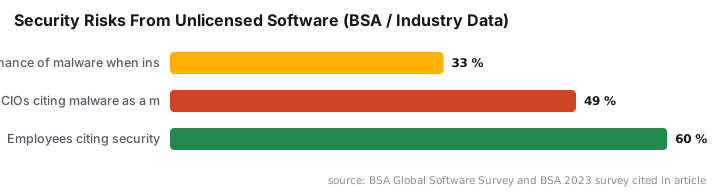
Beyond targeted attacks, the BSA Global Software Survey found that organizations face a nearly one-in-three chance of encountering malware when they obtain or install unlicensed software. Separately, a BSA survey found that 49% of CIOs identified malware from unlicensed software as a major security threat.
One more data point worth knowing: starting with Windows 11 Build 26100.7019, Microsoft fully deprecated the license-transfer mechanism used by the KMS38 activation exploit, rendering it inoperative in all subsequent builds, according to SecurityOnline. That particular workaround is dead.
If you want to understand how attackers use Windows tooling as a delivery mechanism more broadly, our coverage of WhatsApp VBScript malware: how attackers hijack Windows PCs shows a similar pattern in a different context.
For teams managing Windows configurations through Intune, locking down authentication paths is equally important - see disable WinRM basic authentication via Intune: step-by-step as a complementary hardening step.
Key Takeaways
- Generic product keys allow installation and edition selection only - they do not permanently activate Windows 11.
- Unactivated Windows 11 shows a desktop watermark and blocks personalization features such as themes and wallpaper changes.
- GVLKs are a separate key class used exclusively with an organization's on-premises KMS activation infrastructure; activations expire after 180 days without renewal.
- A valid purchased product key or a hardware-bound digital license is always required for full, compliant activation.
- Existing keys can be retrieved from device firmware, the registry, or via WMI using CMD or PowerShell with administrator privileges.
- Fake KMS tools carry documented malware risk - including nation-state-level campaigns using trojanized activators.
Frequently asked questions
Will a Windows 10 product key activate Windows 11?+
In many cases, yes. A valid Windows 10 product key will also work to activate Windows 11 on the same device, particularly when the license is tied to the hardware via a digital license. Always verify this against your specific licensing agreement before relying on it in production.
What happens if Windows 11 is never activated?+
An unactivated Windows 11 installation displays a persistent watermark on the desktop and blocks personalization settings such as themes, wallpaper changes, and dark mode. The OS continues to run for testing purposes but is not considered properly licensed for production use.
Can I use a generic product key on a production machine?+
No. Generic keys are intended for installation, edition selection, and lab evaluation only. They do not permanently activate Windows 11 and do not satisfy licensing requirements for production workloads. A genuine purchased key or a valid digital license is required for full activation.
What is a GVLK and how is it different from a generic key?+
A Generic Volume License Key (GVLK) is a specific type of generic key designed for use with an organization's on-premises Key Management Service (KMS) server. Unlike a standard generic key that leaves Windows unactivated, a GVLK allows KMS to handle activation automatically across devices on the corporate network.